11
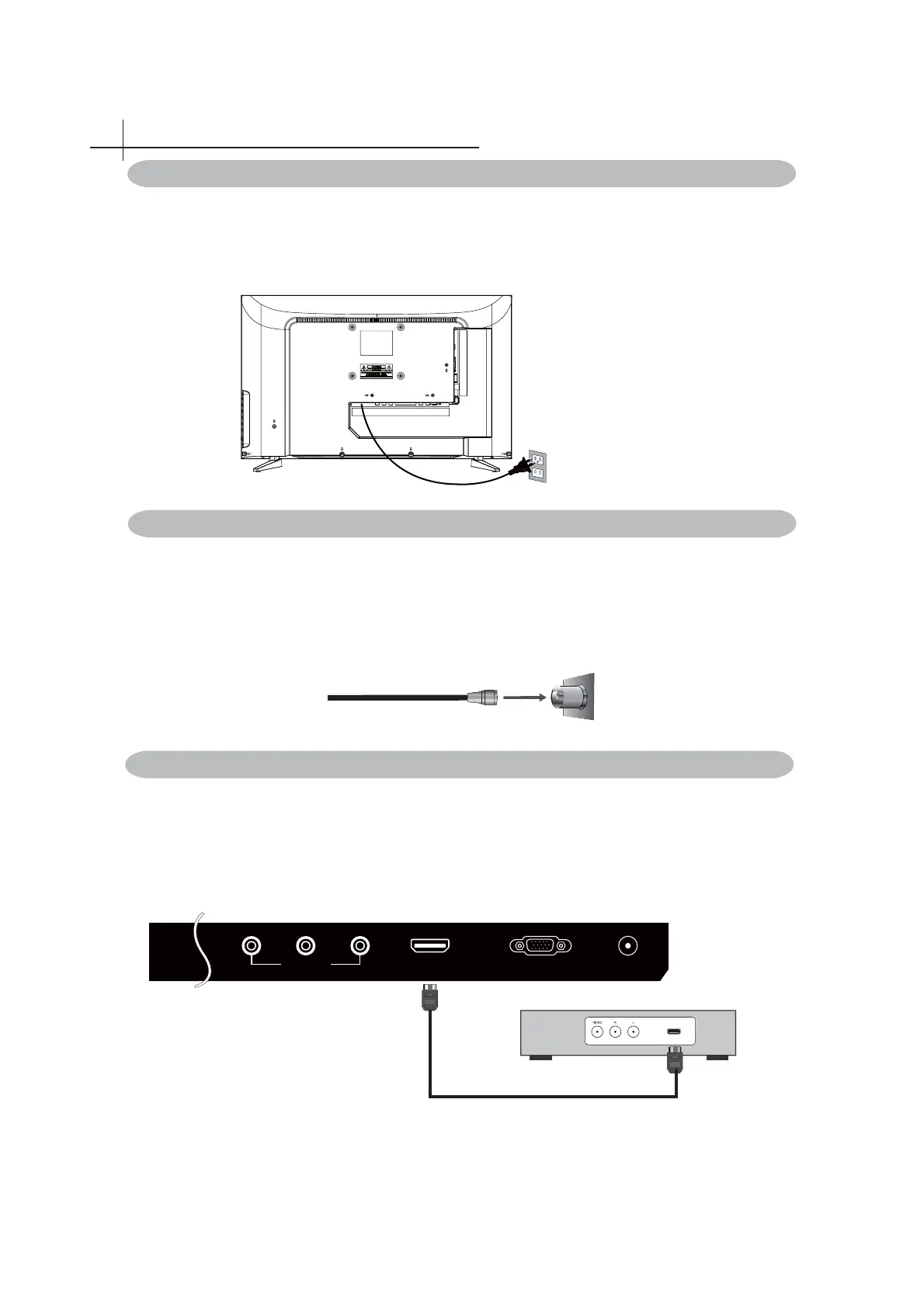
You can also enjoy high-defi nition programming by subscribing to a high-defi nition cable
service or a high-defi nition satellite service. For the optimum picture quality, be sure to
connect this device to your TV via the HDMI or component video (with audio) input on the
back of your LED TV.
HDMI Connection
Connect External Devices
5
Connect the Power Cord
HDMI
HDMI
VGA IN PC AUDIO IN
YPrPb
YPbPr IN
Optional HDMI cable ( not included )
Digital set top box, gaming
console,or Blu-ray w / HDMI
interface
Connect Device Via HDMI interface
75-ohm coaxial cable
Rear of TV
VHF/UHF/CABLE input
Cable or VHF/UHF
Typical wall antenna jack is used in apartment buildings, connect the antenna cable, as
shown in
below diagram (Please use the correct type of antenna cable).
We strongly recommend that you connect the antenna/cable input using a 75-ohm coaxial
cable (not supplied) to ensure the best picture quality.
Connect to Antenna or Cable
How to connect with power cord
Plug the power cord into the power outlet. Ensuring that the cord is tightly
connected at both ends.
It is strongly recommended for best broadcast reception, to use digital cable,
satellite, or a high quality roof top antenna.



 To Next Page