13
Connect External Devices
5
HDMI
VGA IN PC AUDIO IN
YPrPb
YPbPr IN
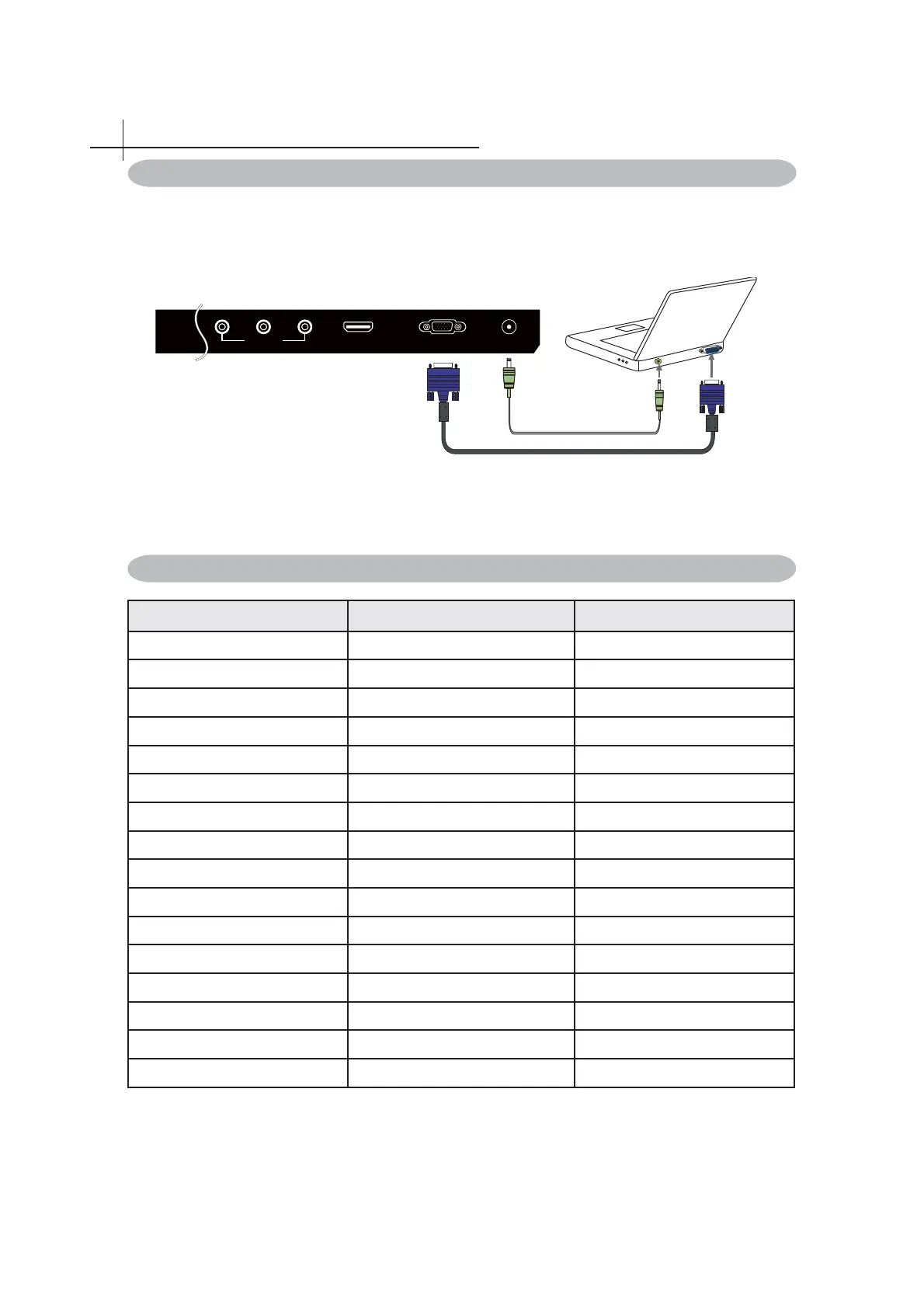
Use the LED TV as the monitor of your computer.
The picture below shows the connection for PC. The LED TV can also be connected to PC with
VGA or HDMI output.
☼
• Connect the PC IN jack to the PC using a 15-pin cable and audio cable.
• If the PC is connected to TV and no signal has been input from PC for more than 5 seconds,
the TV will enter standby mode automatically.
Connect PC Via VGA/HDMI Interface
YPbPr VGA HDMI
480i
640X480 / 60Hz
480i
576i
800X600 / 60Hz
576i
480P
1024X768 / 60Hz
480P
576P
1280X1024 / 60Hz
576P
720P / 50Hz 1920X1080 / 60Hz 720P / 50Hz
720P / 60Hz 720P / 60Hz
1080i / 50Hz 1080i / 50Hz
1080i / 60Hz 1080i / 60Hz
1080P / 50Hz 1080P / 50Hz
1080P / 60Hz 1080P / 60Hz
Supporting signals



 To Next Page