SW500 Wired Scale Systems, Users
Rev E,October, 2016
Page 27 of 36
Standard CG
Center of Gravity
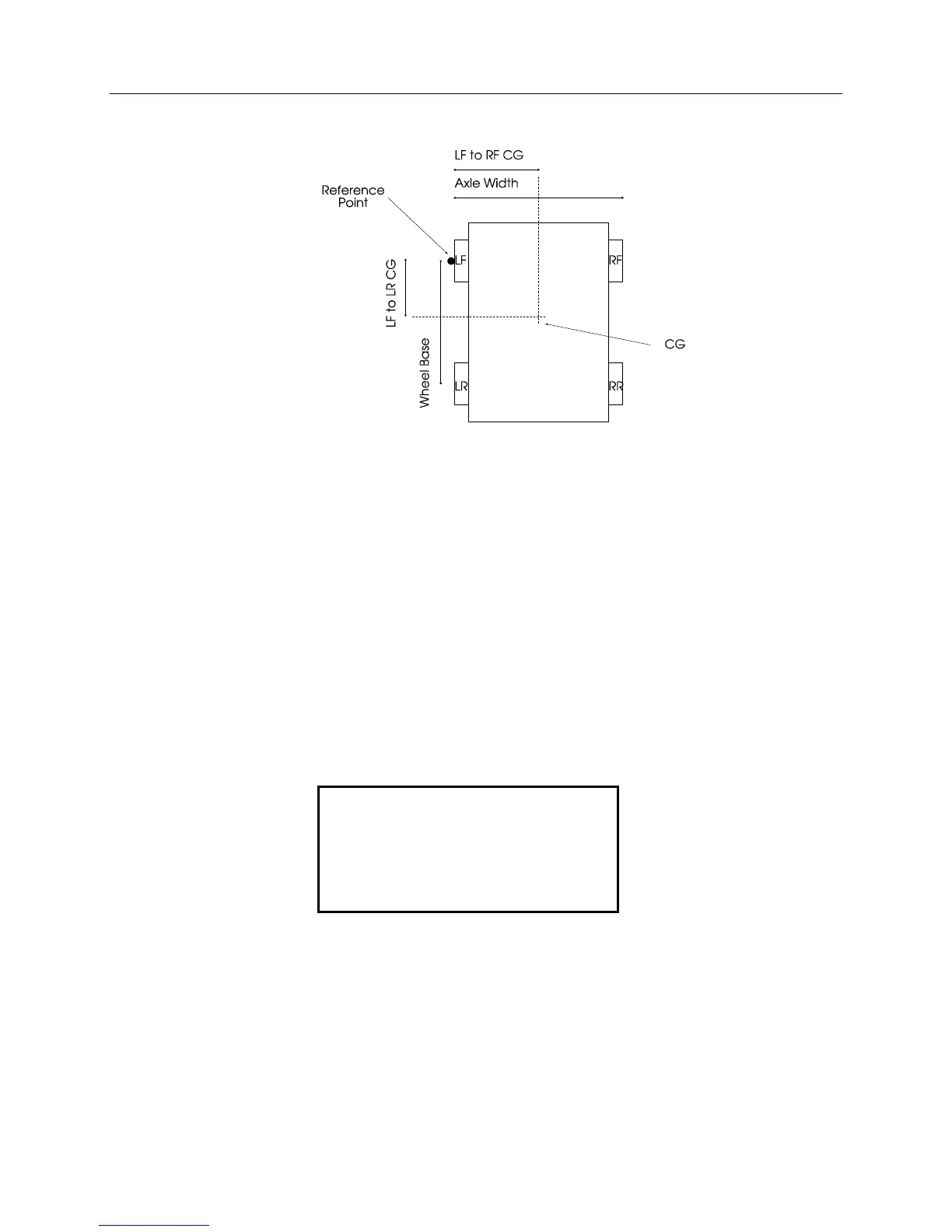
The CG calculation requires that you enter the axle width and the wheel base.
Make sure that the front tires are aligned straight forward before you measure
them. The axle width is from the outside of a left tire to the outside of a right tire.
The wheel base is from the middle of a front tire to the middle of a rear tire. If
the measurements are made according the above diagram the results are from
the marked reference point.
After the axle width and wheel base are entered the scale will display the
location of the center of gravity from the left front to right front tire, and from the
left front to left rear tire (see center of gravity diagram on previous page).
Additionally the percentage of the wheel base (left front to left rear), and the
percentage of the axle width (left front to right front) is shown. The screen
information will be updated if the wheel weights are shifted.
Press the CG key to return to the regular weight screen.
LEFT TO RIGHT: 25.4
(42.33% OF 60.0 )
FRONT TO REAR: 55.0
(50.00% OF 110.0 )


 To Next Page