20
3. If the signal for the outdoor channel has been interrupted and does not recover within 15 minutes,
the signal icon will disappear. The temperature and humidity section (outdoor) will display “—” on the
corresponding channel.
4. If the signal still does not recover within 48 hours, the “—” display will become permanent. You will
need to replace the batteries on the associated channel’s sensor and press the SENSOR/SYNC button to
pair up the sensors again.
5. After replacing batteries in the display console or the wireless weather sensor, or if the unit fails to
receive a specied channel, press the SENSOR/SYNC button while the failed channel is being displayed
to manually receive that sensor’s signal again.
1. While in normal operating mode, press and hold the WIND button for two seconds to enter the
wind speed unit setting mode. The unit display will start ashing. Press the GRAPH/ or
HISTORY/ buttons to cycle through the wind speed units in the following order: m/s > km/h >
knots > mph
INDOOR COMFORT INDICATOR KEY
SELECTING WIND DISPLAY MODE
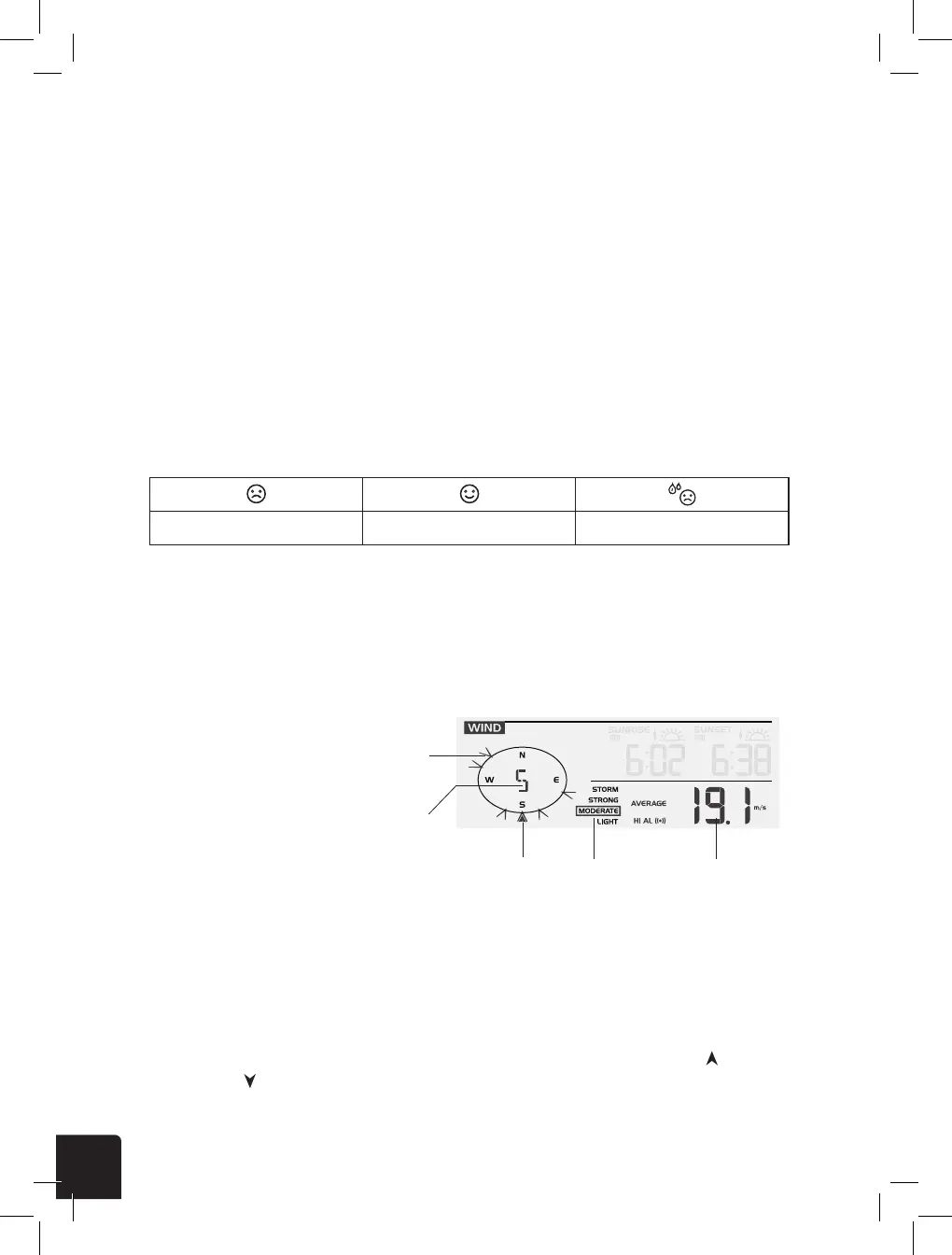
WIND READOUTS
Wind Direction
Set Wind Speed Units and Direction Display Format
The indoor comfort indicators display a pictorial representation based on the indoor air temperature
and humidity levels to determine the approximate comfort level.
While in normal operating mode, press the WIND button to switch between the average wind speed
measurement and gust wind speed measurement.
NOTE:
Comfort indicator levels may vary even when the temperature is the same due to variances in relative
humidity levels. No comfort indicator will be displayed if the temperature falls below 32°F (0°C) or
over 140°F (60°C).
Northern Hemisphere Icons Southern Hemisphere IconsMoon Phase
New Moon
Waxing Crescent Moon
First Quarter Moon
Waxing Gibbous Moon
Full Moon
Waning Gibbous Moon
Third Quarter Moon
Waning Crescent Moon
NOTE:
- In alarm mode, the “
” icon will display on the LCD.
Alarm o Alarm on Alarm with ice-alert
Temp/Humidity Trend
Arrow Icon
Rising Steady Falling
Too cold Comfortable Too hot
No signal Weak signal Good signal
the signal icon will disappear. The temperature and humidity will display “--” for the
corresponding channel.
4. If the signal does not recover within 48 hours, the “--” display will become permanent you
need to replace the batteries of “--” channel’s sensor(s) and then press [ SENSOR / SYNC]
key to pair up the sensors of each “--” channels again.
NOTE:
After replacing the batteries of the wireless sensor or the unit fails to receive sensor signal of
[ SENSOR / SYNC ] key to
manually receive that sensor signal again.
COMFORT INDICATION
The comfort indication is a pictorial indication based on indoor air temperature and humidity in
an attempt to determine comfort level.
Too cold Comfortable Too hot
NOTE:
Comfort indication can vary under the same temperature, depending on the humidity.
There is no comfort indication when temperature is below 0°C (32°F) or over 60°C (140°F).
WIND
Indicator of wind
direction over the
last five minutes
16 direction or relative
degree reading
Real-time wind
direction indicator
Wind speed
level
Average / gust
wind speed
To select the wind display mode
In normal mode, press [ WIND ] key to switch between AVERAGE and GUST wind speed.
To set the wind speed unit and direction display format
1. In normal mode, press and hold [ WIND ] key for 2 seconds to enter into wind speed unit
[ GRAPH / ] or [ HISTORY / V ] key to
change the wind speed unit in this sequence: m/s → km/h → knots → mph
2. Press [ WIND ] key again to enter into wind direction display format setting mode. The wind
[ GRAPH / ] or [ HISTORY / V ] key to select
the display format 16 direction or relative degree reading.
3. Press [ WIND ] key again to return to normal mode.
Wind Speed Level
Speed
Level
0.1~11.8 mph
Light
12~30.4 mph
Moderate
31~54.7 mph
Strong
>55 mph
Storm



 To Next Page