32
BATTERY REPLACEMENT
CLEANING THE RAIN COLLECTOR
Uninstalling the Weather Tool Software
While using the PC software, you can click on the “?” icon located in the upper-right corner for
operating details, setup instructions, and program settings.
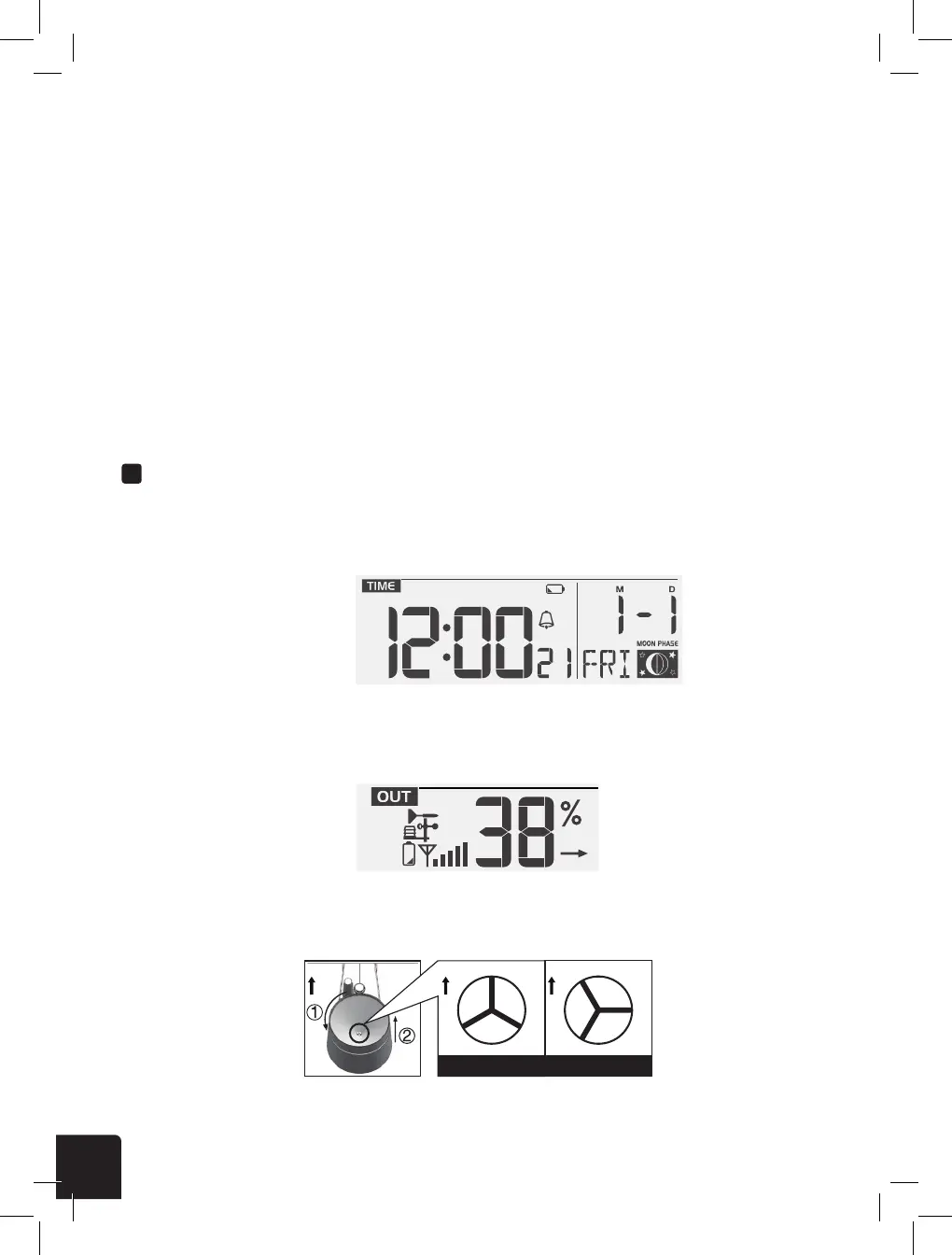
If you see the horizontal low battery indicator icon in the time section of your LCD console display,
this means that the console battery power is running low and should be replaced soon. Always
replace all batteries at once.
If the low battery indicator icon is vertical and displayed in the outdoor temperature and humidity
section of the LCD console display, this indicates that the batteries in your wireless weather sensor
are running low and should be replaced. Make sure to also replace all batteries at the same time.
You can either go through your PC’s options to uninstall the program, or delete the WeatherTool.exe
le from your desktop.
1. Rotate the rain collector by 30° counter-clockwise until it is in the unlock position as shown.
NOTES:
• To avoid incorrect time stamps on your data records, make sure to reset the data logger anytime you
replace the batteries in the display console or in the wireless weather sensor.
• When the data log is almost full, the DATA icon will ash continually to remind you to transfer the
data to your PC for storage. Once the data log is full, it will not log any additional data.
CARE AND MAINTENANCE
20
MAINTENANCE
BATTERY REPLACEMENT
If the low battery indicator “
” displayed in time section, it indicates that the console battery
power is low. You should replace all the batteries in the console at once
If the low battery indicator “
” displayed in outdoor section, it indicates that the current channel
wireless outdoor sensor battery power is low. You should replace all the batteries in the current
channel sensor at once.
Low battery indicator for main unit Low battery indicator for wireless sensor
CLEANING THE RAIN COLLECTOR
1. Rotate the rain collector by 30° anticlockwise.
2. Gently remove the rain collector.
3. Clean and remove any debris or insects.
4. Install all the parts when they are fully clean
and dried.
N
N
“Unlock” Position
“Lock” Position
N
TO CLEAN THE THERMO/HYGRO SENSOR
1. Unscrew the 2 screws at the bottom of the radiation shield.
2. Gently pull out the shield.
3. Remove carefully any dirt or insects inside the sensor casing (Do not let the sensors inside get
wet).
4. Clean the shield with water and remove any dirt or insects.
5. Install all the parts back when they are fully clean and dried.
PRECAUTIONS
- Keep and reading the “User manual” is highly recommended. The manufacturer and
supplier cannot accept any responsibility for any incorrect readings, export data lost and any
consequences that occur should an inaccurate reading take place.
- Do not subject the unit to excessive force, shock, dust, temperature or humidity.
- Do not cover the ventilation holes with any items such as newspapers, curtains etc.
- Do not immerse the unit in water. If you spill liquid over it, dry it immediately with a soft, lint-
free cloth.
- Do not clean the unit with abrasive or corrosive materials.
- Do not tamper with the unit’s internal components. This invalidates the warranty.
- Only use fresh batteries. Do not mix new and old batteries.
- Only use attachments / accessories specied by the manufacturer.
- Images shown in this manual may differ from the actual display.
- When disposing of this product, ensure it is collected separately for special treatment.
- Placement of this product on certain types of wood may result in damage to its nishing
for which manufacturer will not be responsible. Consult the furniture manufacturer’s care
instructions for information.
- The contents of this manual may not be reproduced without the permission of the
manufacturer.
20
MAINTENANCE
BATTERY REPLACEMENT
If the low battery indicator “
” displayed in time section, it indicates that the console battery
power is low. You should replace all the batteries in the console at once
If the low battery indicator “
” displayed in outdoor section, it indicates that the current channel
wireless outdoor sensor battery power is low. You should replace all the batteries in the current
channel sensor at once.
Low battery indicator for main unit Low battery indicator for wireless sensor
CLEANING THE RAIN COLLECTOR
1. Rotate the rain collector by 30° anticlockwise.
2. Gently remove the rain collector.
3. Clean and remove any debris or insects.
4. Install all the parts when they are fully clean
and dried.
N
N
“Unlock” Position
“Lock” Position
N
TO CLEAN THE THERMO/HYGRO SENSOR
1. Unscrew the 2 screws at the bottom of the radiation shield.
2. Gently pull out the shield.
3. Remove carefully any dirt or insects inside the sensor casing (Do not let the sensors inside get
wet).
4. Clean the shield with water and remove any dirt or insects.
5. Install all the parts back when they are fully clean and dried.
PRECAUTIONS
- Keep and reading the “User manual” is highly recommended. The manufacturer and
supplier cannot accept any responsibility for any incorrect readings, export data lost and any
consequences that occur should an inaccurate reading take place.
- Do not subject the unit to excessive force, shock, dust, temperature or humidity.
- Do not cover the ventilation holes with any items such as newspapers, curtains etc.
- Do not immerse the unit in water. If you spill liquid over it, dry it immediately with a soft, lint-
free cloth.
- Do not clean the unit with abrasive or corrosive materials.
- Do not tamper with the unit’s internal components. This invalidates the warranty.
- Only use fresh batteries. Do not mix new and old batteries.
- Only use attachments / accessories specied by the manufacturer.
- Images shown in this manual may differ from the actual display.
- When disposing of this product, ensure it is collected separately for special treatment.
- Placement of this product on certain types of wood may result in damage to its nishing
for which manufacturer will not be responsible. Consult the furniture manufacturer’s care
instructions for information.
- The contents of this manual may not be reproduced without the permission of the
manufacturer.
20
MAINTENANCE
BATTERY REPLACEMENT
If the low battery indicator “
” displayed in time section, it indicates that the console battery
power is low. You should replace all the batteries in the console at once
If the low battery indicator “
” displayed in outdoor section, it indicates that the current channel
wireless outdoor sensor battery power is low. You should replace all the batteries in the current
channel sensor at once.
Low battery indicator for main unit Low battery indicator for wireless sensor
CLEANING THE RAIN COLLECTOR
1. Rotate the rain collector by 30° anticlockwise.
2. Gently remove the rain collector.
3. Clean and remove any debris or insects.
4. Install all the parts when they are fully clean
and dried.
N
N
“Unlock” Position
“Lock” Position
N
TO CLEAN THE THERMO/HYGRO SENSOR
1. Unscrew the 2 screws at the bottom of the radiation shield.
2. Gently pull out the shield.
3. Remove carefully any dirt or insects inside the sensor casing (Do not let the sensors inside get
wet).
4. Clean the shield with water and remove any dirt or insects.
5. Install all the parts back when they are fully clean and dried.
PRECAUTIONS
- Keep and reading the “User manual” is highly recommended. The manufacturer and
supplier cannot accept any responsibility for any incorrect readings, export data lost and any
consequences that occur should an inaccurate reading take place.
- Do not subject the unit to excessive force, shock, dust, temperature or humidity.
- Do not cover the ventilation holes with any items such as newspapers, curtains etc.
- Do not immerse the unit in water. If you spill liquid over it, dry it immediately with a soft, lint-
free cloth.
- Do not clean the unit with abrasive or corrosive materials.
- Do not tamper with the unit’s internal components. This invalidates the warranty.
- Only use fresh batteries. Do not mix new and old batteries.
- Only use attachments / accessories specied by the manufacturer.
- Images shown in this manual may differ from the actual display.
- When disposing of this product, ensure it is collected separately for special treatment.
- Placement of this product on certain types of wood may result in damage to its nishing
for which manufacturer will not be responsible. Consult the furniture manufacturer’s care
instructions for information.
- The contents of this manual may not be reproduced without the permission of the
manufacturer.



 To Next Page
 Loading...







