12
3.4.1 BDI
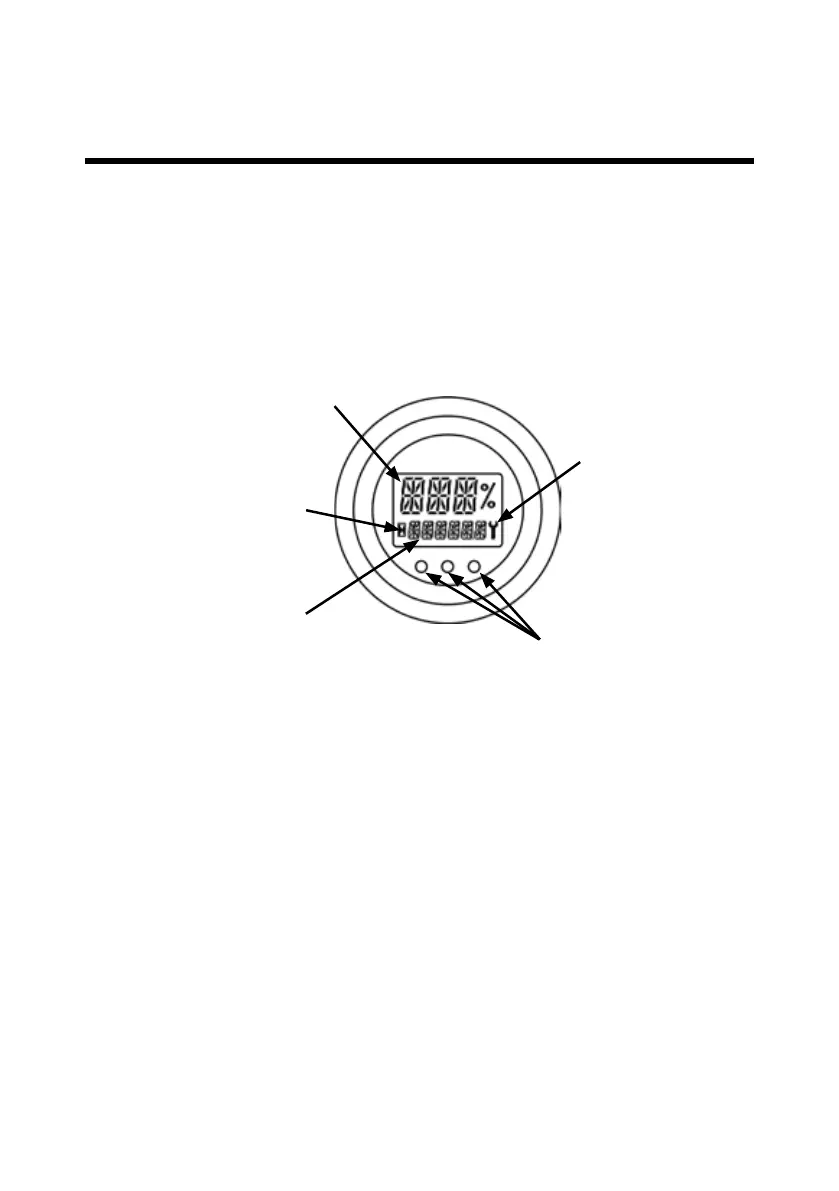
The remaining capacity of the battery or BDI is showed in the upper 3-digit eld in
percentage.
If the BDI is lower than 30% - a “LOBATT” warning will be showed in the lower 6-digit
eld.
3.4.2 Machine operating hours
3 dierent operating hours are being logged:
• ”TOTAL/KEY ON” hours - the total hours with power on the truck.
• ”TRACTION” hours - the hours the traction motor has been in operation.
• ”PUMP” hours - the hours the hydraulic pump has been in operation.
Under normal operation the ”TOTAL” hours are displayed in the lower 6-digit eld.
If the Forward/Reverse switch is activated shortly - the ”TRAC” hours will be displayed.
If the Lift/Lower switch is activated shortly - the ”PUMP” hours will be displayed.
LED’s
Wrench symbol
Lower 6-digit message eld
Hourglass symbol
Upper 3-digit message eld
3.4 Battery Info display
The display can show the following information:
• The BDI or BOC – Battery state of charge
• Machine operating hours
• Fault codes/warnings
• State of operation LED’s
3.0 How to operate Logiex



 To Next Page