Configuring the UTRED-16 for logging UTRED-16 User Guide 15
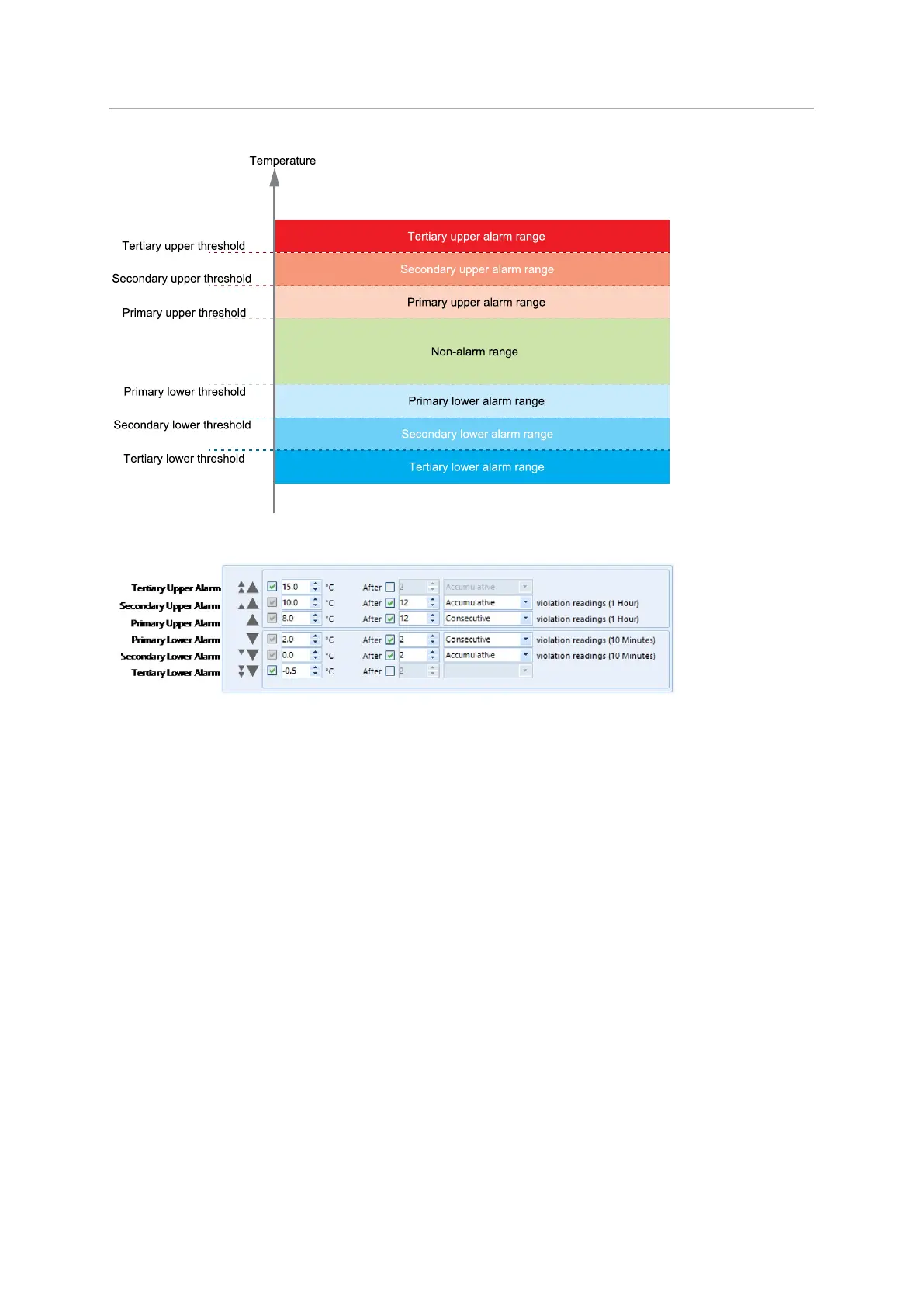
Figure 3: Alarm ranges and thresholds
Figure 4: Representation in LogTag
®
Analyzer
You need to observe some basic rules when entering alarm conditions into the
configuration screen in LogTag
®
Analyzer:
l A primary alarm condition must be entered before the corresponding secondary
alarm condition.
l Equally, primary and secondary alarm conditions must be entered before the
corresponding tertiary alarm condition.
l You can enter a different number of upper and lower conditions, or only upper, or
only lower conditions, or none at all.
l A secondary upper alarm cannot be entered with a lower threshold value than the
primary upper alarm.
l A tertiary upper alarm cannot be entered with a lower threshold value than the
secondary alarm. Threshold values can, however, be equal and combined with
different time-to-activation values. For example, you can enter a primary upper
alarm with 8°C threshold and 10 accumulative readings, plus an alarm with 8°C
threshold and 5 consecutive readings. In this instance the alarm will be triggered, if
either 10 readings in total are above 8°C, or 5 consecutive readings above 8°C have
occurred.


 To Next Page