
 Need help?
Do you have a question about the LogTag UTRED-16 and is the answer not in the manual?
Details the physical construction and materials of the logger's case.
Describes the function of the START/Mark and STOP/Review buttons.
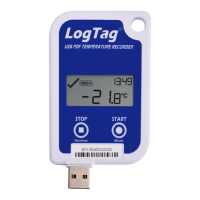
Explains what information is shown on the logger's display.
Specifies the compatible probes for the UTRED-16 logger.
Lists the essential components needed for the logger's operation.
Lists useful accessories that can enhance the logger's functionality.
Details the software needed for configuration and data access.
Steps to prepare the logger before commencing recording.
Actions to perform during the active recording period.
Steps to take after the data recording is complete.
How to identify if the logger is pre-configured and ready for use.
Steps to follow when the logger requires initial setup.
Covers essential settings like User ID, interval, and start method.
How to initiate recording using a physical button.
Capturing data before the official start for data integrity.
Setting a time delay before recording commences.
Settings affecting format for all generated files.
Settings specific to the PDF report's visual presentation.
Additional settings for display and logger-specific options.
Options for managing alarm behavior and display.
Settings related to display power saving and button functions.
How alarm conditions are displayed in the software.
Symbol indicating alarm status or normal operation.
Symbols showing the logger's current recording status.
Symbol indicating an inspection mark has been placed.
Display of minimum and maximum recorded temperatures.
Shows current temperature and time-related indicators.
Visual cues for temperature readings relative to alarm thresholds.
Indicates when the logger's battery level is low.
Display status after logger configuration for different start types.
Shows how the low battery symbol appears on the display.
Initiating recording with quickstart enabled or disabled.
Starting the logger with a pre-configured time delay.
How the display shows readings relative to alarm thresholds.
Displays max/min temperatures and associated alarm status.
Details reviews for multiple upper and lower alarm thresholds.
How the logger stops recording automatically.
How to manually stop the logger recording.
What the display shows after the logger has stopped.
Details the drivers installed for USB connectivity.
Indicates if alarm conditions occurred during the trip.
Summary of recording start, finish, duration, and readings count.
Explains the temperature axis and symbols on the chart.
Describes gaps for USB connection and chart symbol meanings.
Details report file info, logger config, and statistics summary.
Visual representation of upper alarm thresholds on charts.
Visual representation of lower alarm thresholds on charts.
Details report file info, generation time, and formats.
Shows a list of all recorded temperature readings with details.
Explains symbols for download, inspection, paused, USB, and reset events.
Describes how data is shown for USB connection or probe disconnection.
Details model, measurement ranges, and probe compatibility.
Specifies temperature accuracy, resolution, and clock accuracy.
Covers recording capacity, memory, start methods, and alarm functions.
Details the time taken for file download.
Lists required software and USB standards.
Lists optional accessories for the logger.
Graphical representation of the logger's temperature accuracy.
Graphical representation of the logger's temperature resolution.
 General
| Brand | LogTag |
|---|---|
| Model | UTRED-16 |
| Category | Voice Recorder |
| Language | English |

 To Next Page
