Operating the Logger UTRED-16 User Guide 26
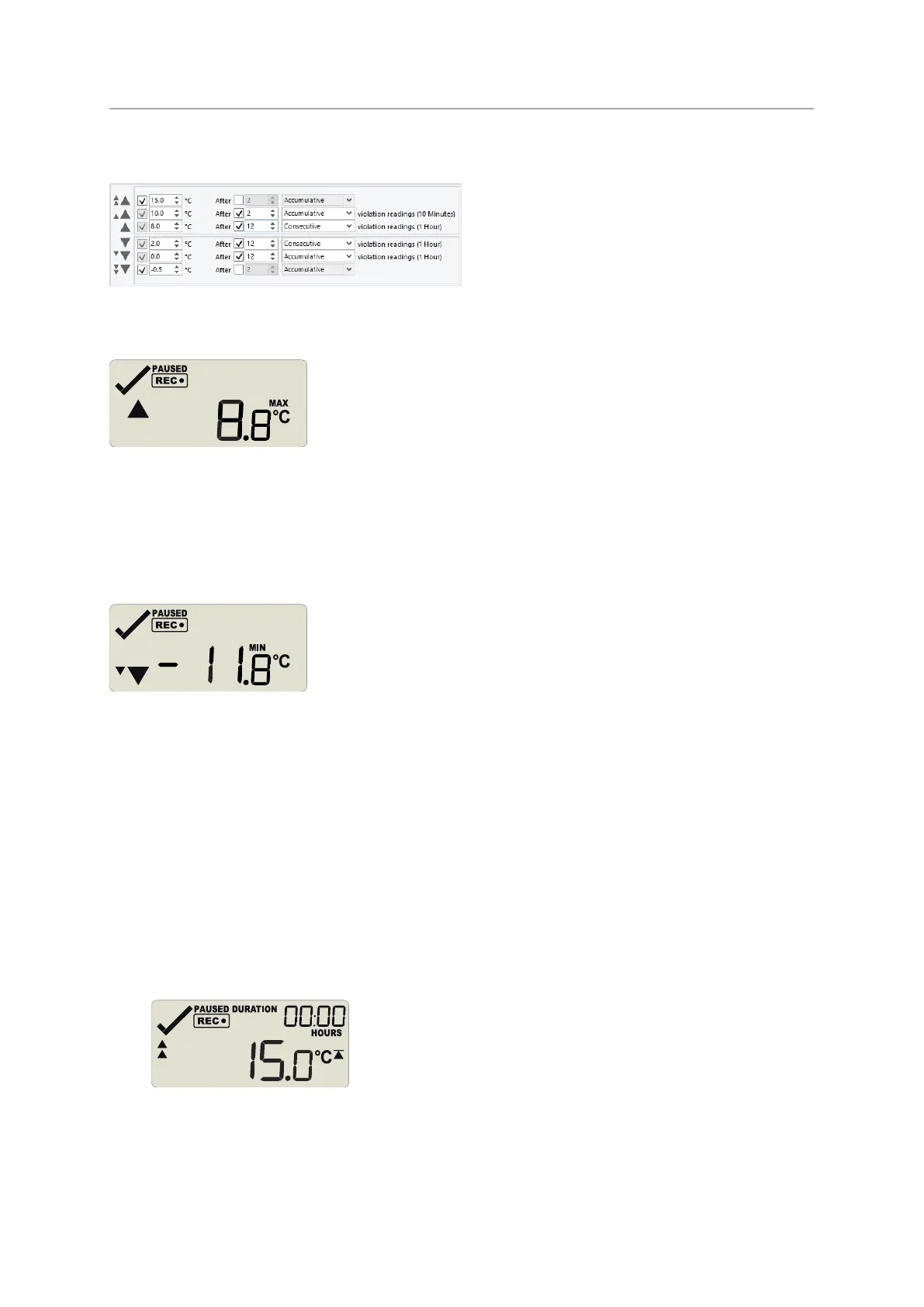
In the example following alarm settings are used:
Figure 7: Alarm configuration settings in LogTag
®
Analyzer
On first press of the STOP/Review button the Maximum Reading screen appears.
The clock disappears, and the MAX symbol is shown along with the maximum temperature
recorded. If this temperature was above or below one of the alarm thresholds, the
corresponding alarm threshold arrow is also shown. Here, the maximum was above the
primary threshold.
When you press STOP/Review again, the Minimum Reading screen appears.
If this temperature was above or below one of the alarm thresholds, the corresponding
alarm marker is also shown. Here, the minimum was below the tertiary threshold.
If the alarm review screens are enabled, the next screens show the enabled alarm
threshold values in descending order, starting with the upper most alarm threshold. Up to
six screens will be shown, depending on how many alarms were enabled during
configuration.
1. In this example the tertiary upper alarm is enabled, indicated by the alarm threshold
marker shown in combination with the two small alarm arrows. The DURATION
symbol is shown, and the clock shows the total number of hours and minutes above
the threshold, instead of the time.
You can see how long the recorded temperature was above this threshold. Here, the
15°C threshold was not exceeded.


 To Next Page