Features UTRED-16 User Guide 6
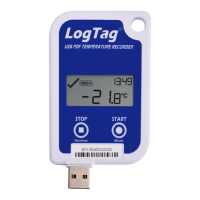
Buttons
l START/Mark button; used to start the unit, clear alarms or place an inspection mark in
the data
l STOP/Review button; used to stop the unit or to review data recorded during the trip
Display
l Shows last recorded temperature and information about alerts
l Allows reviewing statistical data
Probes
The UTRED-16 will accept any probe from the ST100 product range.
PDF
The UTRED-16 will generate a detailed PDFreport when plugged into a USB port of a PC.
The PDF report shows a summary of the trip, presents the data in chart and list format. A
CSV file of the data list is also available.
The PDF can be shown in several different languages:
l English
l French
l German
l Russian
l Spanish
The default ex-factory language is English. You can select which language to use during
configuration in the File Settings tab.
You can only change the language during configuration, but not when viewing the
PDF.


 To Next Page