en – Original instructions
43
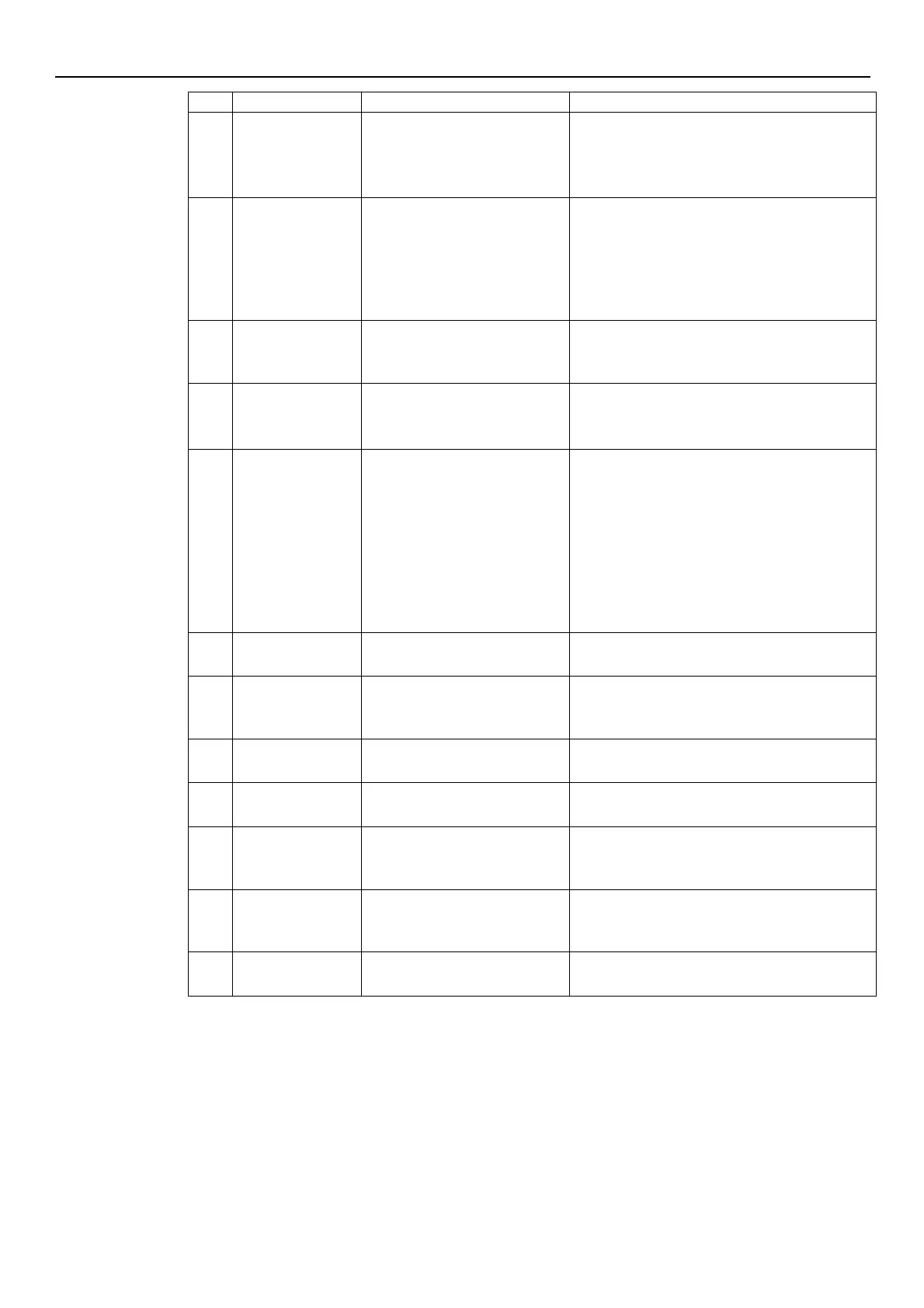
DC-bus overvoltage
External conditions cause the
operation of the pump from
generator
Check:
the system configuration
the position and integrity of the non-return
valves
Motor stall
Loss of rotor synchronism or
rotor blocked by external
materials
Check that there are no foreign bodies
preventing the pump from turning
Stop the pump for 5 minutes and then start it
again
If the problem continues, contact Xylem or the
Authorised Distributor
EEPROM Data memory corrupted
Stop the pump for 5 minutes and then restart it
again; if the problem continues, contact Xylem or
the Authorised Distributor
Voltage supply out of operating
range
Check:
the voltage
the connection of the electric system
Motor winding
temperature error
Motor thermal protection trip
Check for impurities near the impeller and
rotor. Remove them if necessary
Check the conditions of installation and the
water and air temperature
Wait for the motor to cool down
If the error persists, stop the pump for 5
minutes and then start it again
If the problem continues, contact Xylem or the
Authorised Distributor
Power module
temperature error
Frequency converter thermal
protection trip
Check the conditions of installation,and the air
temperature
Stop the pump for 5 minutes and then restart it
again; if the problem continues, contact Xylem or
the Authorised Distributor
Lack of water detection (if P48=
ERR)
Check the water level inside the tank
Missing pressure sensor (not
present in ACT mode)
Check the condition of the sensor connection
cables
Pressure below minimum
threshold (not present in ACT
mode)
Check the settings of parameters P45 and P46
One of the three power supply
phases is missing (three-phase
versions only)
Check the connection to the power supply
network
Multi-pump
protocol error
Incompatible multi-pump
protocol
Bring all the units to the same firmware version
See also Par. 6.3.2 and Par. 6.4.3.


 To Next Page
 Loading...