25
Saving The Cursor Position as a Waypoint
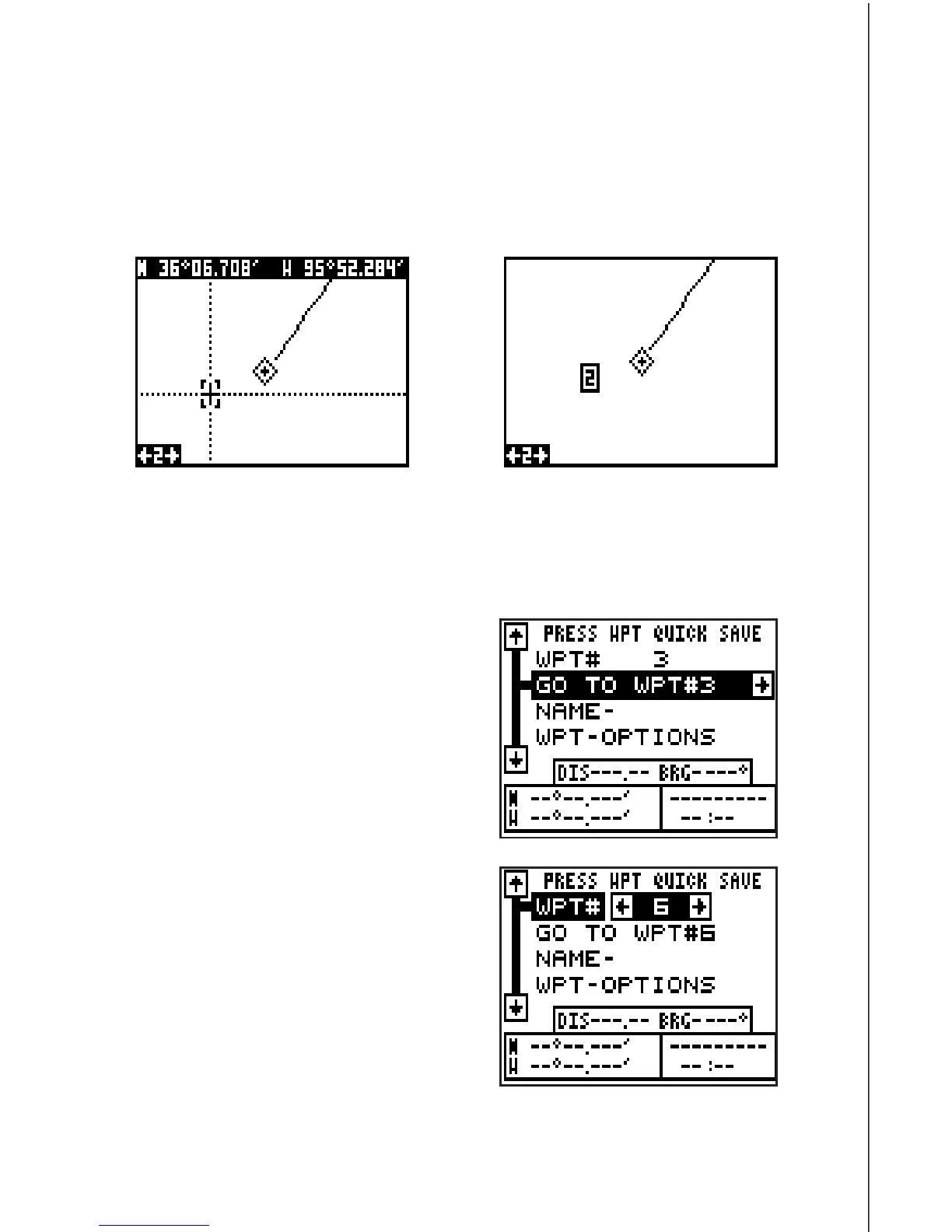
When the cursor is showing on the plotter and you press the WPT key
twice, the GlobalNav 310 puts the
cursor’s
position into the first available
waypoint number. A message appears on the display telling you the way-
point number it just used. Wait a few seconds and the menu will clear
automatically or press the EXIT key to erase the waypoint menu.
Saving Your Present Position as a Waypoint
(Select Number Method)
The method shown above doesn’t let you
choose the waypoint number. You can
pick the waypoint number, then save
your present position. To do this, first
press the WPT key once. A screen simi-
lar to the one at right appears.
Now press the up arrow key once. This
is the waypoint number selection menu.
Press the left or right arrow keys until
the waypoint number appears that you
wish to store your present position. In
this example, we’re going to store a po-
sition as waypoint number 6.
Now press the down arrow key until the
“WPT Options” label is highlighted. Press
the right arrow key. A screen similar to
the one shown at the top of the next page
appears.









 To Next Page