11
Structure Options
To make adjustments to StructureScan display
settings, highlight Structure Options on the
StructureScan menu and press ENTER.
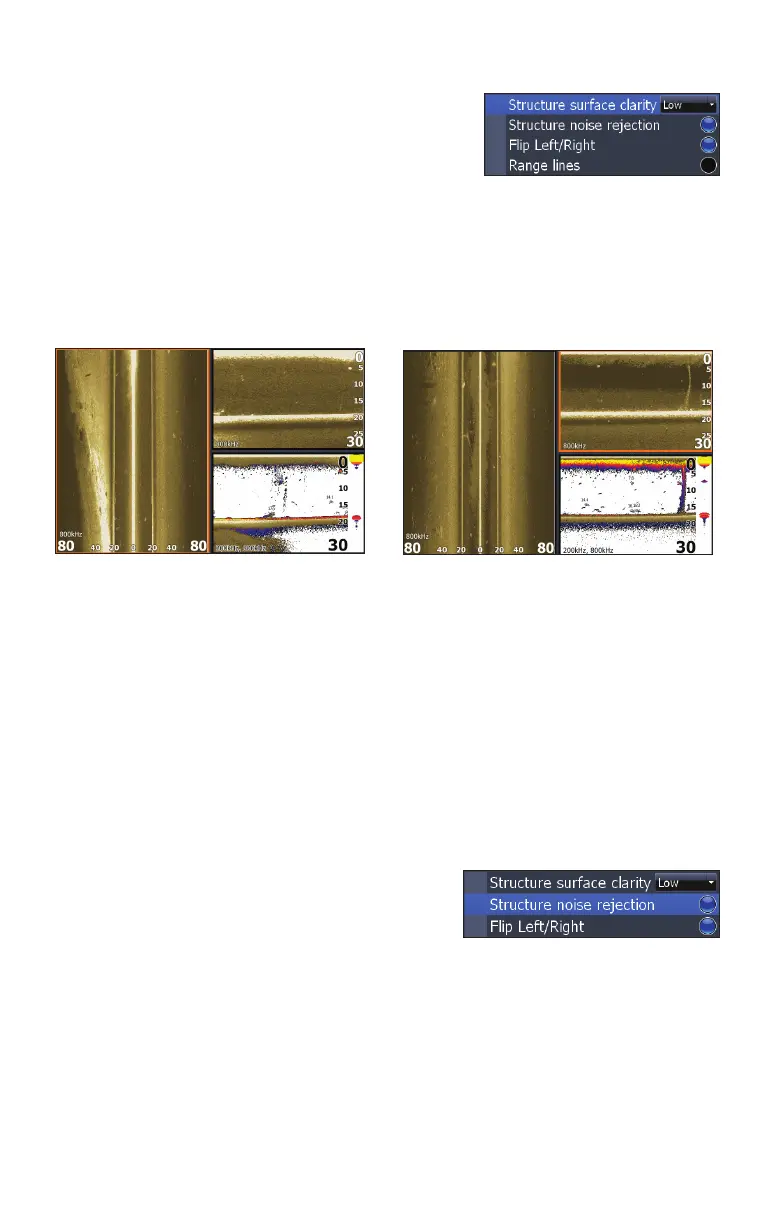
Structure Surface Clarity
Adjusts sensitivity near the surface of the water to reduce or eliminate onscreen
clutter caused by wave action, boat wakes, temperature inversion, etc.
To adjust Surface Clarity:
1. Select Structure Surface Clarity from the Structure Options menu
and press ENTER.
2. Use the keypad to select the desired setting and press ENTER.
Structure Noise Rejection
Reduces onscreen clutter caused by bilge pumps, engine vibration, air bubbles or
other transducers on your boat.
To turn Structure Noise Rejection On/O, high-
light Structure Noise Rejection on the Struc-
ture Options menu and press ENTER.
Flip Left/Right
Controls the orientation of the sidescan/downscan onscreen display.
If the transducer is installed with the cabled end pointing away from the back of
your boat (Direct Step Mount) or pointing away from the front of your trolling
motor, you must turn on Flip Left/Right.
Structure Surface Clarity turned off.
Structure Surface Clarity on High.
Structure Options menu


 To Next Page