22
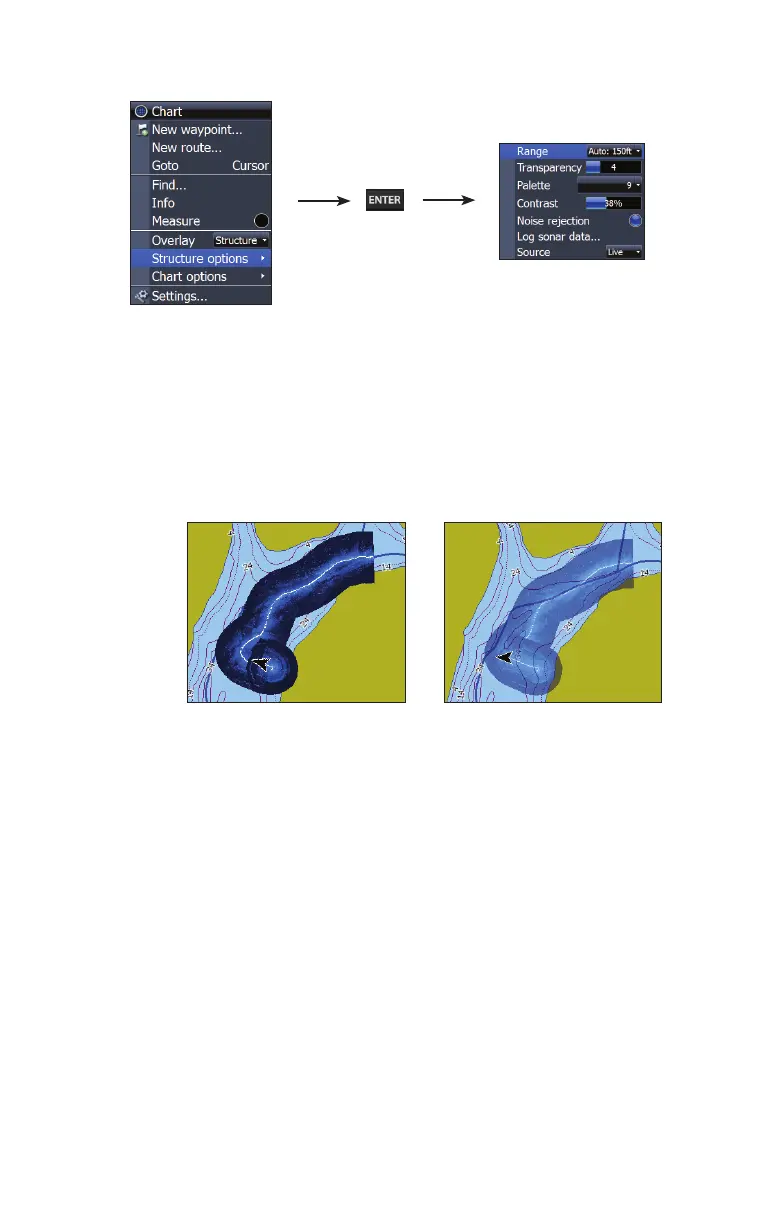
Accessing Structure Options
Structure options:
• Range — Adjusts the width of the sidescan history trail. The greater
the range setting, the wider the StructureMap history trail; Lower
range settings reduce the width of the history trail.
• Transparency — Increases/decreases the visibility of Structure
overlay on top of the map. This is helpful when using marine map-
ping cards.
•
As you increase Structure overlay Transparency, you will be able to
see more marine card map data through the Structure overlay.
• Palette — Used to select a color scheme that allows the Structure-
map detail to appear more clearly on the underlying chart.
• Contrast — Adjusts the brightness ratio between light and dark areas
on the screen, making it easier to distinguish suspended objects from
the background.
• Noise Rejection — Monitors the eects noise (boat pumps, water
conditions, engine ignition systems, etc.) has on your display, and
then lters out undesired signals.
• Source — Selects StructureMap Source, Live mode or Saved mode
Minimum Transparency Maximum Transparency


 To Next Page