21
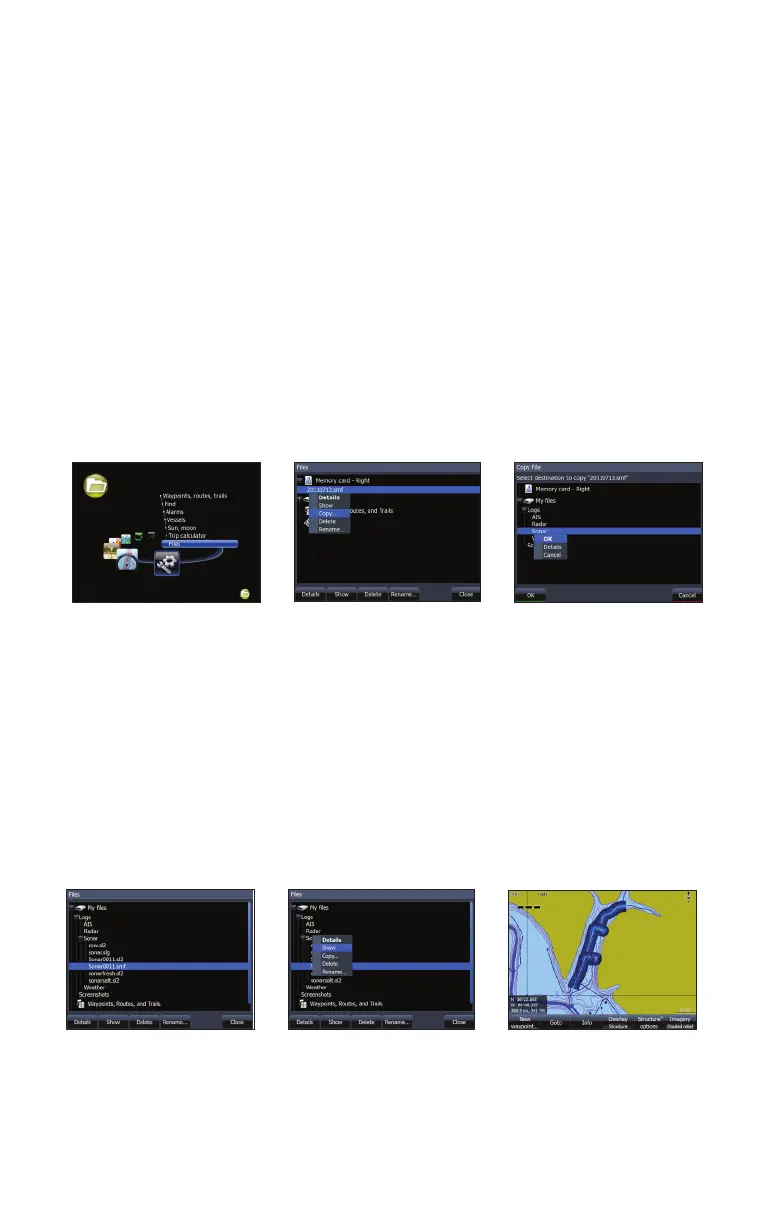
Copying StructureMap (.smf) les from SD to internal memory
Refer to your operation manual for more information about copying les.
Access les Copy StructureMap
(.smf ) le from card
Place le into sonar logs
Using StructureMaps with mapping cards
StructureMap allows you to maintain full chart capability and can be used
with embedded cartography as well as Navionics, Insight and other third-
party charting cards compatible with HDS units. To view StructureMap data
with other mapping card data on an HDS-8 or HDS-10, place the mapping
card in one card slot and the SD card with the StructureMap le in the other
slot.
If you have an HDS-5 or HDS-7, copy the StructureMap (.smf ) les to the
units internal memory to view StructureMap data with data from another
mapping card. We recommend only adding StructureMap (.smf) les of one
lake at a time to the internal memory due to limited space. You should keep
copies of StructureMap (.smf ) les on an external SD card.
Show StructureMap (.smf) les
You can view StructureMap (.smf) les from the Files menu, which allows you
to quickly see what area each StructureMap le covers.
Viewing StructureMap (.smf) les
Select StructureMap
(.smf) le
Select Show StructureMap appears
on the screen


 To Next Page