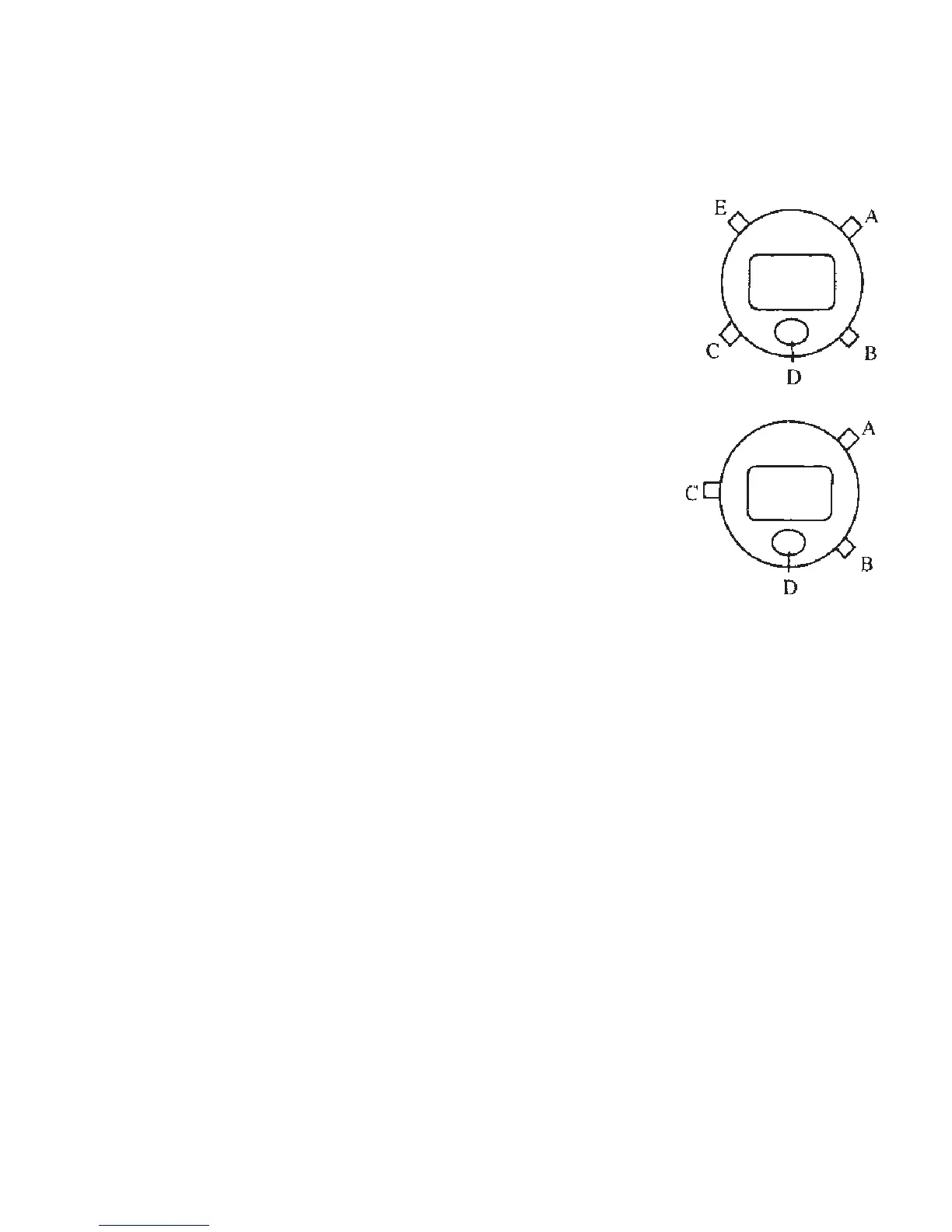
LCD CHRONO-ALARM
Control of Watches:
Normal Display: Hour, minute, second and day of week
Push A Button: Month, date, and day of week
Push B Button: Display shows alarm, time in hour
and minute
Push C Button: For the change of function
Push D Button: For light (Option)
Push E Button: For light (Option)
Alarm and Chime On/Off
In normal time: Hold B-Button and display shows alarm
time in hour and minute
1x Push A-Button: Chime Bell will be on
2x Push A-Button: Alarm mark will be on
3x Push A-Button: Chime Bell will be off
4x Push A-Button: Alarm Bell will be off
Release B-Button and display changes to normal time immediately
Chronograph Mode
In normal time, Push C-Button, chronograph Function will be set.
Start/stop: Push A-Button, it operates in cumulative counting up to 1/100
second
Lap time: Change to lap time from chronograph time display is performed by
pressing B-Button while chronograph is counting. Chronograph
keeps counting after change. Push B-Button again to return to
chronograph time display.
Reset: Push A-Button to stop counting and then push B-Button
29



 To Next Page