Chapter 4 – Quick start procedures
54
4.3 Operation using Keypad and Control Terminals
4.3.1 Frequency set by External Source and Run/Stop by Keypad
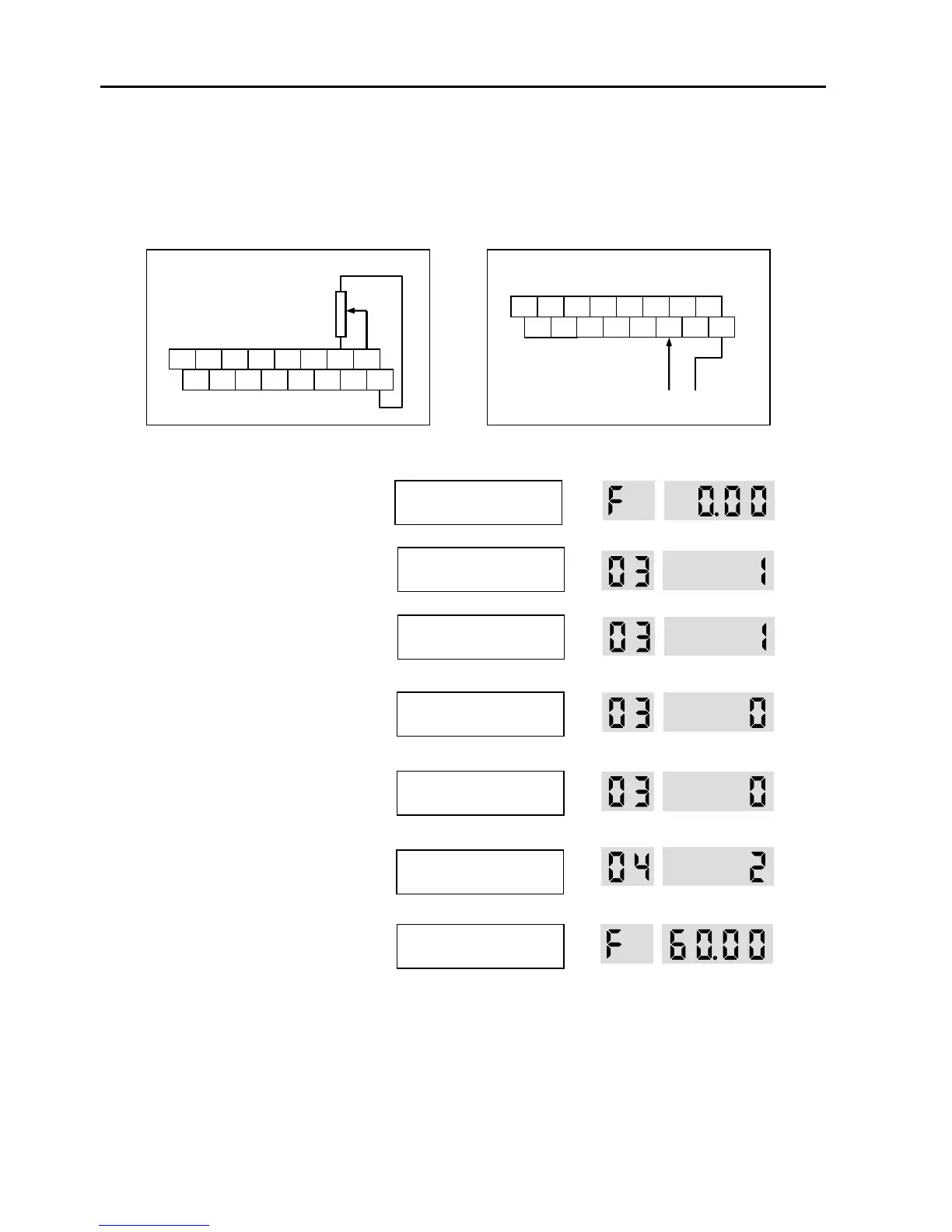
1. Install a potentiometer on terminals V1, VR, 5G and connect wiring as shown below left.
When a ‘4 to 20mA’ current source is used as the frequency reference, use terminals I and 5G as shown below.
2. Apply AC power.
3. LCD: Press [▲] key to move DRV 03.
7-Seg: Rotate encoder knob until ‘03’ is
displayed.
4. LCD: Press [PROG] key.
7-Seg: Press [PROG/ENT] key.
5. LCD: Press [▲] key one time.
7-Seg: Rotate encoder knob and set at ‘0’.
6. LCD: Press [ENT] key.
7-Seg: Press [PROG/ENT] key.
7. Confirm that the DRV 04 is set at ‘V1’.
8. Press [SHIFT/ESC] key.
Set the frequency by rotating the
potentiometer.
9. LCD: Press [FWD] or [REV] key.
7-Seg: Press [RUN] key.
P1



 To Next Page
 Loading...