Changing parameter values in Function 1, 2 and I/O group
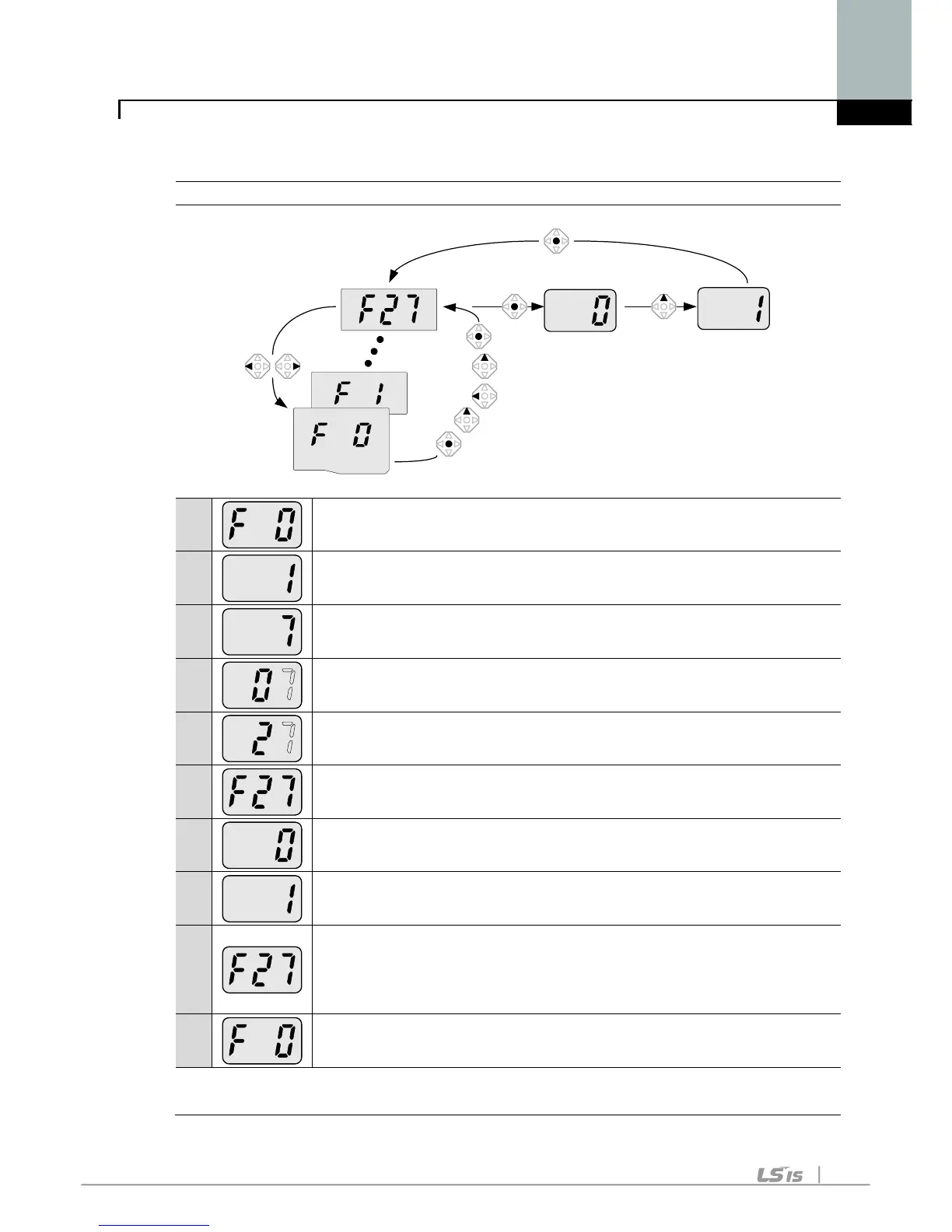
When changing the parameter value of F 27 from 2 to 5
-. In F0, press the Prog / Ent () key once.
2
-. Check the present code number.
-. Increase the value to 7 by pressing the Up () key.
3
-. When 7 is set, press the Left () key once.
4
-. 0 in 07 is active.
-. Increase the value to 2 by pressing the Up () key.
5
-. 27 is displayed
-. Press the Prog / Ent () key once.
6
-. The parameter number F27 is displayed.
-. Press the Prog / Ent () key once to check the set value.
7
-. The set value is 0.
-. Increase the value to 1 by pressing the Up () key.
8
-. Press the Prog / Ent () key once.
9
-
. F27 is displayed after 5 stops blinking. Changing parameter
value has been complete.
-. P
ress the either Left (
) or Right (
) key once to go to the first
-. Return to F0.
♣ The above setting is also applied to change parameter values in
function group 2 and I/O group.



 To Next Page