EasyManua.ls Logo

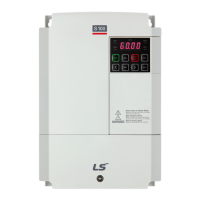
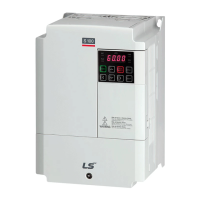
LSIS S100 - User Manual

LSIS S100
288 pages
Print Icon
To Next Page IconTo Next Page
Loading...
This operation manual is intended for users with basic knowledge of electricity and electric
devices.
* LSLV-S100 is the official name for S100.

Table of Contents

Other manuals for LSIS S100

Questions and Answers

  • P
    patricia60Aug 19, 2025
    Why is my LSIS Inverter overheating?
    • A
      Alexander LopezAug 19, 2025
      Your LSIS Inverter may be overheating due to several reasons. First, check the cooling system for any obstructions in the air inlet, outlet, or vent. The cooling fan may also need replacement if it has been operating for an extended period. Finally, ensure the ambient temperature is below 50?. These steps should help resolve the overheating issue.
  • K
    kylie41Aug 21, 2025
    What to do if LSIS Inverter shows E-Thermal error?
    • D
      David HammondAug 21, 2025
      If your LSIS Inverter displays an E-Thermal error, it could be due to several reasons: * The motor might be overheated, in which case you should reduce the load or operation frequency. * If the inverter load is greater than the rated capacity, replace the inverter with a model that has increased capacity. * If the set value for electronic thermal protection is too low, set an appropriate electronic thermal level. * If the inverter has been operated at low speed for an extended duration, replace the motor with a model that supplies extra power to the cooling fan.
  • P
    Philip OwensAug 23, 2025
    What causes LSIS Inverter to display Inverter OLT error?
    • M
      michaelgoodmanAug 23, 2025
      The 'Inverter OLT' error on your LSIS Inverter typically indicates that the load exceeds the rated motor capacity. To resolve this, replace the motor and inverter with models that have increased capacity. Alternatively, the torque boost level might be set too high; try reducing it.
  • N
    Natasha BrightAug 26, 2025
    What to do if LSIS Inverter shows FAN Lock error?
    • O
      olarsenAug 26, 2025
      If your LSIS Inverter displays a FAN Lock error, it's likely due to either a foreign object obstructing the fan’s air vent or the cooling fan needing replacement. First, remove any foreign objects from the air inlet or outlet. If the issue persists, replace the cooling fan.
  • D
    Danielle LeeAug 27, 2025
    What to do if LSIS Inverter has Input Phase Open error?
    • S
      Sheila KellyAug 27, 2025
      If your LSIS Inverter is showing an Input Phase Open error, there are a few things you can check. It could be due to a connection fault in the magnetic contactor on the input side, so check that first. Also, inspect the input wiring for any faults. If neither of those is the issue, the DC link capacitor might need replacing.
  • J
    Jennifer DavidsonAug 30, 2025
    How to troubleshoot low voltage on LSIS Inverter?
    • A
      Audrey Grimes MDAug 30, 2025
      Low voltage on your LSIS Inverter can stem from a few causes. First, ensure that the input voltage is adequate. If the input voltage is sufficient, check whether a load exceeding the power capacity is connected to the system. Also, inspect the magnetic contactor connected to the power source for any faulty connections and replace it if necessary.
  • C
    Colton MartinezSep 1, 2025
    What causes LSIS Inverter to display Output Phase Open error?
    • Z
      Zachary Newman DVMSep 1, 2025
      An Output Phase Open error on your LSIS Inverter can be caused by a connection fault in the magnetic contactor on the output side, or faulty output wiring. Check the magnetic contactor and the output wiring to resolve the issue.
  • A
    Andrew LiuSep 3, 2025
    What to do if LSIS Inverter shows IP54 FAN Trip error?
    • A
      Ashley ThompsonSep 3, 2025
      If your LSIS Inverter is showing an IP54 FAN Trip error, it could be due to the fan connector not being connected, so ensure it is properly connected. If it is already connected, the fan connector may need to be replaced.
  • C
    Curtis BlankenshipSep 5, 2025
    Why does LSIS Inverter show NTC Open error?
    • A
      adavisSep 5, 2025
      The NTC Open error on your LSIS Inverter indicates that the ambient temperature is too low. Ensure the ambient temperature is above -10?.
  • M
    Margaret BrownSep 7, 2025
    Why is the IP address of my LSIS Control Unit communication module randomly changing?
    • K
      Katelyn ClarkSep 7, 2025
      If the IP address of your LSIS Control Unit communication module is randomly changing, it might be due to the PLC settings overriding it. Verify the PLC configuration software to check if IP changes by the PLC are permitted. If you prefer the communication module's IP to remain constant, configure the PLC software to utilize the IP address defined within the communication module itself.

Summary

Safety Information

Safety symbols in this manual

Explains the meaning of danger, warning, and caution symbols.

1 Preparing the Installation

1.1 Product Identification

Explains product naming and specifications on the rating plate.

1.2 Part Names

Displays part names of the inverter with details potentially varying by product group.

1.3 Installation Considerations

Details ideal operation and installation conditions for the inverter.

1.4 Selecting and Preparing a Site for Installation

Considers points for selecting an installation location, including wall support and clearance for air circulation.

1.5 Cable Selection

Provides information on selecting power and signal cables for safe and reliable operation.

2 Installing the Inverter

Installation Flowchart

Lists the sequence of steps for equipment installation and testing.

Basic Configuration Diagram

Shows a typical system configuration with the inverter and peripheral devices.

2.1 Mounting the Inverter

Describes procedures for mounting the inverter on a wall or inside a panel.

2.2 Cable Wiring

Details procedures for connecting ground, power, and signal cables to the inverter.

2.3 Post-Installation Checklist

Provides a checklist to ensure the inverter has been safely and correctly installed.

2.4 Test Run

Instructions for testing the inverter after installation, including wiring and motor rotation verification.

3 Learning to Perform Basic Operations

3.1 About the Keypad

Describes the keypad layout, display, and operation keys.

3.2 Learning to Use the Keypad

Explains how to use the keypad to navigate and set parameter values.

4 Learning Basic Features

4.1 Setting Frequency Reference

Describes methods to set and modify frequency reference using keypad, analog inputs, or RS-485.

4.1.3 V1 Terminal as the Source

Describes setting and modifying frequency reference using voltage inputs from the V1 terminal.

4.1.6 Setting a Frequency Reference via RS-485 Communication

Details controlling the inverter via RS-485 communication with PCs or PLCs.

4.5 Command Source Configuration

Discusses selecting various devices as command input devices for the inverter.

4.10 Setting Acceleration and Deceleration Times

Sets Acc/Dec time values based on maximum frequency, not inverter operation frequency.

4.13 V;F(Voltage;Frequency) Control

Configures inverter output voltages, gradient levels, and patterns to achieve target output frequency with V/F control.

5 RS-485 Communication Features

5.1 Communication Standards

Details RS-485 communication standards for data exchange with PLCs and computers.

5.2.2 Setting Communication Parameters

Guides on setting communication configurations, including inverter ID, protocol, speed, and frame settings.

5.3 Communication Protocol

Explains the slave device response to read/write requests from the master device.

5.4 Compatible Common Area Parameter

Lists common area parameters compatible with various LSIS inverter models.

5.5 Control Area Parameter (Read;Write)

Details control area parameters that can be read and written.

6 Table of Functions

6.1 Drive group (PAR→DRV)

Lists function settings for the Drive group, covering parameters like jump code, frequency, torque, and acceleration/deceleration times.

6.2 Basic Function group (PAR→BAS)

Lists function settings for the Basic group, including auxiliary reference source and command calculation types.

6.3 Advanced Function group (PAR→ADV)

Lists function settings for the Advanced group, covering acceleration/deceleration patterns and frequency limits.

6.9 Protection Function group (PAR→PRT)

Details protection functions such as overload, underload, and fault trips.

6.11 User Sequence Function group(USF)

Lists user function blocks for creating sequences, including mathematical and logical operations.

7 Troubleshooting

7.1 Trips and Warnings

Explains how the inverter stops operation or sends warning signals when a fault is detected.

7.1.1 Fault Trips

Categorizes fault conditions like Level, Latch, and Fatal.

7.2 Troubleshooting Fault Trips

Provides a table of possible causes and remedies for fault trips related to protection functions.

8 Maintenance

8.1 Regular Inspection Lists

Details regular inspections, including daily and annual checks.

8.2 Replacing Major Components

Provides information on the exchange cycles for major components like cooling fans and capacitors.

8.3 Storage and Disposal

Advises on categorizing and recycling the product and its packaging.

9 Technical Specification

9.1 Input and Output Specification

Details the electrical specifications for 3-phase 400V (30-75 kW) models.

9.2 Product Specification Details

Summarizes key product specifications like control method, frequency settings, and operation functions.

9.3 External Dimensions (IP 20 Type)

Shows external dimensions and mounting hole positions for different kW models.

9.8 Continuous Rated Current Derating

Explains current derating based on carrier frequency, input voltage, ambient temperature, and installation type.

Product Warranty

Warranty Information

Form for recording product name, model, installation date, and customer/retailer details.

Warranty Period

Specifies warranty duration and conditions.

Non-Warranty Service

Lists cases where a service fee will be incurred for malfunctions.

EC DECLARATION OF CONFORMITY

EMI; RFI POWER LINE FILTERS

RECOMMENDED INSTALLATION INSTRUCTIONS

Provides instructions for installing EMI/RFI filters.

UL mark

CE mark

Low Voltage Directive

Confirms product compliance with the Low Voltage Directive.

EMC Directive

Defines requirements for immunity and emissions of electrical equipment.

EAC mark

LSIS S100 Specifications

General IconGeneral
BrandLSIS
ModelS100
CategoryDC Drives
LanguageEnglish

Related product manuals