Digital Video Recorder User Manual
49
Step1: enter into system configurationÆother alarm; refer to Fig 4-27:
Step2: select a hard disk in the pull down list box, when the disk capacity is lower than that value, there will appear some text information on the
lower right of the live image.
Step3: click “default” button to resort default setting; click “apply” button to save the setting; click “exit” button to exit current interface.
4.5.5 Alarm out
Alarm out includes three sub menus: alarm out, schedule and buzzer
① Alarm out
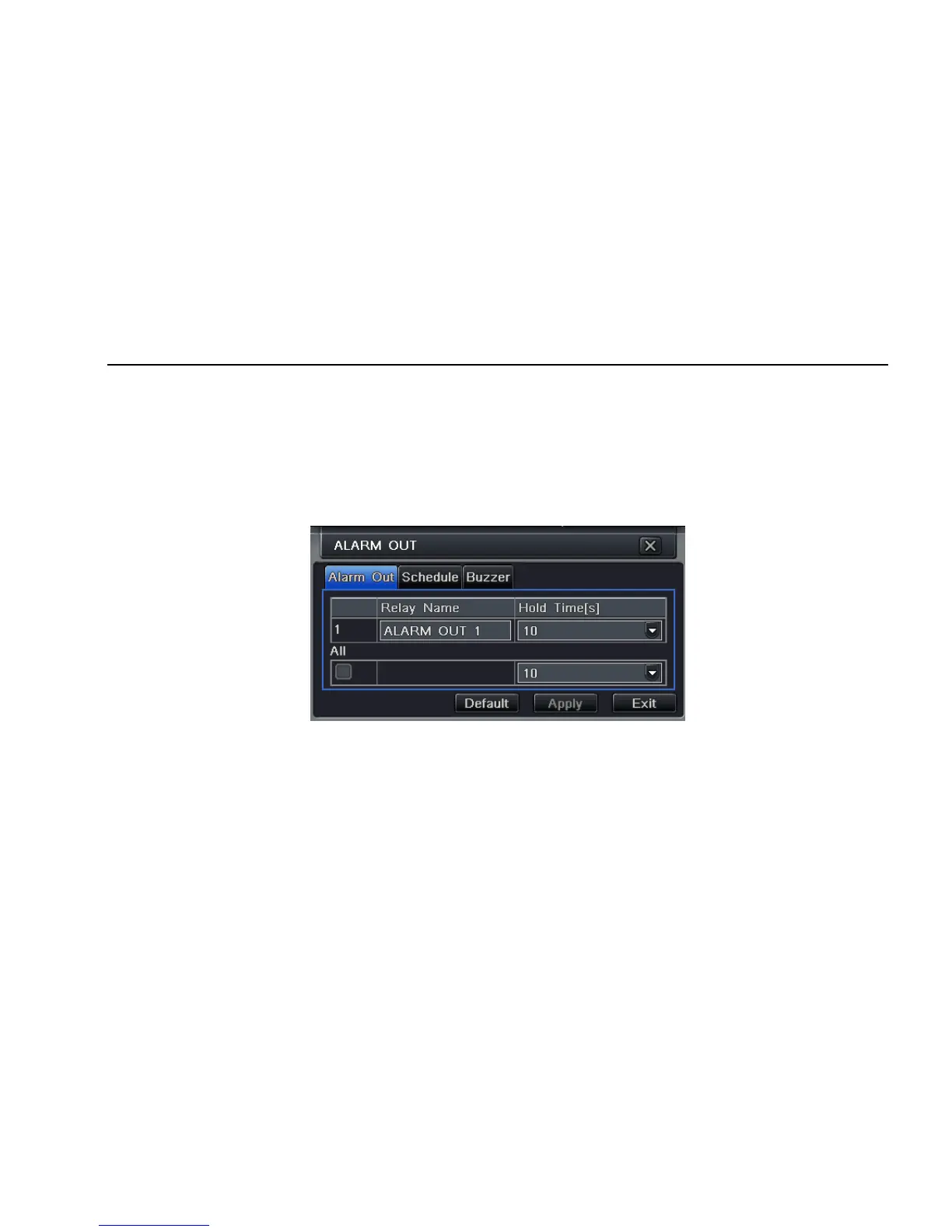
Step1: enter into system configurationÆalarm out; refer to Fig 4-28:
Fig 4-28 system configuration-alarm out
Step2: in this interface, set relay alarm out name, select hold time which means the interval time between the two adjacent alarms.
Step3: user can setup all channels with same parameters, tick off “all”, then to do relevant setup.
Step4: click “default” button to resort default setting; click “apply” button to save the setting; click “exit” button to exit current interface.
② Schedule
Step1: enter into system configurationÆschedule;
Step2: the setup steps of alarm out schedule are familiar with schedule; user can refer to 4.4.1 Schedule for details.



 To Next Page