Lumenera Scientific Infinity Camera
Release 3.3 User’s Manual
Copyright 2004 Page 13
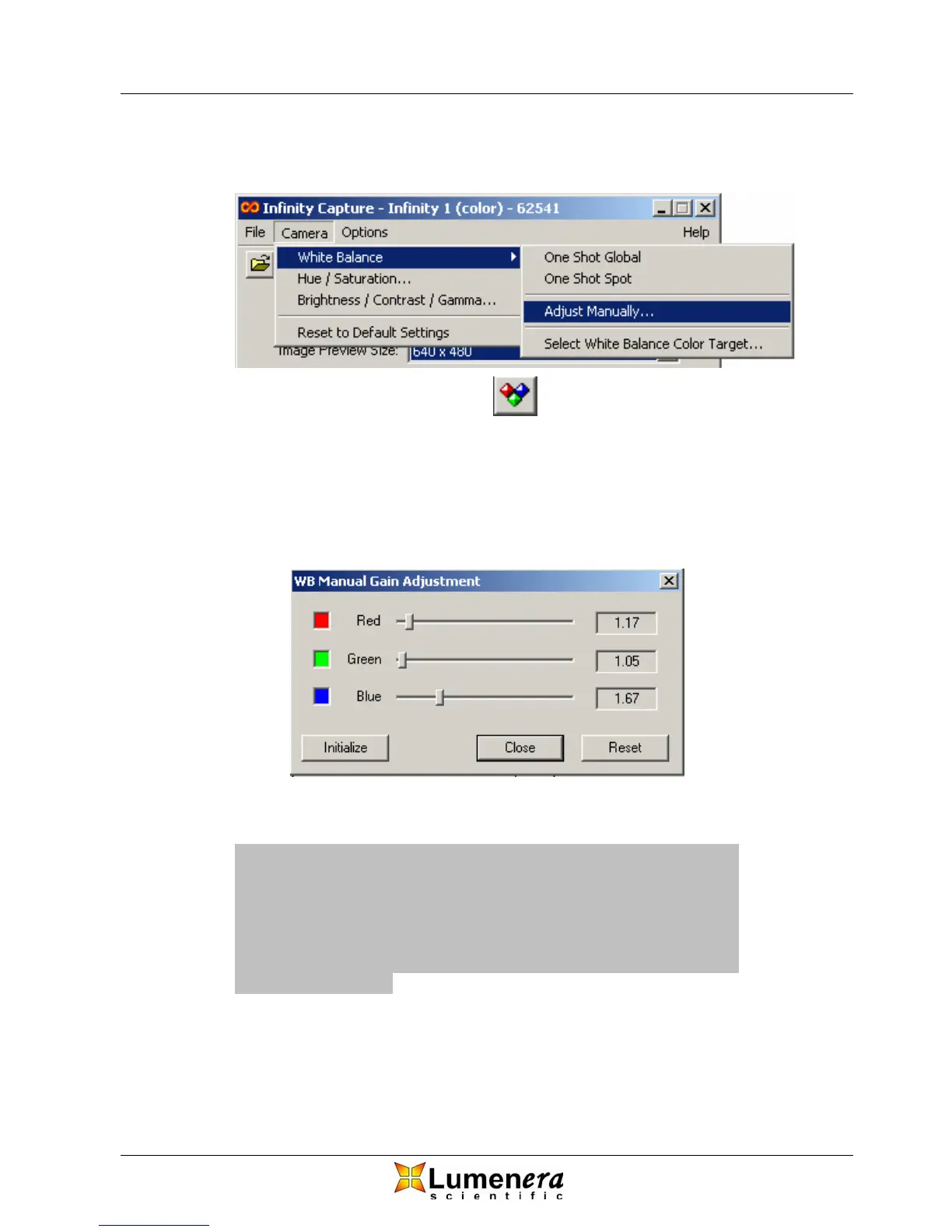
tricolour icon on the toolbar or by selecting Adjust Manually from the Camera >
White Balance drop down menu as depicted in Figure 9.
Figure 9 - White Balance / Adjust Manually
Not all cameras have a green gain adjustment. In those cases, simply adjust the
Red and Blue gains together, higher to remove green and lower to add green.
The gain values represent multiplicative factors. The Initialize button will set all
gains to one and the Reset button will reset the gains to the values they had
when the dialog was popped up.
Figure 10 - Manual Gain Adjustment Dialog
Note: If you use an extreme white balance target color, a
proper white balance may not be achievable using the one
shot or manual methods. Likewise, under extreme lighting
conditions (very warm or very cool) proper white balance
may be difficult to achieve. In the latter case, try using a
color filter to bring the light temperature closer to the daylight
standard of 5500K.
3.4.6 Hue and Saturation
Hue is a term typically used to describe the tone in your image. Adjusting the
hue changes the appearance of the image by shifting the color spectrum



 To Next Page