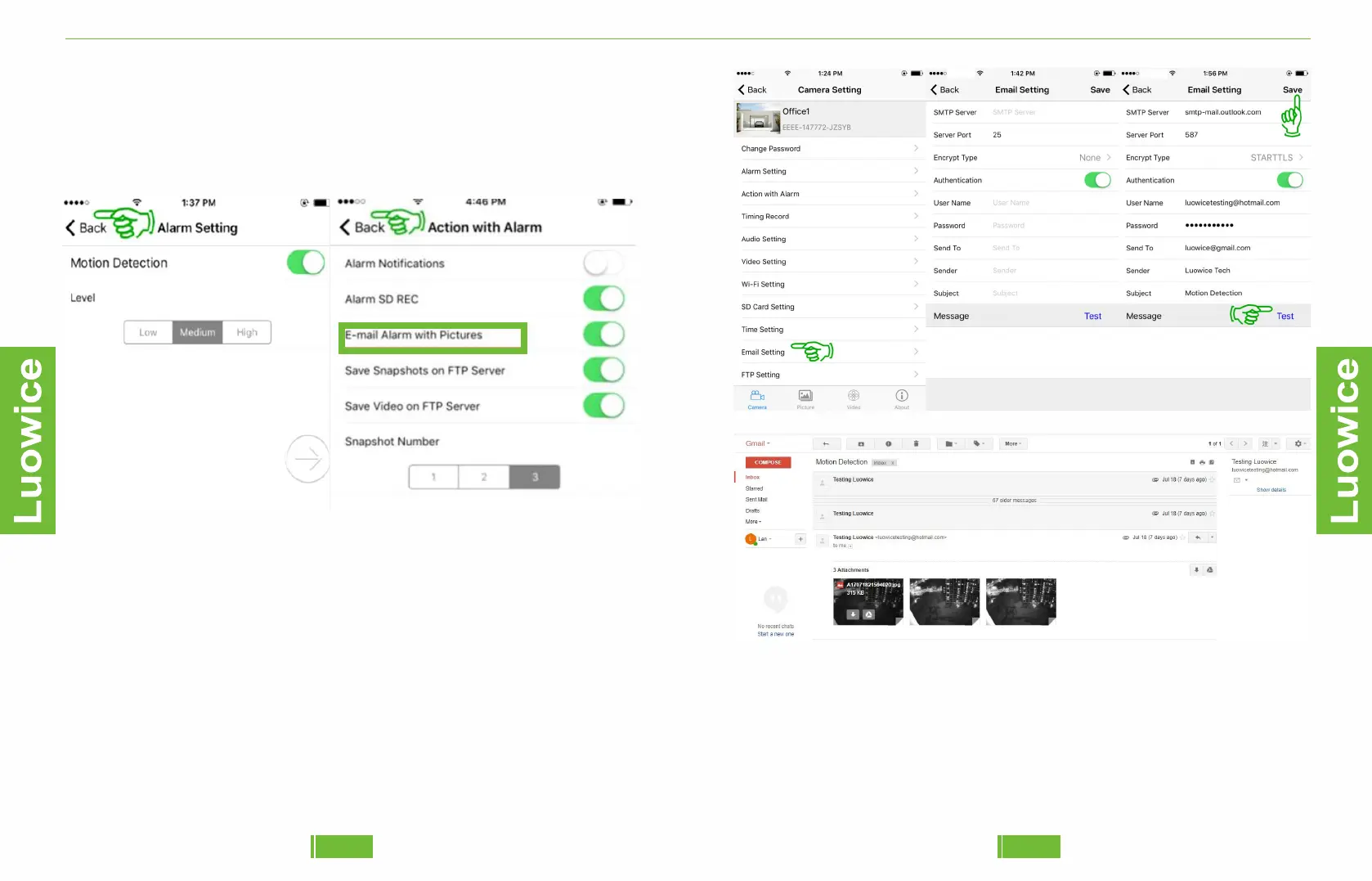
a)SMTP server :
❶Please make sure the POP and IMAP of your email account have been
enabled.
To enable POP/IMAP, please follow the operation below:
After logging in your gmail account, click 'Settings' – 'Forwarding and
POP/IMAP'– Enable POP & IMAP as picture shows.
2625
Luowice Wireless Security Camera User ManualLuowice Wireless Security Camera User Manual
Step 3. Set Up Email Alert
Before operation, please make sure you have activated the 'Motion
Detection Function' and the 'E-mail Alarm with Pictures Function' as the
following pictures show:
Operation: Please click 'Email Setting' on the main menu interface. And
then insert the relevant information in the pop-out page. Then click 'Test'
to check whether the email setting works. After confirming the email
setting working, click 'Save' and the setting will be successful.
And the email alert will be as follows:


 To Next Page