Luowice Wireless Security Camera User Manual
Luowice Wireless Security Camera User Manual
When there is no visible router with network cable port for configuration,
please apply the Hotspot mode to configure the camera with your local
Wi-Fi network, for this mode does not require a network cable during
configuration.
Video instruction is available from:
https://youtu.be/48N9BqopzXQ
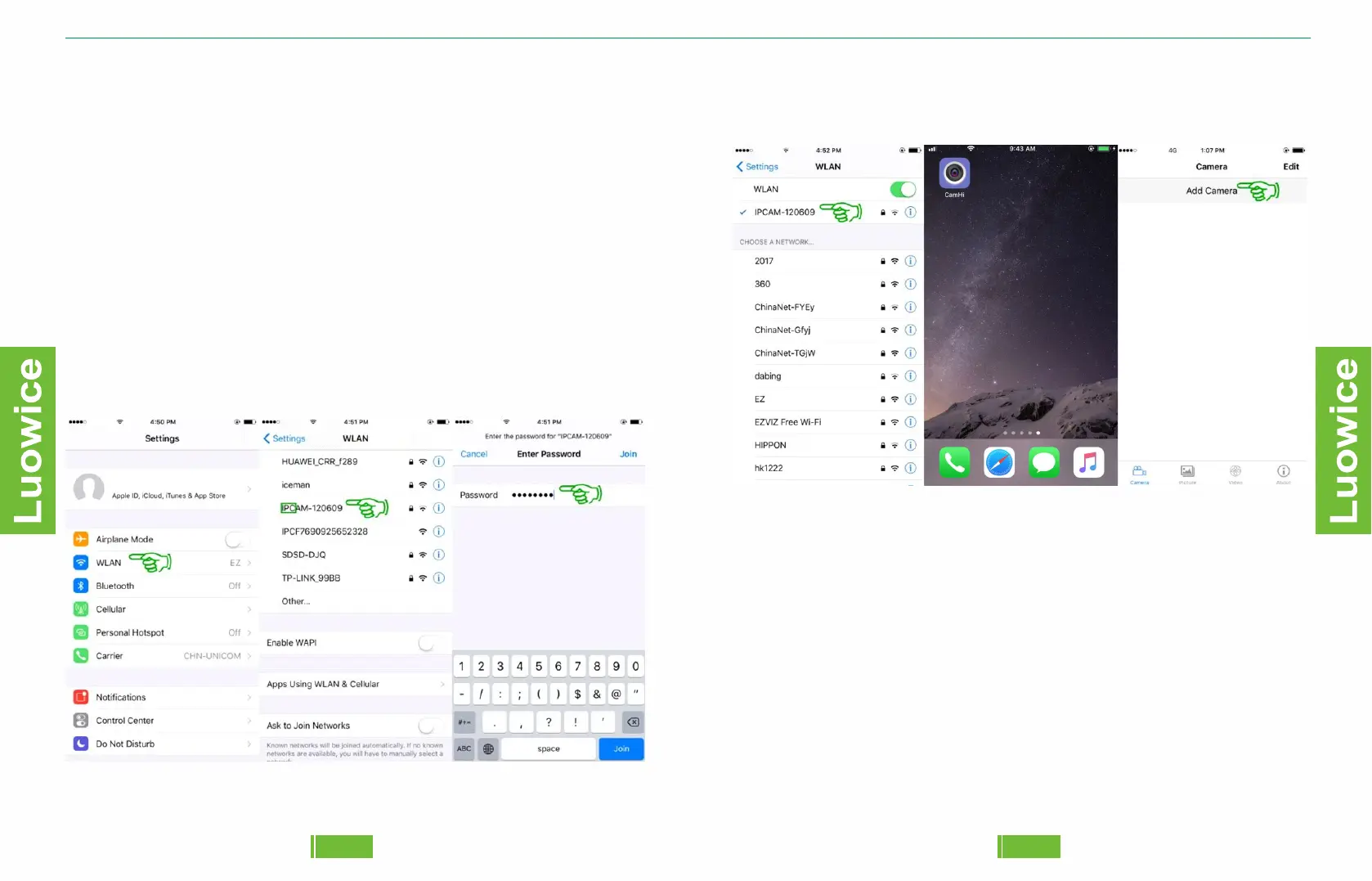
Step 1: Please kindlyclick 'Setting' on your phone - Click 'WLAN' -
Choose the WLAN with the name starts with 'IPC' - Insert the default
password '01234567' - Click 'Connect'. And your phone has been
connected the the camera's Wi-Fi Hotspot now.
4847
Step 2: After confirming your phone has been connected to the camera's
Wi-Fi Hotspot, please kindly open the APP on your phone. And then click
'Add Camera'.


 To Next Page