30
1
13
14
12 11
2 3 10
USING THE SYSTEM
The video of the baby unit will be displayed
on the screen of the parent unit when both
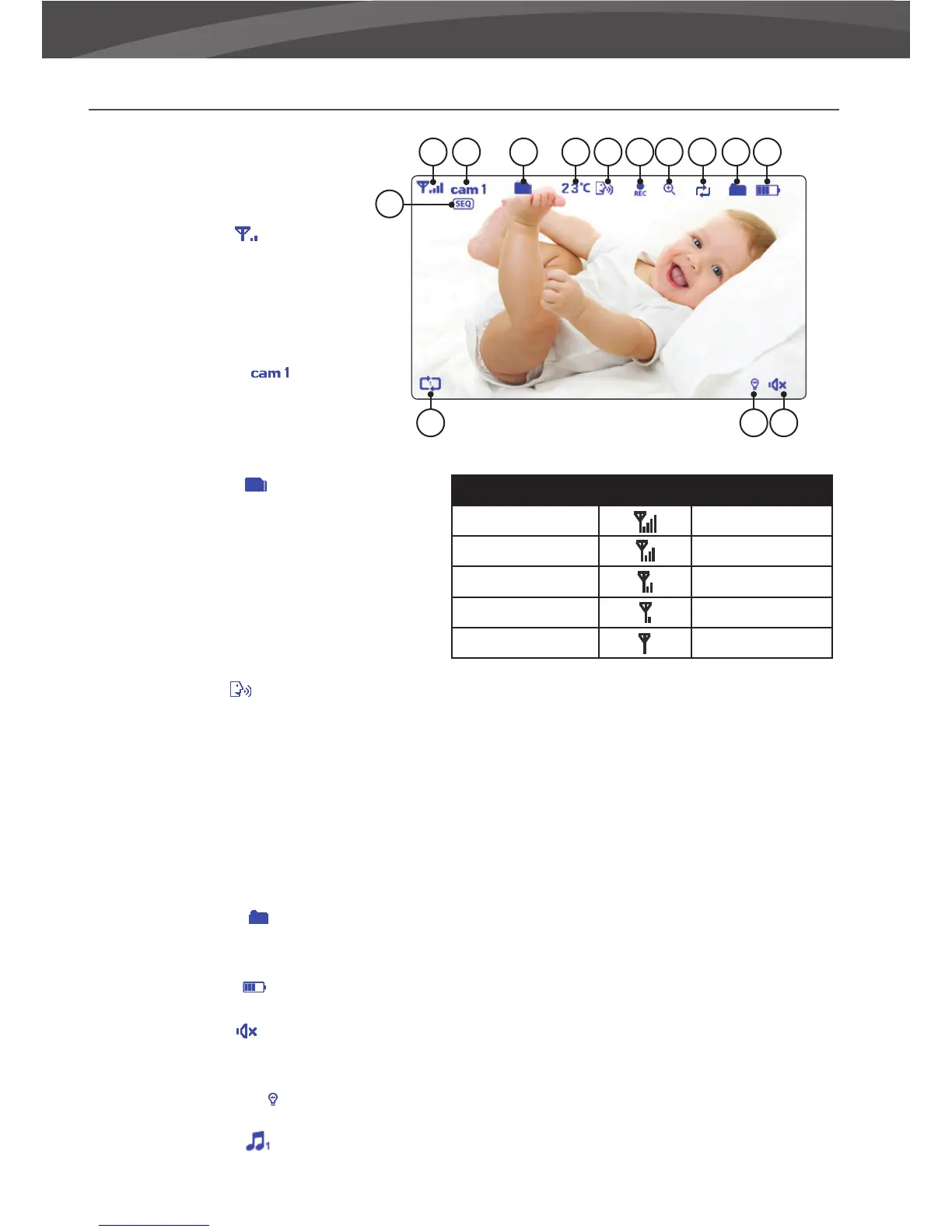
are switched on. The icons on the screen are
explained below.
1. Signal indicator
The signal
indicator shows the strength of the
connection between units. no bars
indicate a poor signal and 4 bars
indicate the strongest signal (see table).
2. Channel indicator The channel
indicator displays the current channel.
Press the CA M button (page 4) to
switch between the di erent channels.
3. SD card indicator The SD icon will
appear when an SD card has been
properly inserted in the SD slot of the
parent unit.
4. Temperature indicator Displays the
temperature measured by the baby
unit.
5. ‘Talk’-indicator Appears when the talk button is pressed. You can now talk through the baby unit.
6. Record indicator Appears when a video is being recorded. Press the ‘REC’ button again to stop the
recording.
7. Zoomindicator Indicates that the video from the baby unit is zoomed in.
8. Overwrite indicator when you have selected “yes” for the SD-card overwrite function. The icon will be
displayed on the screen.
9. New le indicator This icon will appear and icker when a new video has been recorded but has not
yet been watched. The SD icon will start to ash on screen when the SD card is full.
10. Battery indicator Indicates the battery life of the parent unit.
11. Sound indicator When the volume has been decreased to mute, the mute icon will be displayed on
the screen. Press the volume button to increase the volume.
12. Night light indicator Is being displayed when the night light on the baby unit is activated.
13. Lullaby indicator
When the play lullaby button is pressed the lullaby indicator is displayed on the
screen. Press next to switch between songs.
Signal sterkte Indicator Waarschuwing
Perfect None
Good None
Fair None
Low Out of Range
No Signal Out of Range
4 5 6 7 98















 To Next Page