M2I Corporation Industrial HMI Touch Panel HW Installation Manual
M2I Corporation
M2I Bldg, 35-11, Jeonpa-ro 24beon-gil, Manan-gu, Anyang-si, Gyeonggi-do, 430-857, Korea. Tel :+82-70-465-3366,Fax:+82-31-465-3355 www.m2i.co.kr
18 / 23
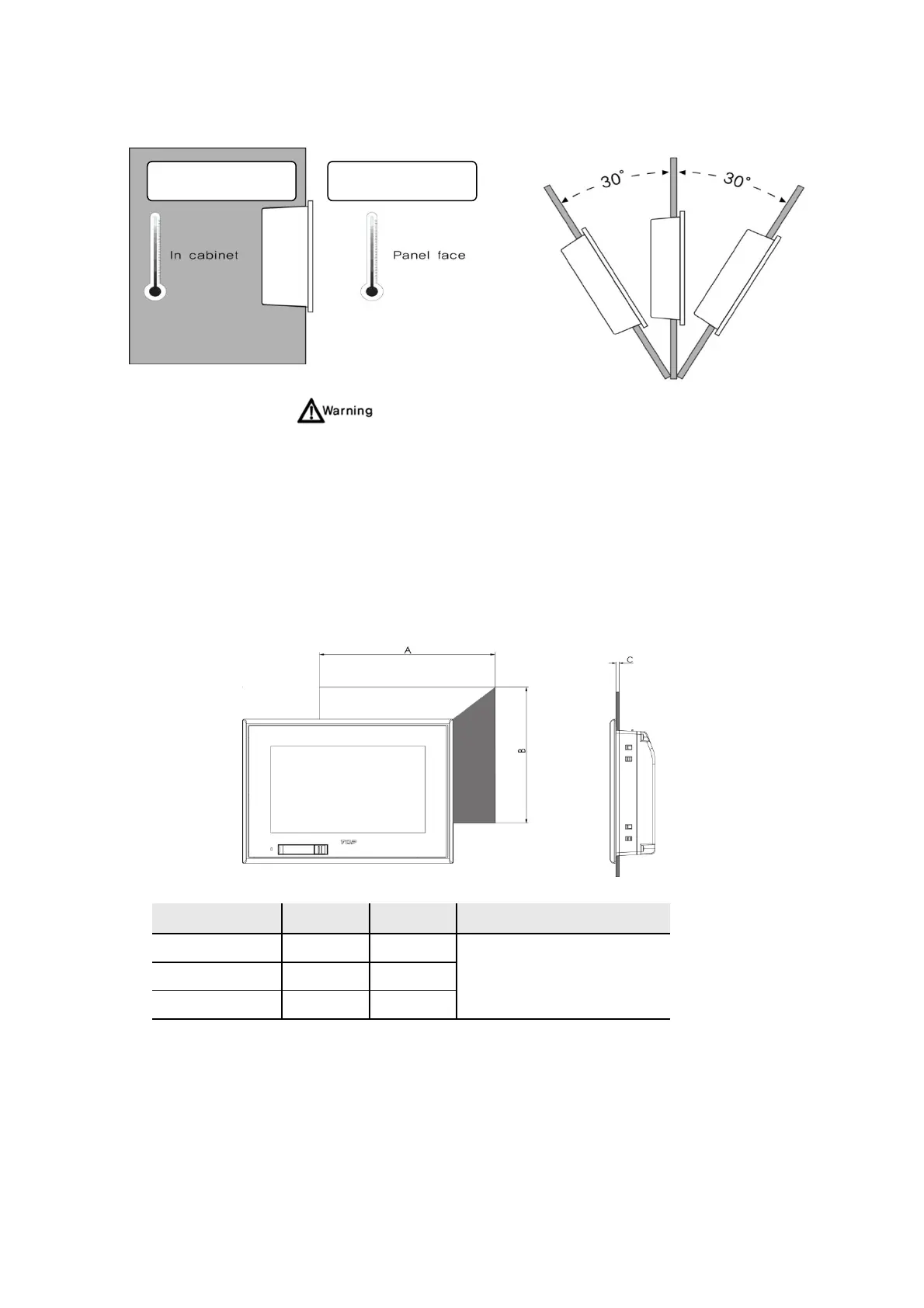
When installing the product in a slanted position, The product screen should not incline more than 30°.
(5) In order to minimize external mechanical hazards, please control the mechanical hazards of the
surrounding environment.
6.2 Installation Procedure
In order to install this product, please follow the following procedure.
(1) Panel Cut-out
Make a panel cut which product is mounted and insert the product to the panel form the front side.
The Size of Panel Cut
Making the Panel Cut (Mounting Size) per each TOPRW Series as below Table, Before Installation.
Model A (mm) B (mm) C (mm)
TOPRW0500WD 136 100
1-5
TOPRW0700WD 197 127
TOPRW1000WD 260 202
-10 ~ 50°C, 10~80% -10 ~ 50°C, 10~80%


 To Next Page