M2I Corporation Industrial HMI Touch Panel HW Installation Manual
M2I Corporation
M2I Bldg, 35-11, Jeonpa-ro 24beon-gil, Manan-gu, Anyang-si, Gyeonggi-do, 430-857, Korea. Tel :+82-70-465-3366,Fax:+82-31-465-3355 www.m2i.co.kr
22 / 23
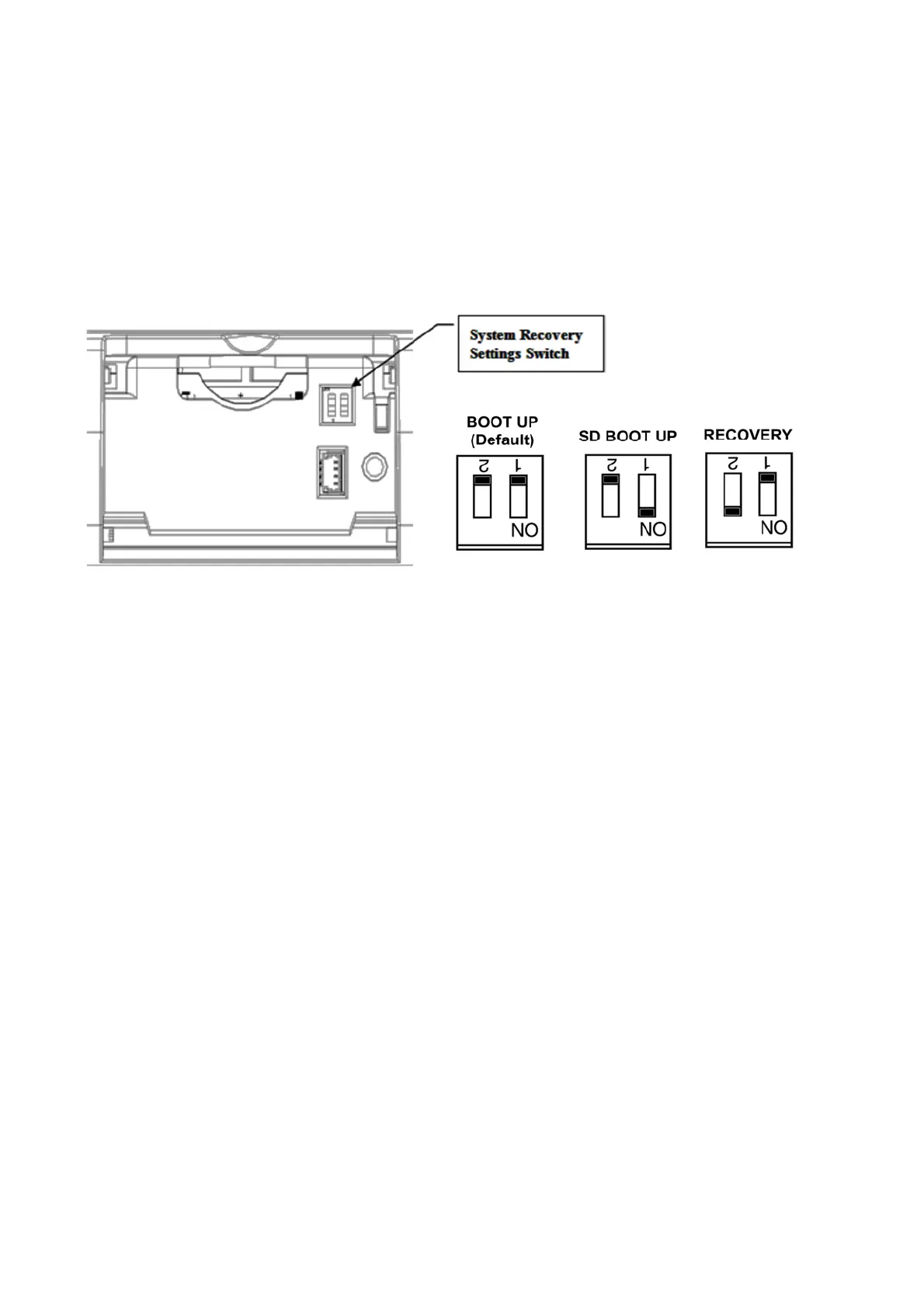
8.4 Setting System Recovery Mode
a. If the system fails to boot normally due to a problem during operation, the built-in recovery function
can be used to maintain the factory default state. Please note that the built-in project will be deleted
when using the recovery mode.
b. After opening the rear cover, you can adjust the setting switch.
Keep the "BOOT UP" state when booting normally. If the system is recovering, turn off the power and
set it to "RECOVERY".
c. When the recovery is completed, the buzzer sounds, then turn off the power and reset to
"BOOT UP" state.


 To Next Page