UNLOADING AND ASSEMBLY
169558 Revision D
35
L1 C
||
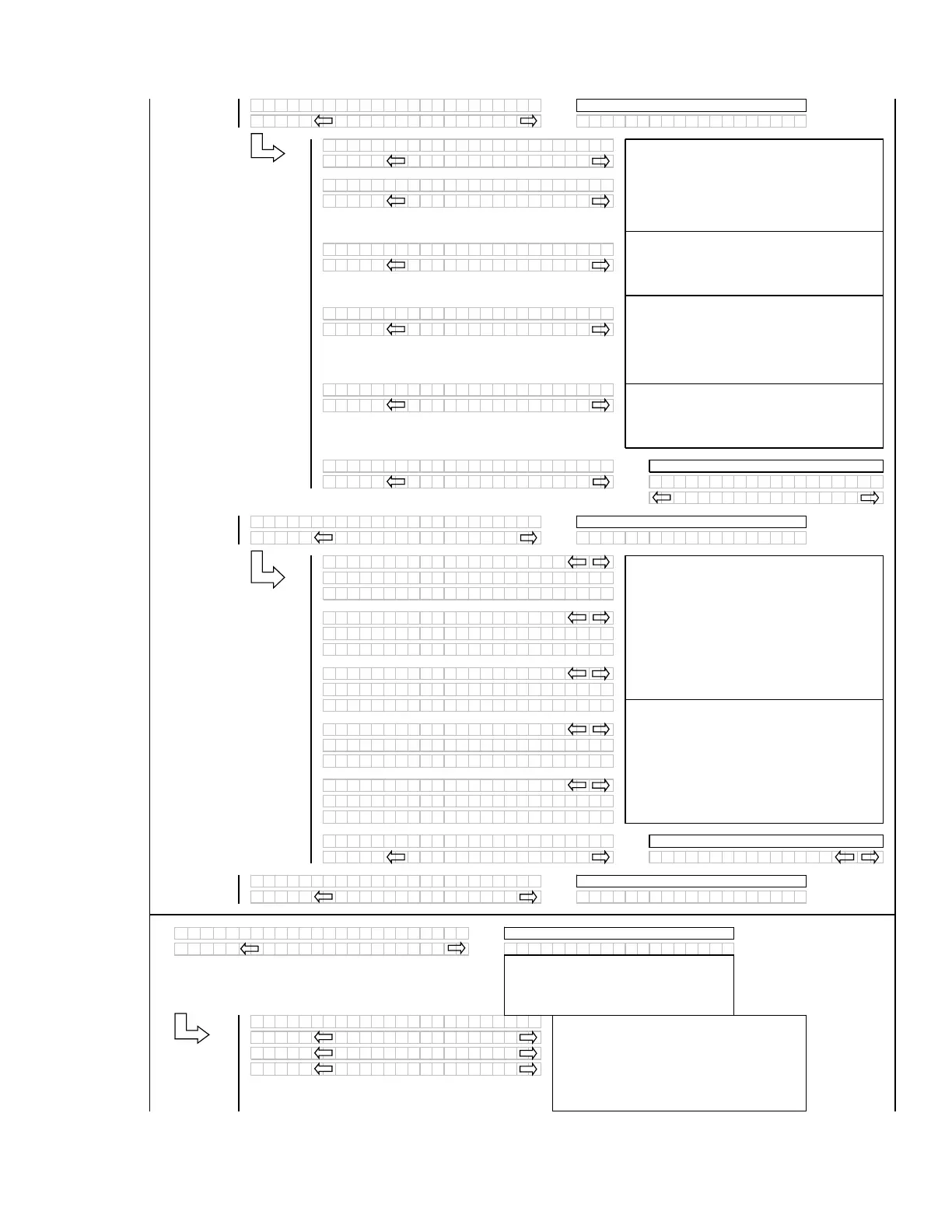
SET CONTROL LOCKS?
L2 M
||
NO /
ES
IE
CONTROL LOCKS?
L1 C
DR
PER SPEED
L2 M
EN
BLED / LOCKED
L1 C
||
UGER SPEED
L2 M
||
EN
BLED / LOCKED
L1 C
REEL SPEED
L2 M
||
EN
BLED / LOCKED
L1 C
||
REEL FORE /
FT
L2 M
||
EN
BLED / LOCKED
L1 C
HE
DER T I LT
L2 M
||
EN
BLED / LOCKED
L1 C
||
E
I T CONTROL LOCKS?
L2 M
||
NO /
ES DR
PER SPEED
EN
BLED / LOCKED
L1 C
||
IE
CONTROL LOCKS?
L2 M
NO /
ES E
IT
INDR
R SETUP?
L1 C
||
DR
PER SPEED
L2 M
||
575.1 HRS EN
BLED
L2 M
||
648.6 HRS LOCKED
L1 C
UGER SPEED
L2 M
575.1 HRS EN
BLED
L2 M
||
648.6 HRS LOCKED
L1 C
||
REEL SPEED
L2 M
||
575.1 HRS EN
BLED
L2 M
||
648.6 HRS LOCKED
L1 C
REEL FORE /
FT
L2 M
||
575.1 HRS EN
BLED
L2 M
||
648.6 HRS LOCKED
L1 C
||
HE
DER T I LT
L2 M
575.1 HRS EN
BLED
L2 M
648.6 HRS LOCKED
L1 C
||
E
IT
IE
LOCKOUTS?
L2 M
||
NO /
ES DR
PER SPEED
L1 C
||
EX I T
I NDR
RSETUP?
L2 M
NO/
ES SELECT HE
DER T
PE?
L1 C
||
C
B DISPL
SETUP?
L2 M
N O /
ES C
LIBR
TE SENSORS?
L1 C
||
DISPL
L
NGU
GE?
L2 M
||
ENGLISH
L2 M
ESP
NOL
L2 M
||
RUSSI
N
If “NO” then
um
to:
If “NO” then
um
to:
Tilt to be suppressed if not “installed” in the
windrower setu
menu.
Use the “arrow” keys to change the default
language. Pressing “SELECT” goes to the next L1
menu selection.
If “NO” then
um
to:
When the control lock outs are viewed, the lower
display line (L2) will show the engine hours and
either ENABLED or LOCKED to indicate the
present status along with the engine hours at which
time the function was either ENABLED or LOCKED.
If “NO” then
um
to:
If “NO” then
um
to:
Using the “arrow” keys allows the operator to select
the various functions. Pressing “SELECT” will go to
the EXIT VIEW LOCKOUTS? menu selection.
NOTE:
REEL FORE/AFT option only available with
FORE/AFT installed
If any of the HDR ANGLE / KNIFE SPEED or REEL
SPEED sensors are not “installed” (no expansion
module or A30 Auger header selected, they should
be suppressed.
The “arrow” keys are used to ENABLE or LOCK
OUT each function. Pressing “SELECT” will go to
the next L1 menu item.
NOTE:
HEADER TILT option only available when
HYDRAULIC TILT CYLINDER is installed
NOTE:
REEL SPEED option only availbale with
expansion module and draper or A40 auger.
If “NO” then
um
to:
NOTE:
CALIBRATE SENSORS option is
only available when engine is running during
selection, otherwise system jumps to
DIAGNOSTIC MODE
This menu allows the operator to selectably “lock
out” the control functions for the various header
functions. The default or selected “status” for each
item will flash.
NOTE:
AUGER SPEED option only available with
A40 Auger
If the expansion module is not installed the
corres
ondin
menu items should be su
ressed.
NOTE:
North America have English and Spanish
options; Overseas have English and Russian
options.
(continued next page)



 To Next Page