8 R2 Series Clinic Handout
Cutterbar Components
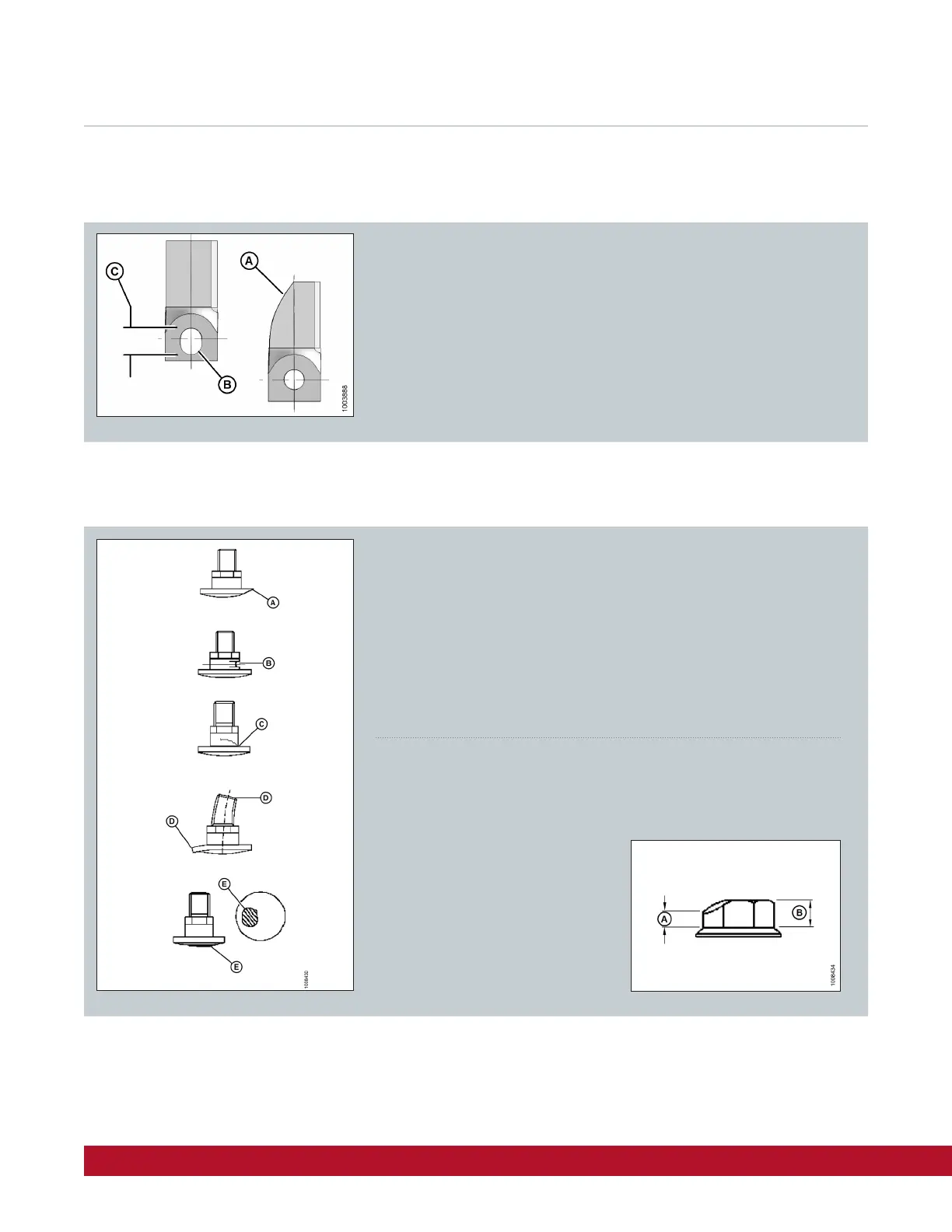
Check daily to ensure that disc blades are securely attached to the disc.
Change disc blades when they show cracks, signs of wear (A) and/or an
elongated hole (B) beyond safe operating limits (C). Max elongation is
21mm (13/16 in)
Disc Blades
Disc Blade Hardware
Check and replace bolt if:
Bolt has been removed and installed five times
Head (A) is worn flush with bearing surface of blade
Diameter of bolt neck is worn (B) 3mm (1/8 in)
Bolt is cracked (C)
Bolt is visibly distorted (D)
Bolt shows evidence of interference (E) with adjacent parts
Check and replace nut if:
Nut has been previously installed – nuts are one-time use only
Nut shows signs of wear (A below)
that is more than half the original
height (B below)
Nut is cracked



 To Next Page