5.10.3 Working with the position indicator
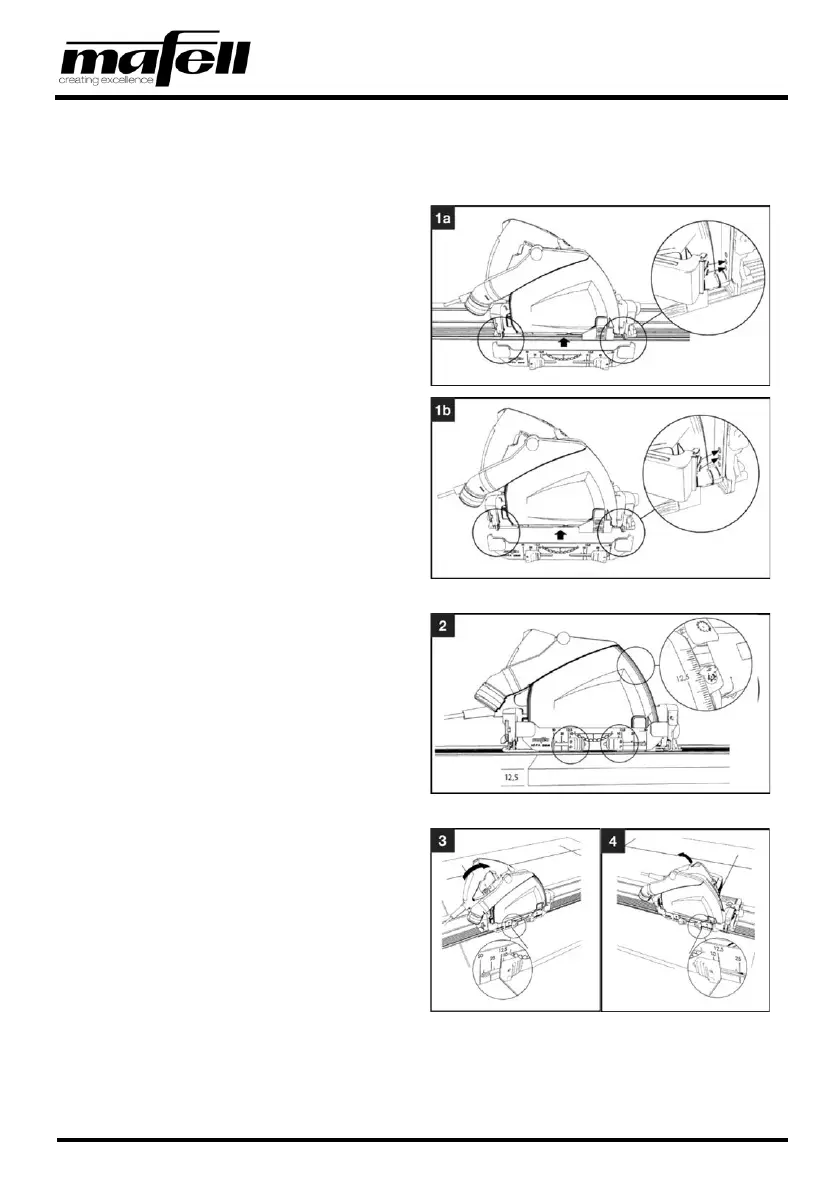
For plunge cuts with a fixed cutting depth of 50/25/12.5/10 mm [1.97/0.98/0.49/0.39 in], using the position
indicator is recommended. This permits the exact cutting area of the plunge cut to be determined.
Use the following procedure to use the position
indicator:
1. Clamp the position indicator into the holes
provided for this purpose.
➢ Use the two lower holes when you use a
guide rail (see 1a).
➢ Use the two upper holes without a guide
rail (see 1b).
Fig. 28: Clamping the position indicator
2. Depending on the thickness of the panel you
want to cut, set the cutting depth on the
machine.
➢ For this, see the information in chapter
5.5 Cutting depth setting.
Fig. 29: Setting the cutting depth
3. Set one of the red sliders on the position
indicator to the value of the cutting depth.
4. Set the slider on the other side to the same
value.
➢ The cutting area for the saw blade is
between the two red sliders.
✓ Position indicator used.
Fig. 30: Setting the position indicator to the cutting depth


 To Next Page