40
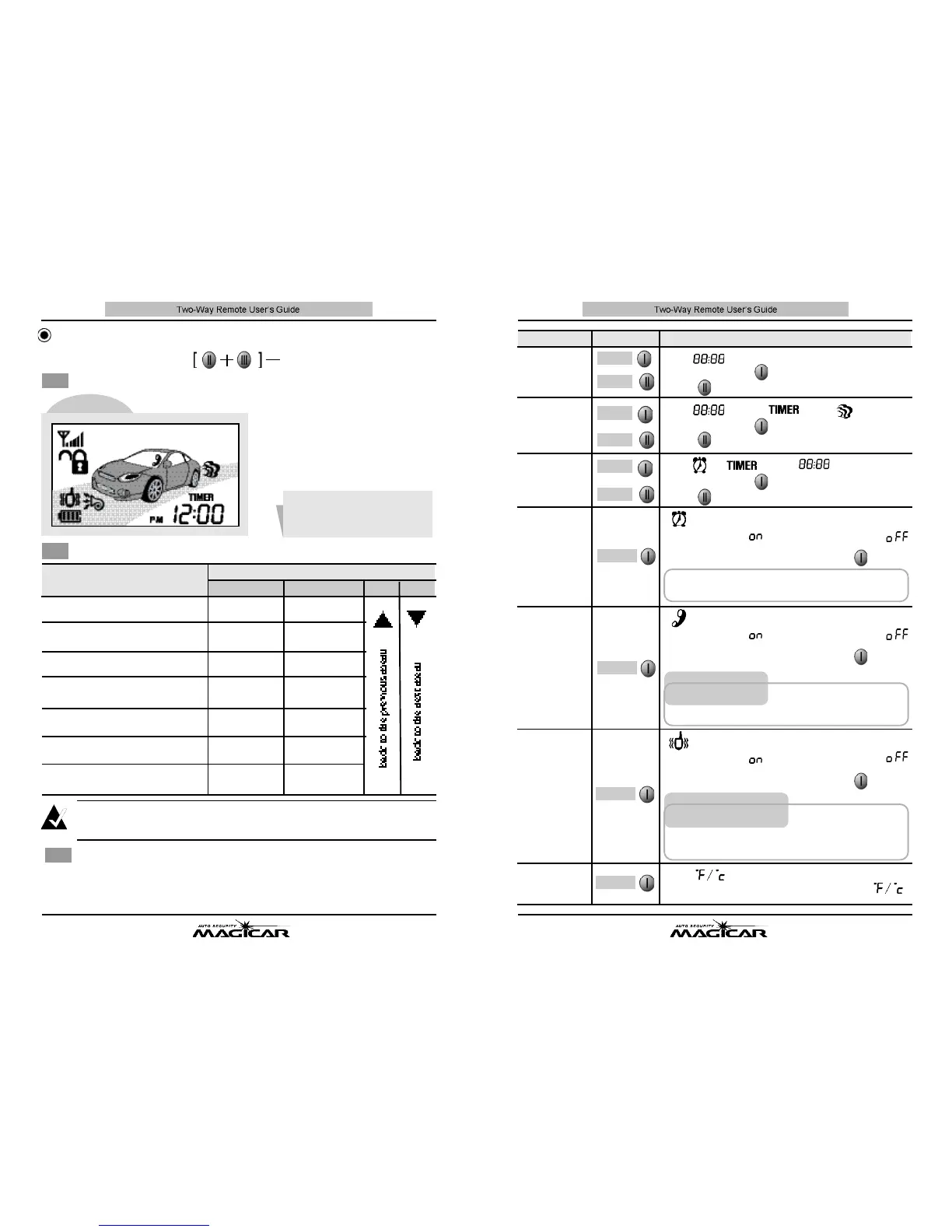
F u n c t i o n
B u t t o n
Application Method
Set-up of
A l a r m
Clock Time
S e t - u p / c a n-
cellation of
A l a r m
C l o c k
F u n c t i o n
Set-up of
Timer Start
R e s e r v a t i o n
T i m e
S e t - u p / c a n c e l-
lation of
R e m o t e
Paging Sensor
S e t - u p / c a n-
cellation of
V i b r a t i o n
M o d e
F a h r e n h e i t
C e n t i g r a d e
메뉴
O N / O F F
메뉴
C h a n g e
메뉴
O N / O F F
메뉴
O N / O F F
H o u r
M i n u t e
H o u r
M i n u t e
H o u r
M i n u t e
The “ ”icon flashes.
The “ ”icon, “ ”and [ ] flash
The [ ], “ ”and “ ”icon flash.
[ ] icon flashes
Set-up of
Present time
At this time, button will control the hour, and
button will control the minute.
At this time, button will control the hour, and
button will control the minute.
At this time, button will control the hour, and
button will control the minute.
Clock display
“ ”for alarm clock active, “ ”
for alarm clock disabled.
Toggle this option on and off with button .
[ ] icon flashes
When the alarm clock activates at the specified time, tap
any button for 0.5 sec. to silence the remote.
In order for someone to use the RPS to page your
remote, the system must be armed/locked and the
RPS must be knocked on twice within 2 sec.
With the vibration function on, the remote will not
make any sound unless the alarm is triggered. With
vibration mode off, vibration will be felt during an
RPS page, or if alarm is triggered.
The icon flashes.
The change of the temperature unit with either
Clock display
“ ”for alarm clock active, “ ”
for alarm clock disabled.
Toggle this option on and off with button .
RPS Func
t
ion
O
N/OFF
[ ] icon flashes
Clock display
“ ”for alarm clock active, “ ”
for alarm clock disabled.
Toggle this option on and off with button .
Vibration Function ON/OFF
M
e
nu
O
p
t
i
o
n
s
39
Set-up of Remote Options
To exit the remote programming menu, press buttons I I+ I I Ifor more than 2 sec.
The remote will automatically exit the programming menu if 15 sec. pass without a
button being pressed.
Entering the Main Menu
The remote c an be progra
m
med
after pressing buttons II +
I I I f o r
more
t
han 2 sec.
a
t the same time.
MENULCD
Button Control Method
Menu End Method
▶
The icon corresponding to the option you are changing will flash on the screen.
No
t
e
F u n c t i o n ( M e n u )
Set-up of present time
Set-up of timer start
reservation time
hour control
hour control
hour control
minute control
minute control
minute control
change(basic :
c a n c e l l a t i o n )
change(basic :
c a n c e l l a t i o n )
change(basic :
c a n c e l l a t i o n )
c h a n g e
(basic : “℉” )
The change of
℉ or ℃
Set-up of alarm clock time
Set-up /cancellation of
alarm clock function
Set-up/cancellation RPS
Set-up/cancellation of
vibration mode
Change of the temperature unit
Button
I I I I I I I V


 To Next Page