14 MAGICFX® SPARXTAR — User and Installation Manual
3 LET’S SPARK!
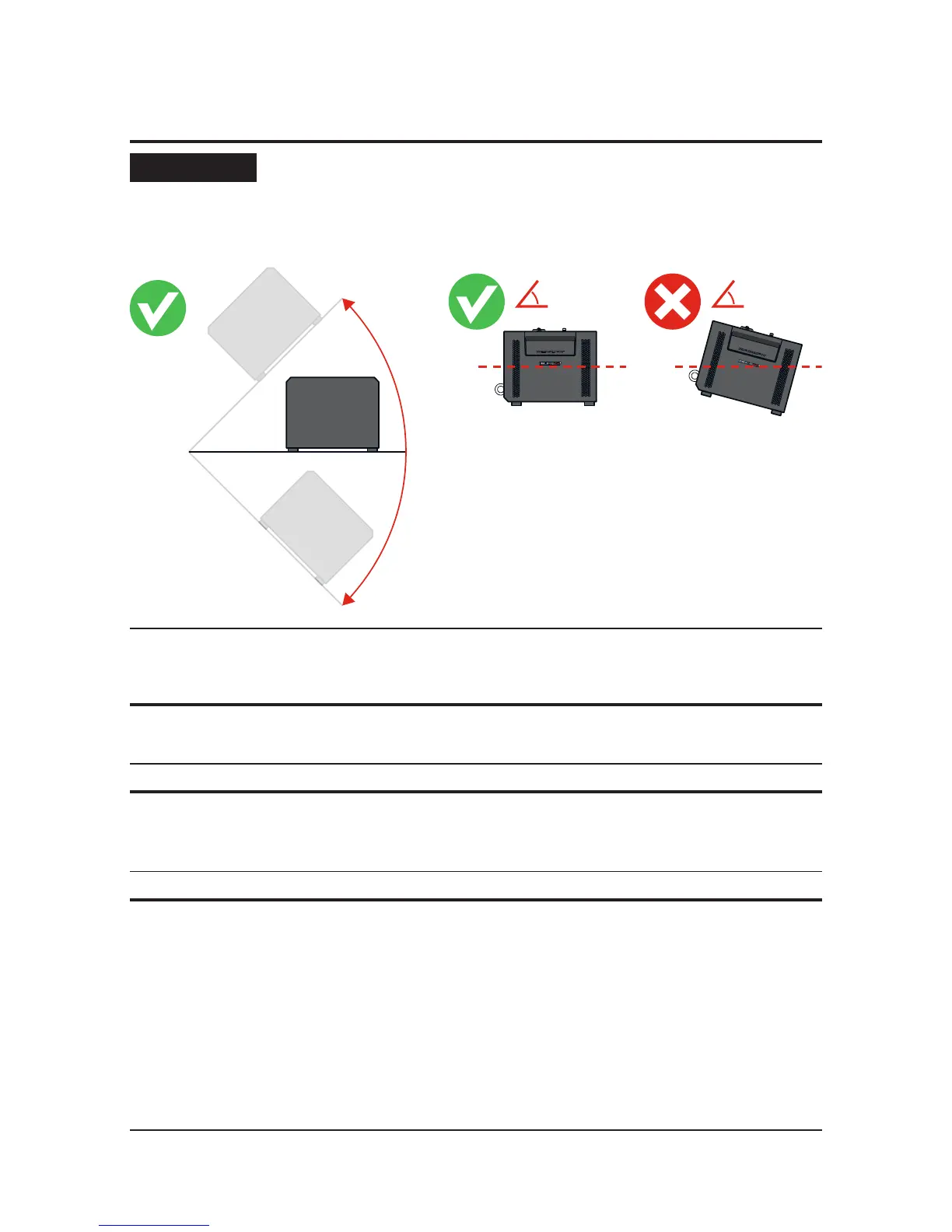
NOTICE
The MAGICFX
®
SPARXTAR will also remain functioning correctly
when angled sideways at a maximum of 45° or -45°. However the
greater the angle becomes, the more powder will remain
unused in the hopper. Therefore level installation is preferred.
0°
45°
3.1 INSTALL THE MACHINE
1 Install the MAGICFX
®
SPARXTAR on a rm and preferably level surface.
2 Inspect the machine and remove any foreign objects and material that will block
or obscure the output pipe or the air inlets of the machine during operation.
3 Take the necessary safety precautions, including:
a) Creating a safety zone with a distance of 3 m around the eect of the
MAGICFX
®
SPARXTAR and a clearance of 2 m from the set eect height.
b) Making sure that the direct output will be free from persons and animals.
c) Making sure there are no objects near the machine and within the output
distance that can be damaged or catch re by the emitted powder and
sparks from the MAGICFX
®
SPARXTAR.


 To Next Page