55EN 55EN
Recording
Basic SetupConnections Playback EditingIntroduction Function Setup Others
Español
DVC to HDD / DVD Dubbing
DUBBING
Preparing for DV dubbing (DVC to HDD):
• Make sure your DVC is in video mode.
Preparing for DV dubbing (DVC to DVD):
• Insert a recordable DVD.
• Make sure your DVC is in video mode.
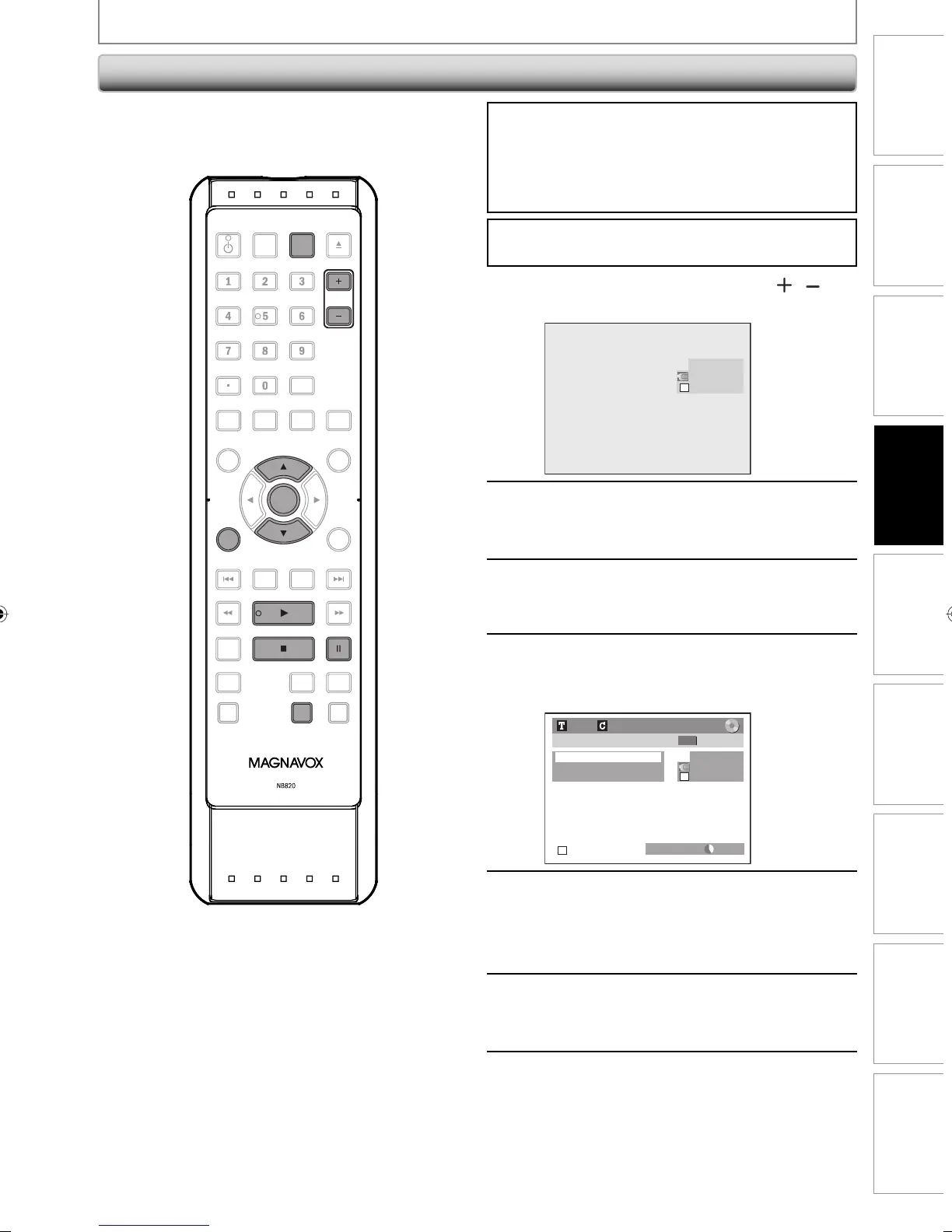
If you are recording to the HDD, press [HDD] first.
If you are recording to a disc, press [DVD] first.
1
Use [SOURCE] or [CHANNEL / ] to
select “L3(DV-IN)”.
AB-1234
0:00:00
L3 (DV-IN)
2
Press [REC MODE] to select a
recording mode.
(Refer to page 40.)
3
Press [DISPLAY].
4
Press [OK] to display the item
selection. Use [K / L] to select
“DV Input”, then press [OK].
L3 (DV-IN)
AB-1234
0:12:34
1/ 1 1/ 1
+
RW
Control DVD
DV Audio Stereo1
Start Rec
DVD HQ(1Hr) 1h00m
5
Press [PLAY B] to find where you
wish to start dubbing. Then, press
[STOP C] where you wish to start
dubbing.
6
Use [K / L] to select “Start Rec”, then
press [OK].
The dubbing will start.
7
To stop dubbing;
Use [K / L] to select “Control”, then
press [OK].
Use [K / L] to select “HDD” / “DVD”,
then press [OK].
Then press [STOP C].
Before recording from DVC, see page 52 for connection
instructions.
OPEN/
CLOSE
SOURCE
HDMI
.@/: ABC
GHI
PQRS TUV
SETUP REPEAT
DISPLAY
AUDIO
DISC MENU
RETURN
TITLE
WXYZ
CLEARSPACE
JKL MNO
DEF
OK
DVDHDD
D.DUBBING
V.REPLAY V.SKIP
RAPID PLAY
RECREC MODETIMER
DTV/TVSTANDBY-ON
CHANNEL
OK
CHANNEL
REC MODE
DISPLAY
SOURCE
E2M01UD_H2160MW9_EN.indd 55E2M01UD_H2160MW9_EN.indd 55 2008/04/16 10:14:492008/04/16 10:14:49


 To Next Page
 Loading...