87EN 87EN
Playback
Editing
Recording
Basic Setup
ConnectionsIntroduction Function Setup Others Español
EDITING
Chapter Marks (Delete All)
To delete all chapter marks:
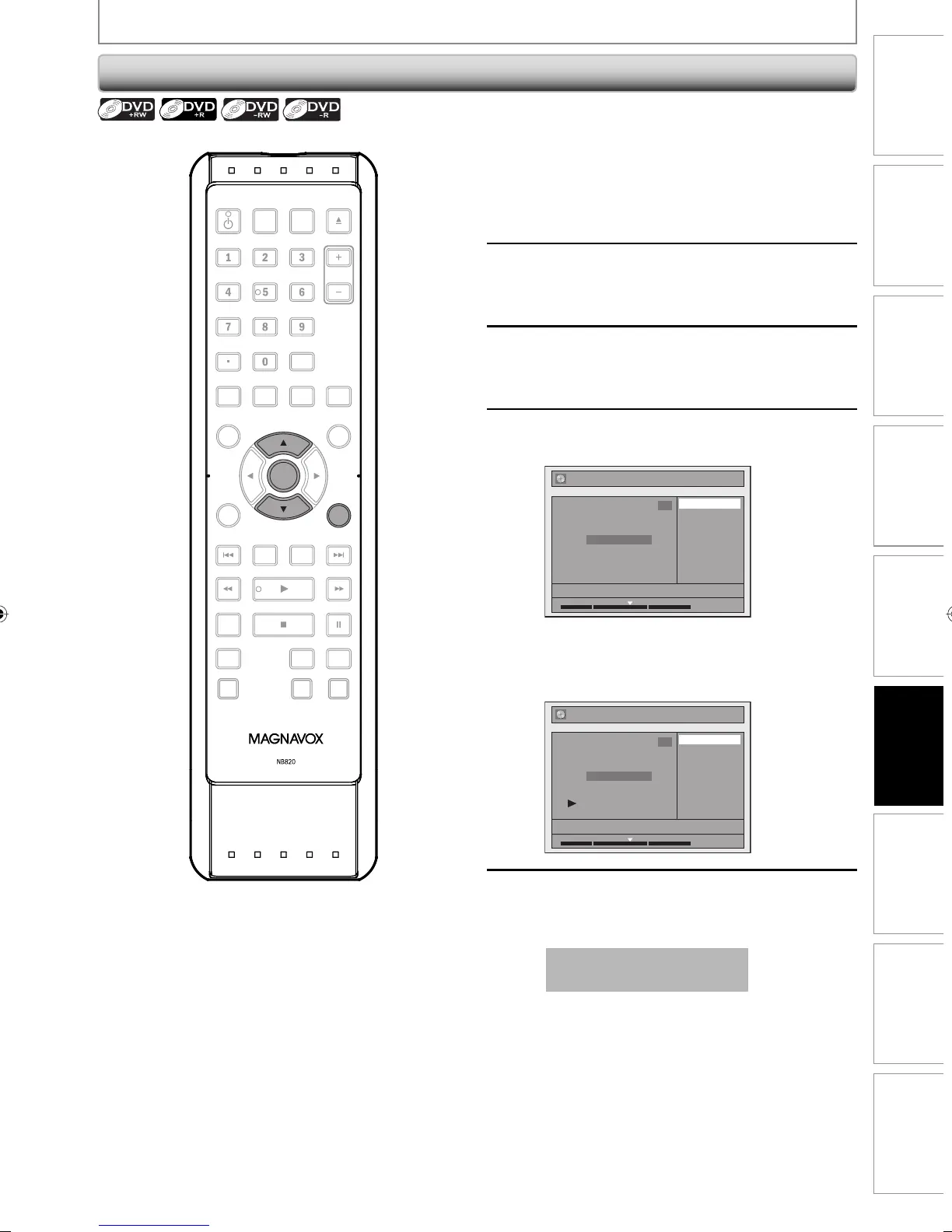
1
Follow steps in “How to Access the
Edit Menu” on page 80 to display
“Edit” menu.
2
Use [K / L] to select “Chapter Mark”,
then press [OK].
Submenu will appear.
3
Use [K / L] to select “Delete All”,
then press [OK].
4
Use [K / L] to select “Yes”, then press
[OK].
Edit - Chapter Mark - Delete All
No
Yes
NOV/21/08 11:00AM CH12 SP
1
Chapter 2/ 2
F
1 : 05 : 00
Final confirmation message will appear. Select
“Yes”, then press [OK].
All chapter marks are now deleted.
Chapter 1/ 1
Edit - Chapter Mark
NOV/21/08 11:00AM CH12 SP
1
Delete
Delete All
Add
1 : 05 : 00
5
Press [RETURN] once or repeatedly to
go back to the title list.
Data will be written onto the disc momentarily.
This operation may take a
while to be completed.
OPEN/
CLOSE
SOURCE
HDMI
.@/: ABC
GHI
PQRS TUV
SETUP REPEAT
DISPLAY
AUDIO
DISC MENU
RETURN
TITLE
WXYZ
CLEARSPACE
JKL MNO
DEF
OK
DVDHDD
D.DUBBING
V.REPLAY V.SKIP
RAPID PLAY
RECREC MODETIMER
DTV/TVSTANDBY-ON
CHANNEL
OK
RETURN
E2M01UD_H2160MW9_EN.indd 87E2M01UD_H2160MW9_EN.indd 87 2008/04/15 19:58:592008/04/15 19:58:59


 To Next Page
 Loading...