83EN 83EN
Playback
Editing
Recording
Basic Setup
ConnectionsIntroduction Function Setup Others Español
EDITING
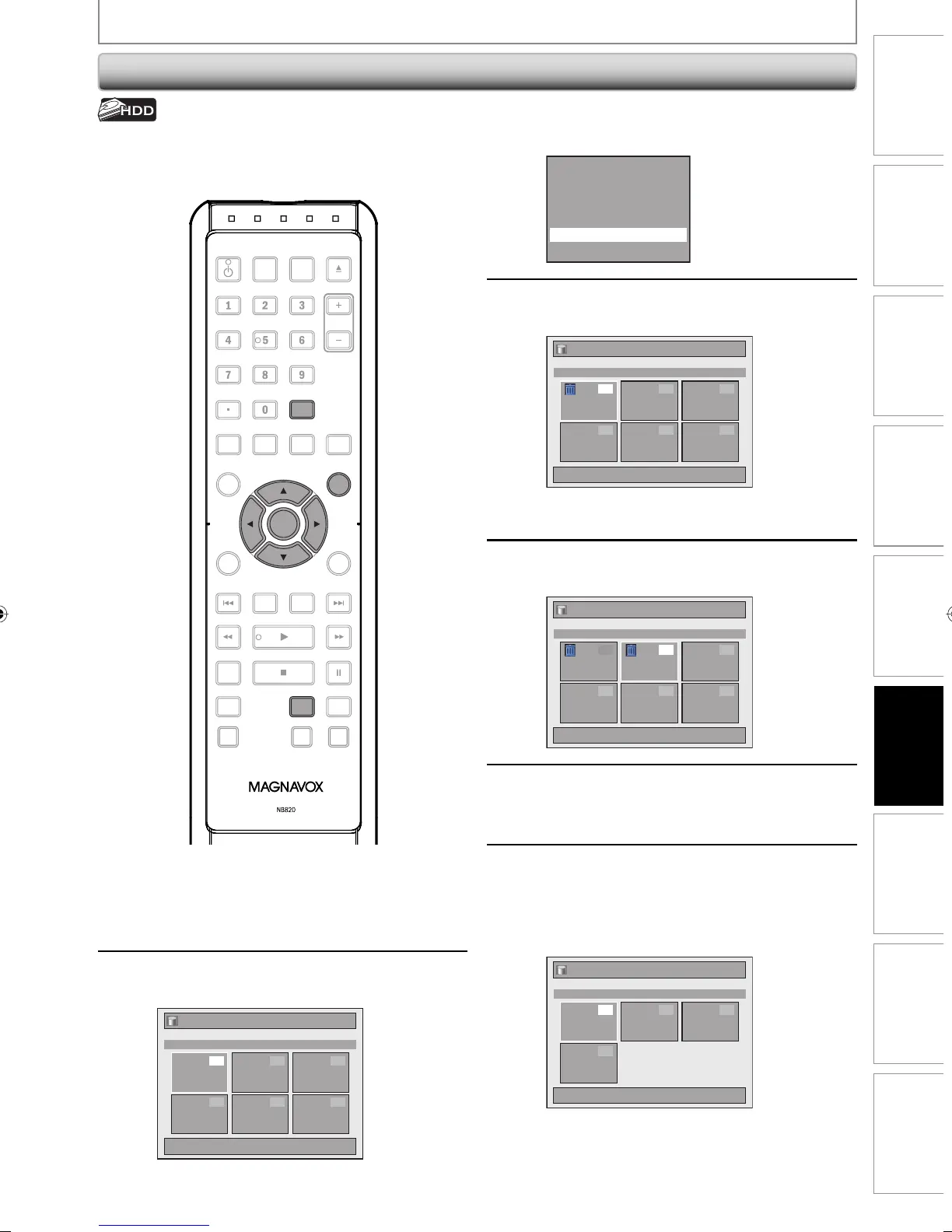
Deleting Selected Titles
3
Use [K / L] to select “Delete Multiple
Titles”, then press [OK].
Resume Playback
Play From Start
Edit
Title Delete
Delete Multiple Titles
Dubbing
4
Use [K / L / { / B] to select the title
you want to delete, then press [OK].
Title List
1 / 1
Title 1
12:00AM (1:00:00) JAN/ 1/08
CH10 SP
1
4 5 6
2 3
Trash mark will appear indicating the title is
marked for deletion.
5
Repeat step 4 until you select all the
titles you want to delete.
Title List
1 / 1
Title 1
12:00AM (1:00:00) JAN/ 1/08
CH10 SP
1
4 5 6
2 3
6
Press [CLEAR].
Confirmation message will appear.
7
Use [K / L] to select “Yes”, then press
[OK].
Final confirmation message will appear. Select
“Yes”, then press [OK].
Titles are now deleted.
Title List
1 / 1
Title 1
12:00AM (1:00:00) JAN/ 1/08
CH10 SP
1
4
2 3
To remove the trash mark from the title:
Select the title with the trash mark, then press
[OK].
You can delete titles which you do not need anymore.
Please be advised that the titles once deleted cannot be
brought back.
1
Press [HDD], then press [TITLE].
2
Use [K / L / { / B] to select any title,
then press [OK].
Title List
1 / 1
Title 1
12:00AM (1:00:00) JAN/ 1/08
CH10 SP
1
4 5 6
2 3
OPEN/
CLOSE
SOURCE
HDMI
.@/: ABC
GHI
PQRS TUV
SETUP REPEAT
DISPLAY
AUDIO
DISC MENU
RETURN
TITLE
WXYZ
CLEARSPACE
JKL MNO
DEF
OK
DVDHDD
D.DUBBING
V.REPLAY V.SKIP
RAPID PLAY
RECREC MODETIMER
DTV/TVSTANDBY-ON
CHANNEL
OK
HDD
TITLE
CLEAR
E2M01UD_H2160MW9_EN.indd 83E2M01UD_H2160MW9_EN.indd 83 2008/04/18 15:12:112008/04/18 15:12:11


 To Next Page
 Loading...