Flex M Engineered Receiver Instruction Manual
May 2019
Page 31 of 50
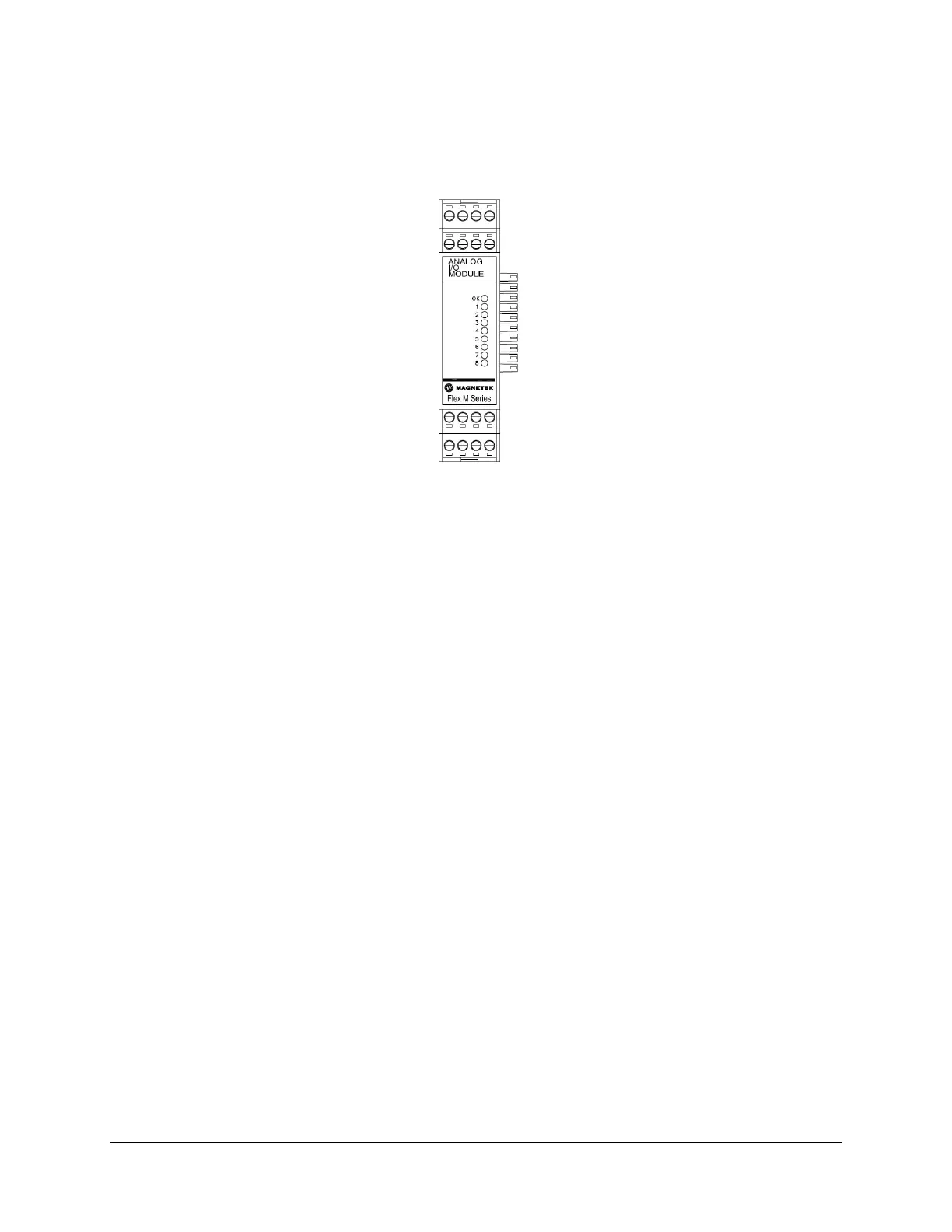
4.8.1 ANALOG I/O MODULE LED OPERATION
When the Flex M system is supplying power to the Analog I/O module, an LED indicates the power and
communication status of the Analog I/O module.
Figure 29. Analog I/O Module LED Placement
• OK LED
o Solid indicates module communication with system is good
o 3 Blinks indicates read/write error to attached CPU module
Additionally, there are eight LEDs labeled 1 through 8 on the Analog I/O module. When the LED is on,
this indicates that the module is sending/receiving a signal on that input or output.
• LED1
o Analog Output 1 is Active (non-zero)
• LED2
o Analog Output 2 is Active (non-zero)
• LED3
o Analog Output 3 is Active (non-zero)
• LED4
o Analog Output 4 is Active (non-zero)
• LED5
o Analog Input 1 is Active (non-zero)
• LED6
o Analog Input 2 is Active (non-zero)
• LED7
o Analog Input 3 is Active (non-zero)
• LED8
o Analog Input 4 is Active (non-zero)


 To Next Page