10
46-605 Flanged External Cage Float Actuated Liquid Level Switches
2.5 Replacement of Standard Float
and Stem Assembly
1. Disconnect wiring or medium lines from control and per-
form system shutdown. See Troubleshooting, Section 3.0.
2. Remove switch housing assembly from float chamber at
head flange.
3. Remove sleeve stop strap from the underside of the head
flange and slide the float stem assembly out of the enclos-
ing tube.
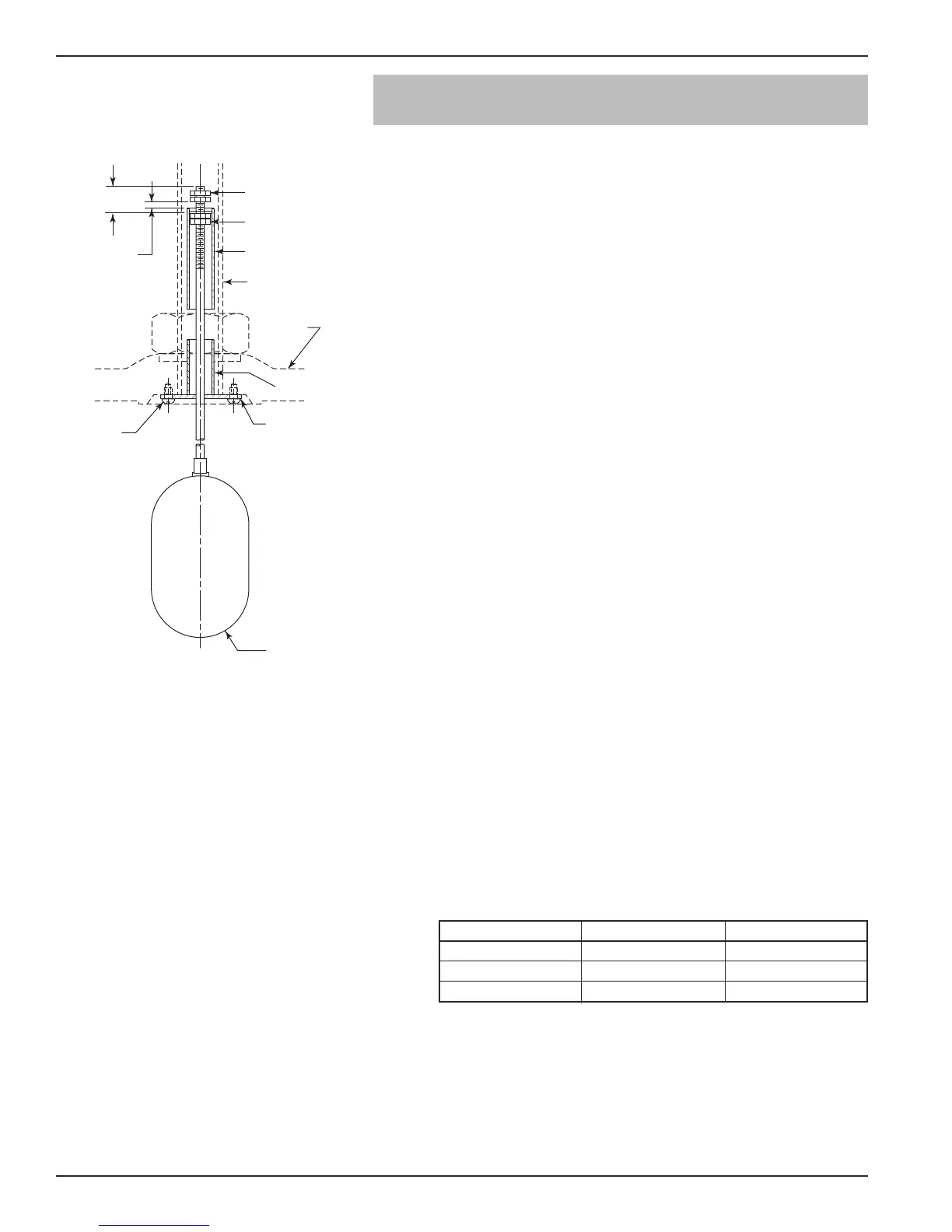
NOTE: New float and stem kits are supplied unassembled. Refer to
Figure 9 for standard jam nut settings (Dimension A).
4. Check new float and stem assembly to be certain it is the
correct replacement unit:
a. Float should be of same physical size and shape.
b. Stem length should match closely.
c. Set attraction sleeve per Dimension A as shown in
Figure 9.
NOTE: If differential adjustment has been altered in the field,
disregard Dimension A and readjust new assembly to the
previously determined level differential settings. See Switch
Differential Adjustment, Section 2.4.
5. Replace new float and stem assembly into head flange and
install new stop strap with screws included.
6. Remount head flange on float chamber using new gasket
provided. Tighten flange nuts evenly, using an alternating
pattern typical of standard industry practice.
NOTE: Care must be taken during installation to be certain float stem
does not bend.
7. With control assembly in place, test switch actuation by
varying liquid level in float chamber.
NOTE: When reassembling the enclosing tube or the upper flange
assembly to the control, tighten according to the following
torque values.
0.03"
Minimum
gap setting
T
op jam
n
uts
Bottom jam
nuts
A
ttraction
s
leeve
E
nclosing tube
(
ref.)
S
top tube
S
leeve
s
top strap
R
etaining
s
crews
Float and stem
assembly
H
ead
flange
(ref.)
D
im. A
.87 (22)
Figure 9
Model Flange Bolting Enclosing Tube
C29, D30 55–60 ft–lbs 200–225 ft–lbs
C60, J30, L30 100–125 ft–lbs 75–100 ft–lbs
B60 250–300 ft–lbs 200–225 ft–lbs



 To Next Page