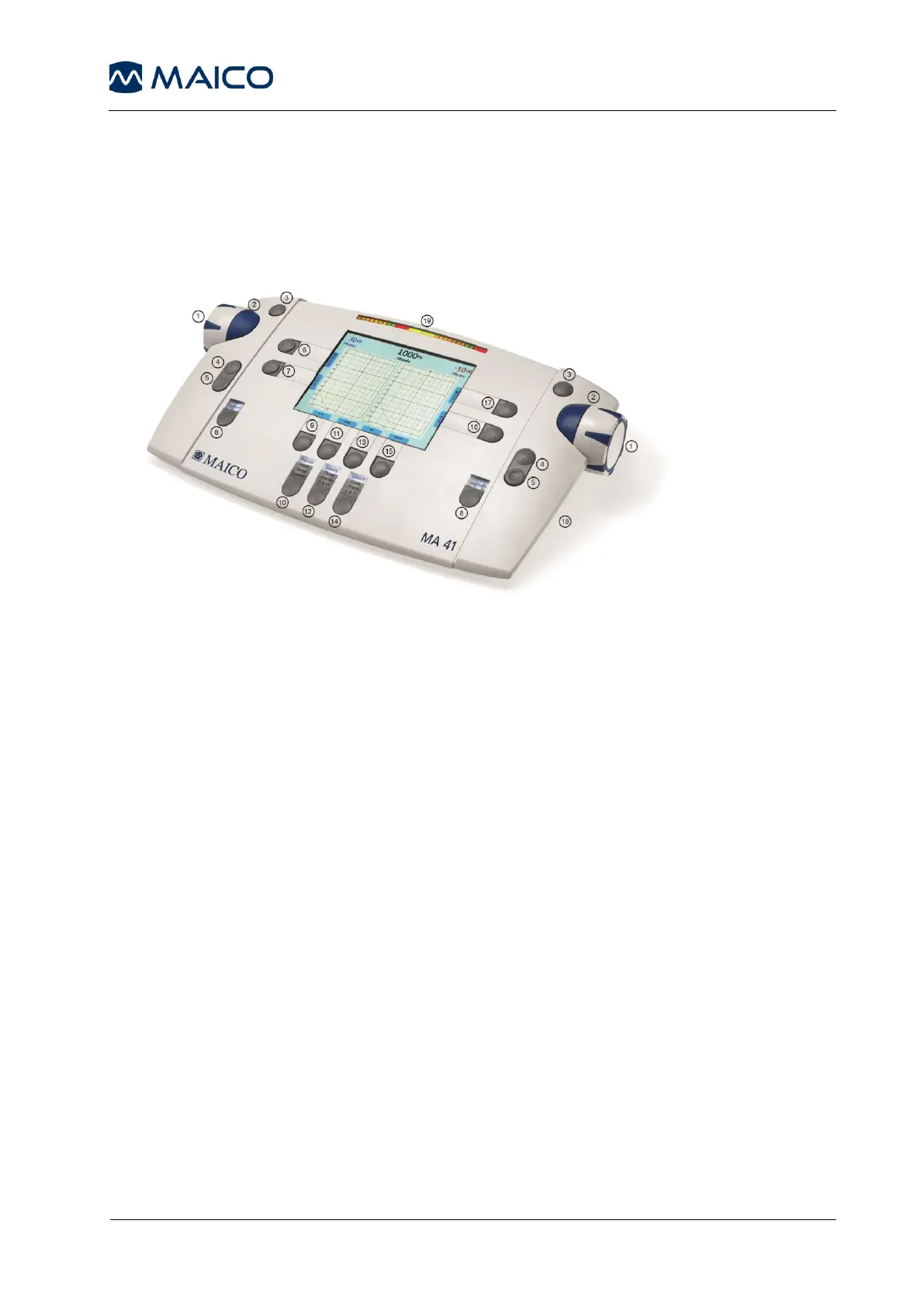
5.2 Functionality of Operating Elements
The following table describes the main functions of each button for the tone
and speech audiometry screens:
Figure 3 - Control Panel MA 41
(1) Level control: adjusts the hearing level for the left/right ear
(2) STIM bar: presents or interrupts the signal for the left/right ear
(3) STORE button: stores results for the left/right ear
(4) Frequency up: change to higher frequency for tone audiometry, enters a
correct answer for word recognition score (WRS) testing, or selects the next
word in the word list for speech recognition threshold (SRT) testing with wave
files
(5) Frequency down: change to lower frequency for tone audiometry, enters
an incorrect answer for WRS testing, or selects a previous word in the word list
for SRT testing with wave files
(6) Monitor with options to adjust monitor and talk back settings; for speech,
the input calibration for microphone or CD player can be adjusted
(7) Function button: function is displayed on the screen based on test screen
Tone: Select New, to delete all stored results and start a new session
Speech: Reset the result percentage counter or Play wave file
(8) Channel STIM Mode button/TALK: to change from presenter to
interrupter mode, or to talk to the patient by pressing and holding the button
down



 To Next Page