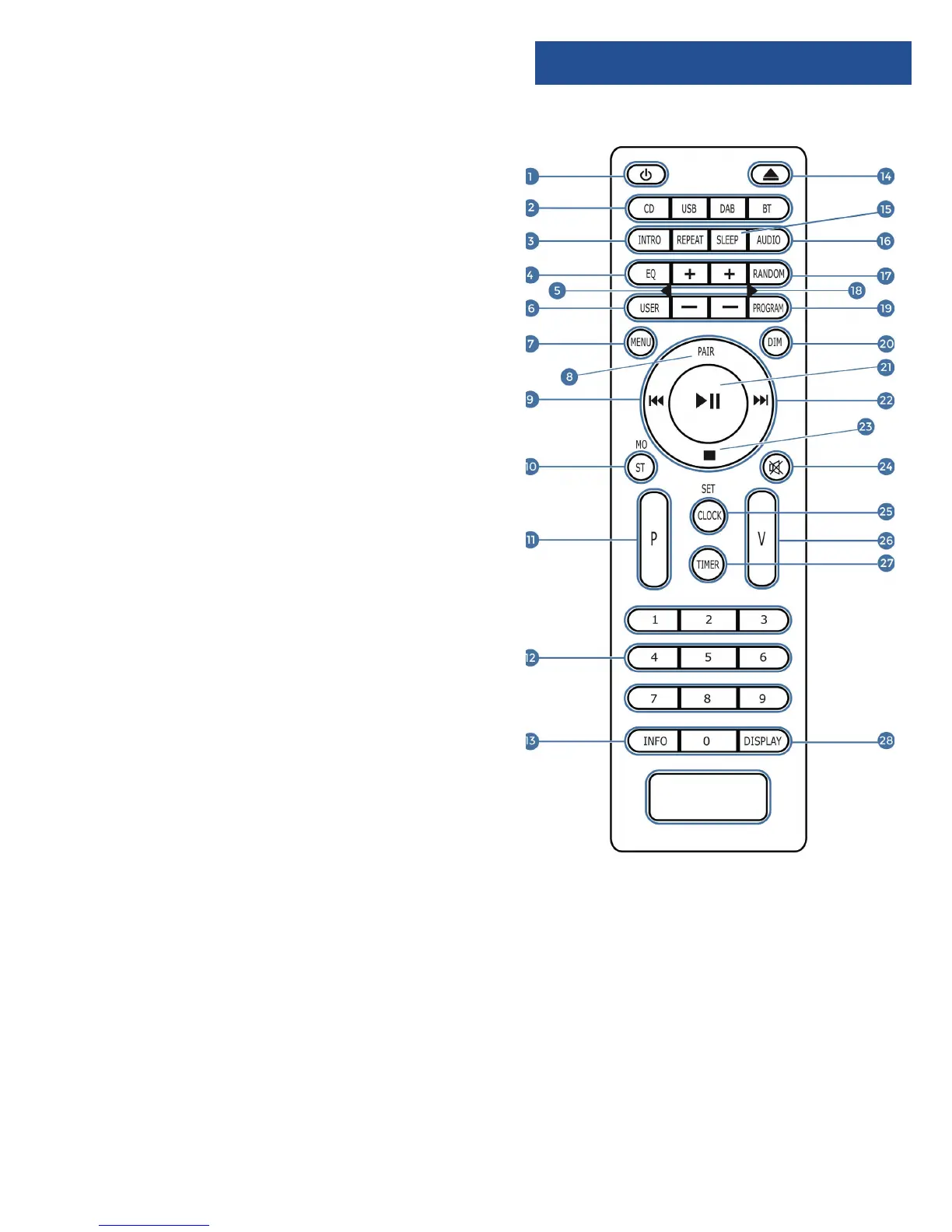
Controls and Funcons
ON/STANDBY
INTRO/AMS (Automatic Music Scan)
– Press to scan all tracks in CD or USB
– Press to automatically search for a channel in FM.
– Press again to stop search
REPEAT for CD and USB
EQUALISER – Press to select sound characteristics: Classical/
Pop/Rock/Jazz/Normal.
BASS +/– (need to press User Mode (Ref.6) rst)
USER Mode
MENU for DAB and FM
PAIR – Press and hold to activate the Bluetooth pairing
function or to disconnect.
PREVIOUS/RE-WIND (hold button to re-wind)/Fine Tune FM
MONO/STEREO
P +/- Press to skip to the beginning of a current/pervious/
subsequent album
– Press to select next/preset track in DAB or FM
– Press and hold for manual tuning in FM
NUMBER KEYS 0 – 9
INFO – Press to turn on/o the Information on CD or USB
– Press to view information on DAB or FM
EJECT – Press to put disc in or out
SLEEP – Press to set the sleep timer
AUDIO – Press Audio/CD/USB/DAB/FM/ BT (Bluetooth
Connection)
RANDOM – Press to play tracks randomly in CD or USB.
TREBLE +/– Press to adjust the treble (need to press User
Mode (Ref.6) rst)
PROGRAM – Press to programme in CD,USB, DAB & FM.
DIM – Press to select dierent levels of brightness for the
display.
ENTER/PLAY/PAUSE/SKIP – Press to play/pause CD/USB/
Bluetooth Device or use to skip to subsequent menu in DAB
and FM.
1.
2.
3.
4.
5.
6.
7.
8.
9.
10.
11.
12.
13.
14.
15.
16.
17.
18.
19.
20.
21.
NOTE: Remote Control Operating distance of up to 5 Meters and operates using 2 x AAA Batteries.
FAST–FORWARD/NEXT
STOP
MUTE/RESUME Sound
CLOCK (See page 13)
VOLUME +/–
TIMER (See page 13)
DISPLAY – Press to display the date when in
power mode.
22.
23.
24.
25.
26.
27.
28.
Remote Control
3













 To Next Page