EasyManua.ls Logo

Mamiya DSX - Replacing Cds

Mamiya DSX
55 pages
Print Icon
To Next Page IconTo Next Page
To Previous Page IconTo Previous Page
Loading...
Replacing
CdS
for
Spot
a.
Removing
procedure
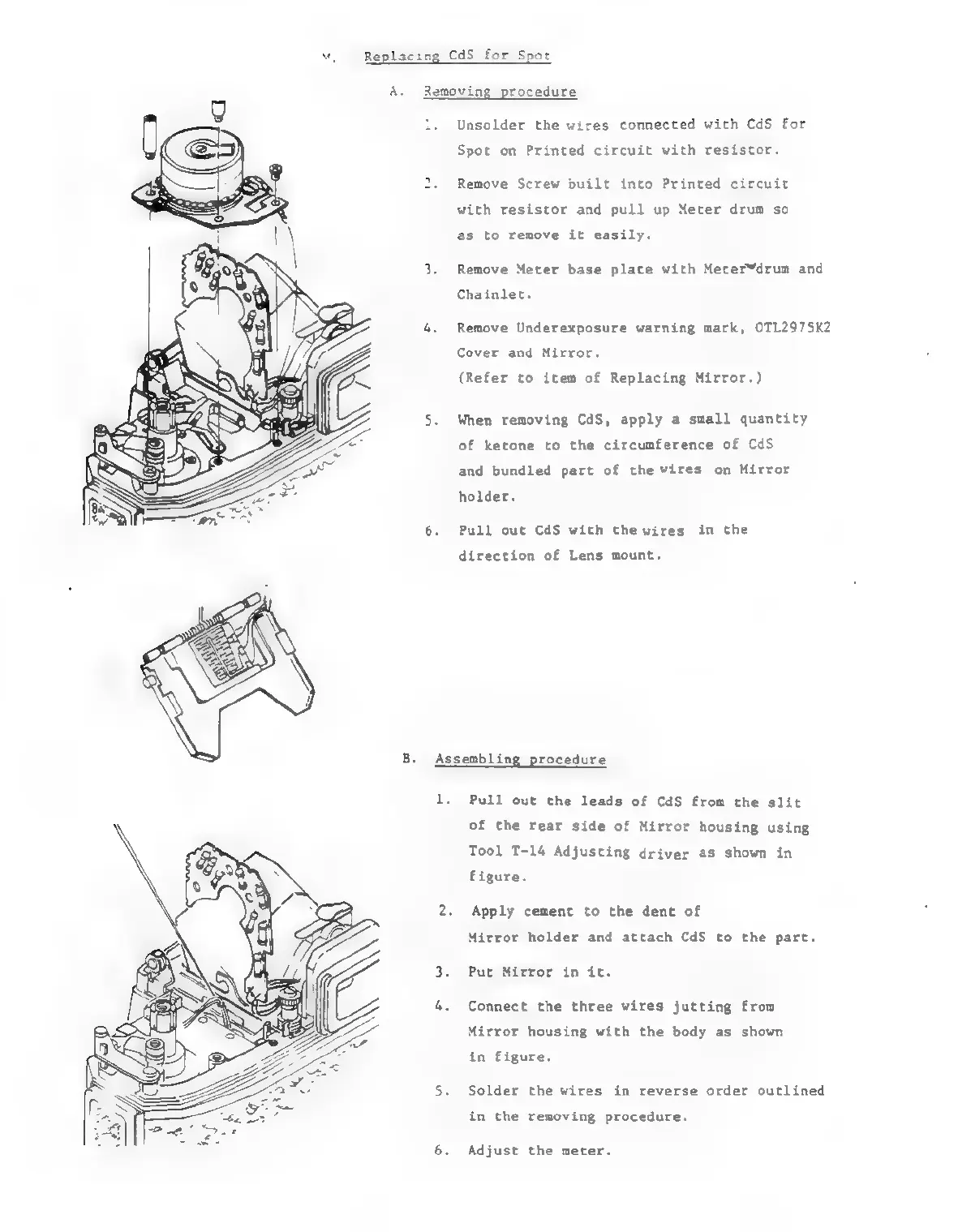
Unsolder
the
wires
connected
with
CdS
for
Spot
on
Printed
circuit
with
resistor.
Remove
Screw
built
into
Printed
circuit
with
resistor
and
pull
up
Meter
drum
so
as
to
remove
it
easily.
Remove
Meter
base
plate
with
Meterâ„¢drum
and
Chainlet.
Remove
Underexposure
warning
mark,
OTL2975K2
Cover
and
Mirror.
(Refer
to
item
of
Replacing
Mirror.)
When
removing
CdS,
apply
a
small
quantity
of
ketone
to
the
circumference
of
CdS
and
bundled
part
of
the
wires
on
Mirror
holder.
Pull
out
CdS
with
thewires
in
the
direction
of
Lens
mount.
Assembling
procedure
1.
Pull
out
the
leads
of
CdS
from
the
slit
of
the
rear
side
of
Mirror
housing
using
Tool
T-14
Adjusting
driver
as
shown
in
figure.
Apply
cement
to
the
dent
of
Mirror holder
and
attach
CdS
to
the
part.
Put
Mirror
in
it.
Connect
the
three
wires
jutting
from
Mirror
housing
with
the
body
as
shown
in
figure.
Solder
the
wires
in
reverse
order
outlined
in
the
removing
procedure.
Adjust
the
meter.

Related product manuals