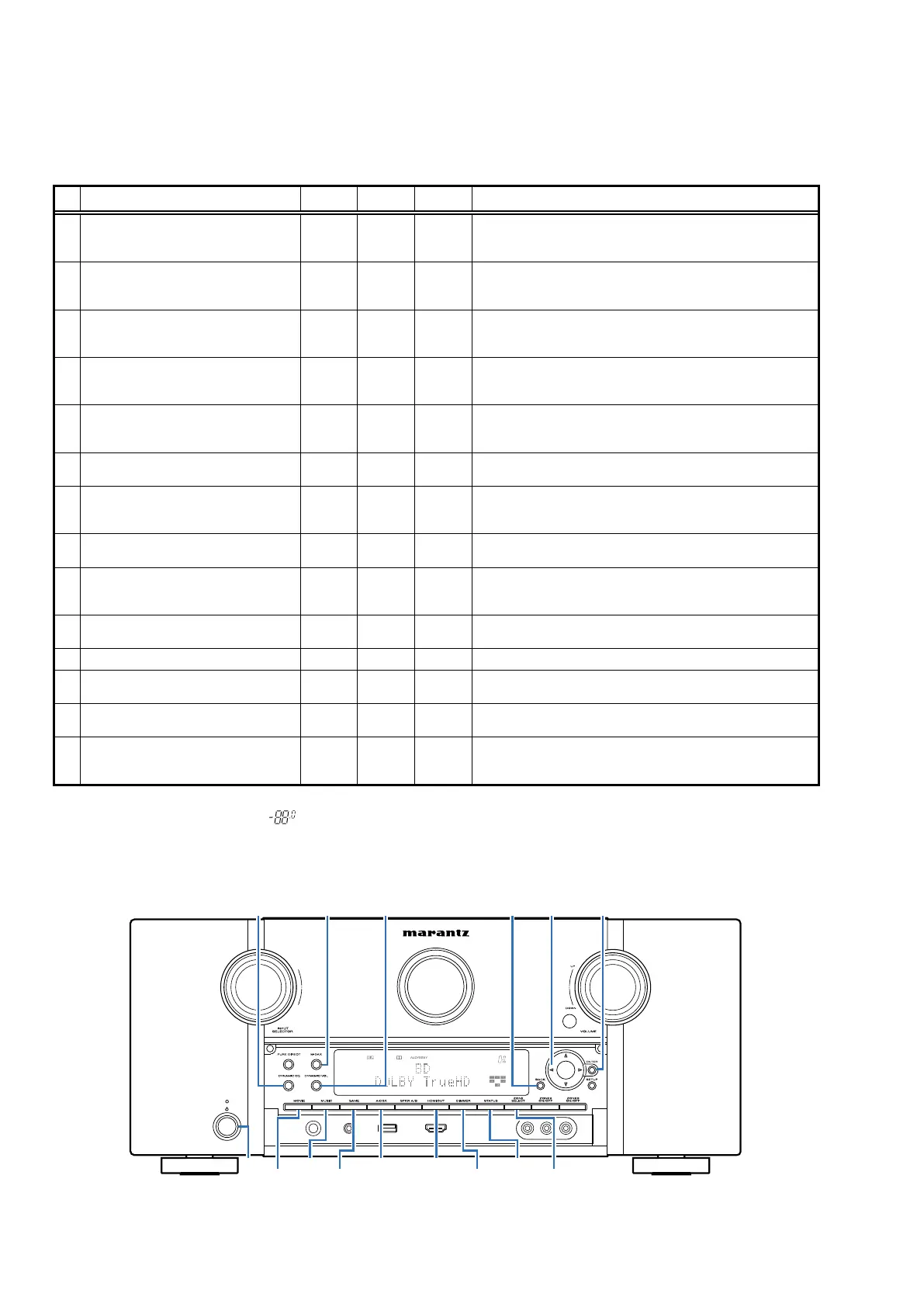
SPECIAL MODE
Special Mode Conguration Buttons
b
No.1-10,13: Holddownbuttons"
A
","
B
"and"
C
"atthesametimeandpressthepowerbuttontoturnonthepower.
b
No.11,12: Holddownbuttons"
A
"and"
B
"foratleast3secondswhilethepowerison.
b
No.14: Pressthe"
A
"and"
B
"buttonssimultaneouslywhileinsertingtheACplugtoturnthepoweron.
No. Mode Button A Button B Button C Contents
1
VersionDisplayMode
(u-COM/DSPErrorDisplay)
DIMMER STATUS -
DisplaystheversionofrmwaresuchasthemainrmwareorDSP,
etc.Errorsthathaveoccurredaredisplayed.
(See19page)
2
UserInitializationMode
(SettingsfortheInstallerSetuparenot
initialized.)
GAME A-DSX -
Initializesbackupdata.
(SettingsfortheInstallerSetuparenotinitialized.)
3
FactoryInitializationMode
(Initializationincludessettingsforthe
InstallerSetup.)
MOVIE MUSIC -
Initializesbackupdata.
(InitializationincludessettingsfortheInstallerSetup.)
4
PANEL/REMOTELOCKSelectionMode BACK ENTER -
StartthisunitinthePANEL/REMOTELOCKselectionmodesothat
PANELLOCKandRemoteLockcanbeselectedasONorOFF.
(See23page)
5
ChecktheVideo/Audiopass
Mode
ZONE
SELECT
BACK -
Thisisaspecialmodeforserviceconrmationusedduringrepair
worktosimplifytheconrmationworkfortheAudiochannel/video
channel.(See24page)
6
232CStandbyClearMode ↑ ↑ -
Switchesfrom232Cstandbymodetonormalstandbymode.
(See69page)
7
OperationInfoMode ↑ ↑ -
Displaysthetotaloperatingtimeoftheset,numberoftimes
thepowerwasswitchedon,andnumberofoccurrencesofeach
protection.(See69page)
8
TUNERSTEPMode
(Nmodelonly)
↑ ↑ -
EnablesreceptionSTEPoftheANALOGTUNERtobechanged.
(See70page)
9
InstallerSetupMode
CURSOR
0
BACK -
AccesstheRemoteMaintenancemodeviatheinternet.InstallerSetup
isdisplayedonSetupmenu/Network.
b
RefertoAVR_RemoteMaintenance_.pdfofSDI.
10
AdditionalSourceMode SLEEP A-DSX -
AddsAUX3-7asaSource.
(See70page)
11
CX870/CY920RebootMode BACK ENTER - RestartsCX870/CY920.(See71page)
12
CX870/CY920InitializationMode M-DAX
DYNAMIC
EQ
-
EnterthismodeonlyafterreplacingFlashforCX870/CY920and
rewritingthermware.(See71page)
13
USBUpdateMode
HDMI
OUT
STATUS
SwitchesthisunittoUSBUpdatemode.
(See74page)
14
ForcedUSBAllDeviceWriteMode
HDMI
OUT
STATUS -
Modeusedwhenthisunitcannotberecovered.
ForciblyswitchesthisunittoUSBupdatemode.
(See77page)
NOTE :
When the volume indicator displays " ", the set has entered a special mode for developers. In this case, RS-232C communication
cannot be used.
To cancel this special mode, press and hold the "
DIMMER
"and "
STATUS
" buttons for 3 seconds and longer. When the volume indicator
returns to the normal display, RS-232C communication can be used.
X
0
BACK ENTER
DYNAMIC
VOL
DYNAMIC
EQ M-DAX
DIMMER
STATUS
ZONE
SELECT
GAME
MUSIC
MOVIE
HDMI
OUT
A-DSX
18



 To Next Page