17
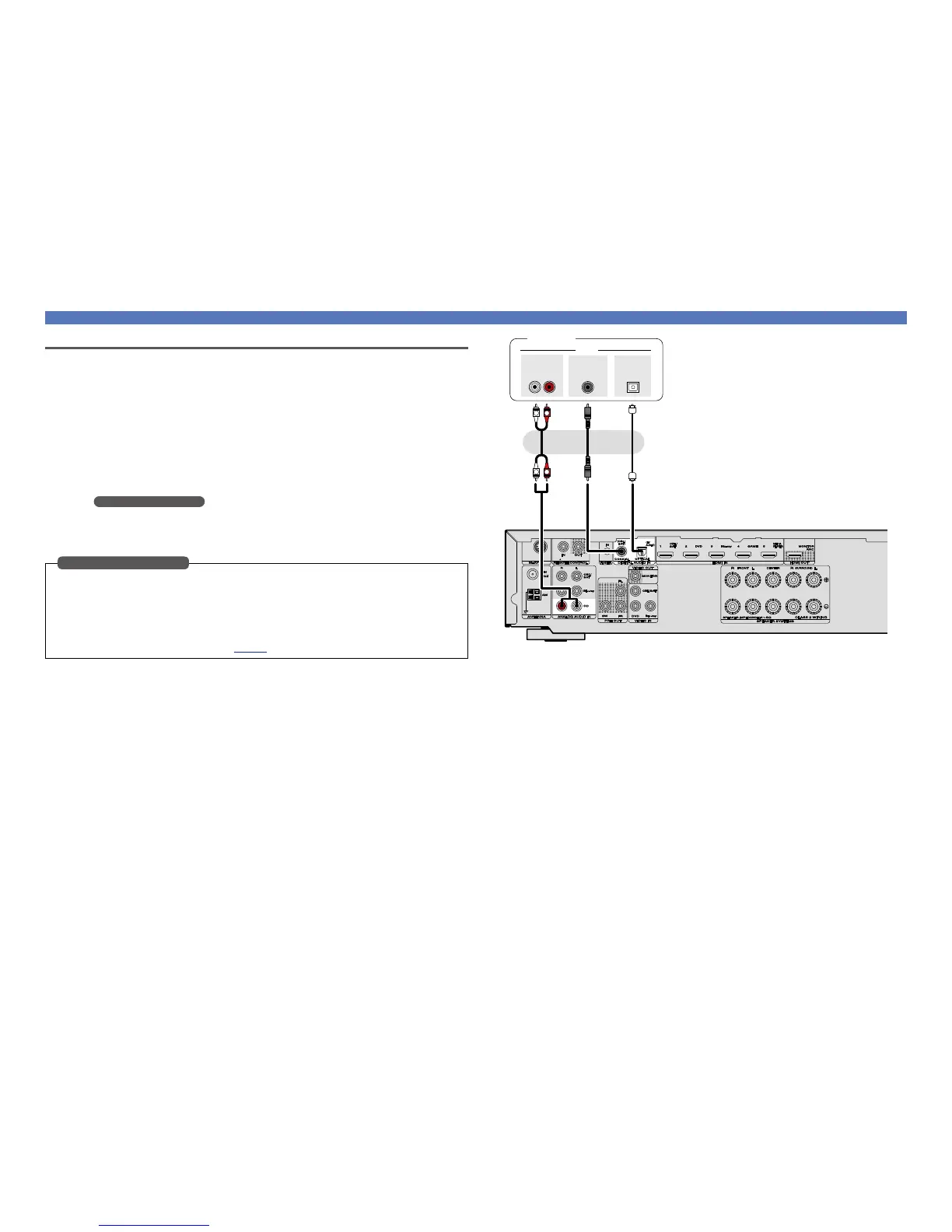
Connecting a CD player
You can enjoy CD sound.
n Audio connection
The following methods are available for connecting to this unit. Use either of the methods to make
a connection.
The numbers prefixed with connectors indicate the recommendation order. The smaller the number is,
the higher playback quality is achieved.
a DIGITAL AUDIO COAXIAL connector
DIGITAL AUDIO OPTICAL connector
When a multichannel audio (digital bit stream audio) is input, this unit decodes the audio to play
back surround sound.
When making this type of connection, you must change the settings on this unit.
(v Input connector setting )
s ANALOG AUDIO IN (CD) connector
This makes an analog audio connection. This type of connection converts digital audio to analog
audio, so the output audio may be degraded compared to connections a.
When making the following connection, you must change the input connector settings.
a DIGITAL AUDIO COAXIAL connector
Change the default “CBL/SAT” to “CD”.
DIGITAL AUDIO OPTICAL connector
Change the default “TV AUDIO” to “CD”.
For how to change, see “Digital Assign” (vpage68).
Input connector setting
Connecting an HDMI-incompatible device
a as
R
L
R
L
AUDIO
AUDIO
RL
OUT
OUT
COAXIAL
OPTICAL
OUT
CD player
or or



 To Next Page