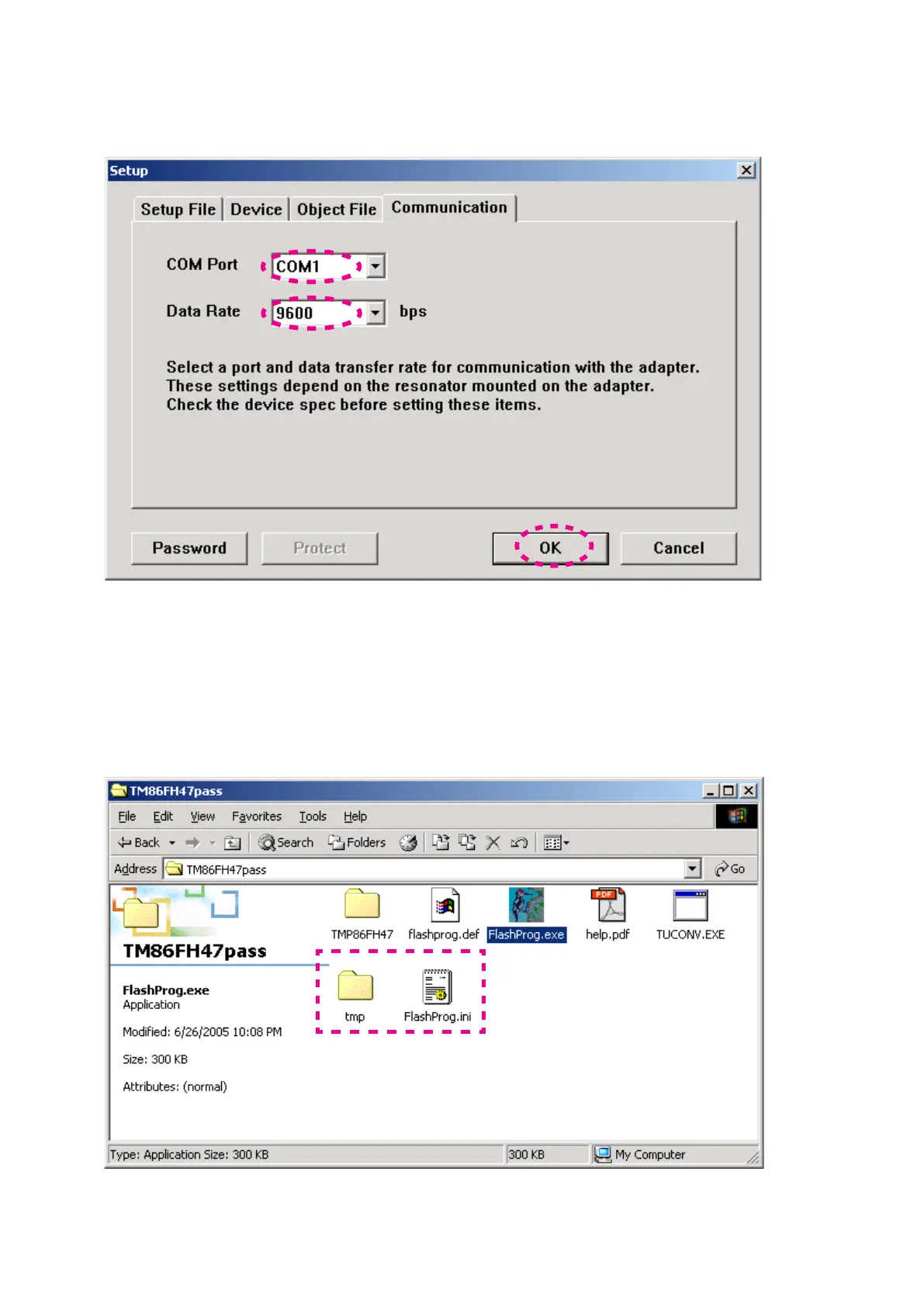
Choose 14. COM port number in COM port.
Choose 9600 in Data Rate.
Click OK.
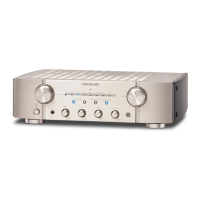
When Setup window is closed, the tmp folder and
15.
FlashProg.ini file are created simultaneously.
NOTE : These are the original set-up configuration files for
that PC. They do not operate, if these files moved
to another PC. When you make it operate with other
PC, delete the tmp folder and the FlashProg.ini file
and redo a setup.
COM Portから接続する14. COM Port番号を選びます。
Data Rateから9600を選択します。
OKをクリックします。
この時TMP86FH47passフォルダにtmpフォルダと15.
FlashProg.ini
ファイルが作成されます。
注意
: これらは今設定したWindows PC独自の設定ファイルに
なります。他の
PCにこれらのファイルをコピーしても
正しく動作しません。もし他の
PCで動作させる場合は
tmpフォルダとFlashProg.iniファイルは削除して設定を
やり直してください。



 To Next Page