When writing in a blank microprocessor
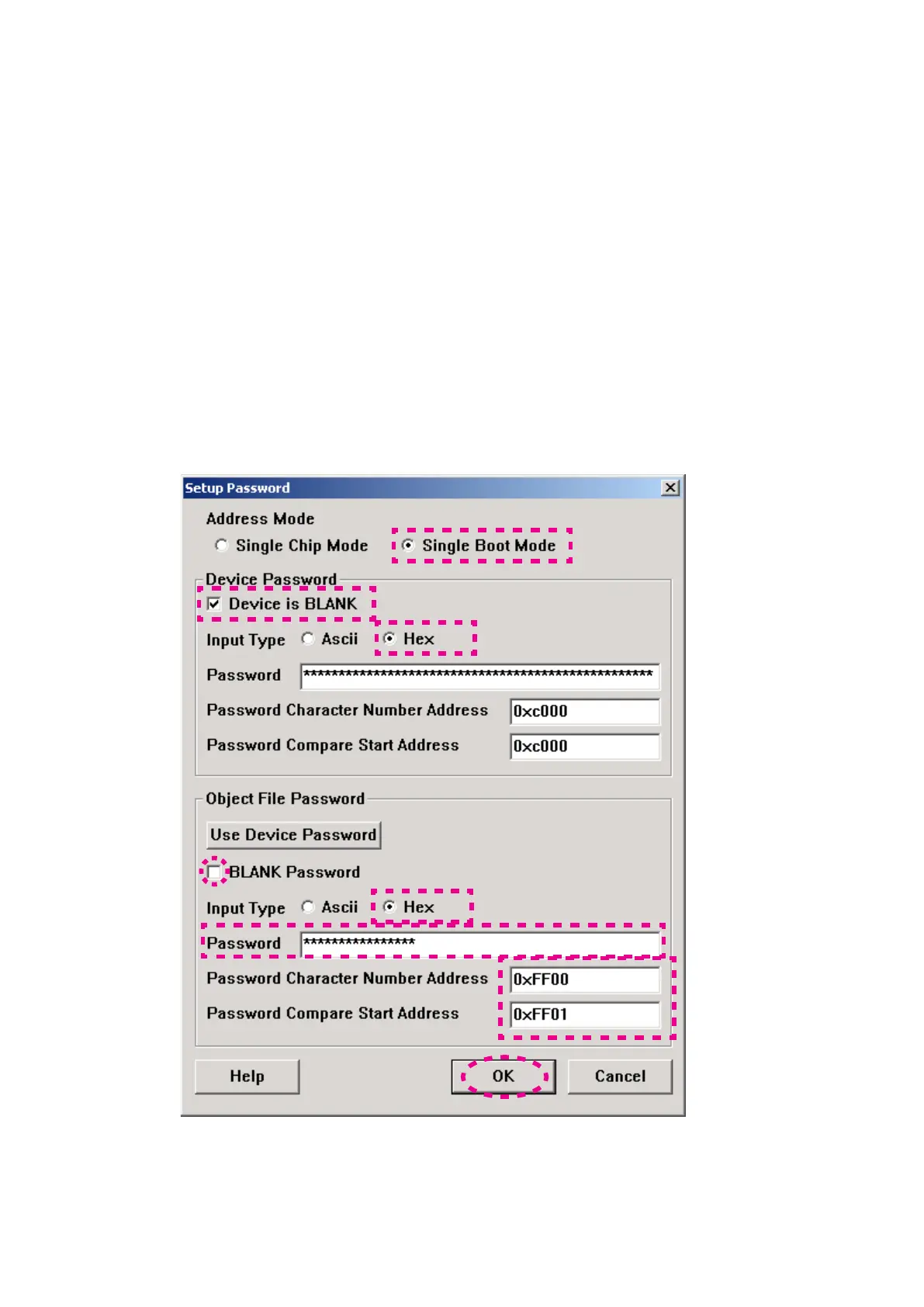
Check Single Boot Mode in Address Mode.
Setting in Device Password
Check Device is BLANK.
Check Hex in input type.
Since they are inputted automatically, please do
not change text box of "Password", "Password
Character Number Address" and “Password
Compare Start Address”.
Setting in Object File Password
Do not check BLANK password.
Check Hex in Input Type.
Type 0102030405060708 into Password.
Type 0xFF00 into Password Character Number
Address.
Type 0xFF01 into Password Compare Start
Address.
Click OK.
ブランクマイコンに書き込む場合
Address ModeからSingle Boot Modeにチェックを入れます。
Device Password内の設定
Device is BLANKのチェックボックスにチェックを
入れます。
input typeからHexにチェックを入れます。
Password、Password Character Number
Address
、Password Compare Start Addressは自動
的に入力されますので変更しないでください。
Object File Password内の設定
BLANK Passwordにはチェックを入れないでください。
Input TypeからHexにチェックを入れてください。
Passwordに0102030405060708を入力します。
Password Character Number Addressに0xFF00を
入力します。
Password Compare Start Addressに0xFF01を入力
します。
OKをクリックします。



 To Next Page