ENGLISH
18
BASIC
CONNECTIONS
BASIC OPERATION
ADVANCED
CONNECTIONS
SETUP
ADVANCED
OPERATION
TROUBLESHOOTING
OTHERS
NAMES AND
FUNCTION
BASIC OPERATION
REMOTE CONTROLLER OPERATION
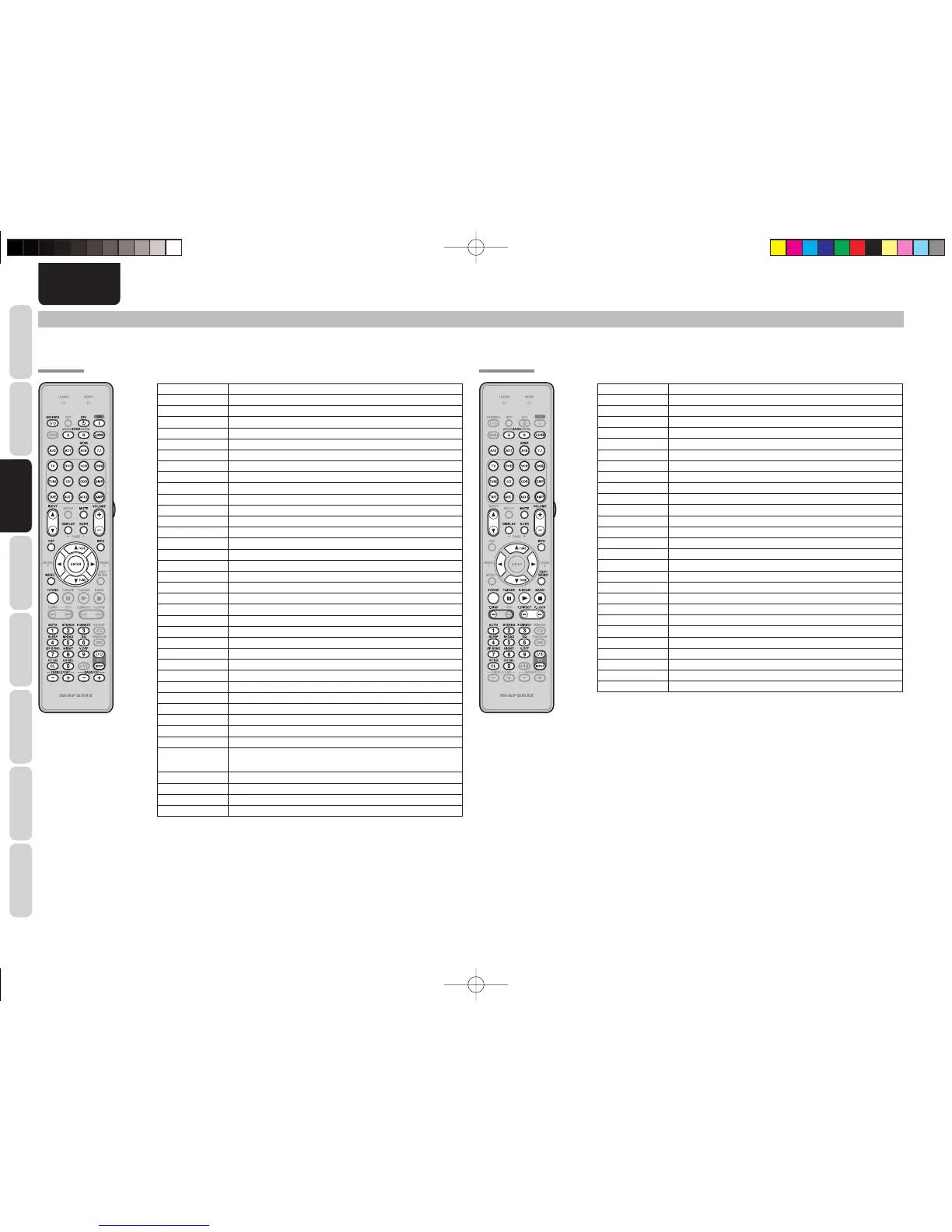
To control the unit by your remote controller, you have to select the device AMP or TUNER by pressing the SOURCE button. Please refer below for the details in AMP and TUNER mode.
TUNER MODE
SOURCE ON/OFF Turns the SR5003 on and off
POWER OFF Turns the SR5003 off
POWER ON Turns the SR5003 on
ZONE A/B Turns on or off ZONE A or ZONE B
Z.SPKR Turns on or off ZONE Speaker A
A/D Switches between the analog or digital inputs
ATT Reduces the input level
SPKR A/B Selects the speaker system
7.1 Selects the 7.1CH IN
SOURCE Selects a particular source component
AMP Select AMP mode of remote unit
INPUT 3 / 4 Change the input selecter of SR5003
DISPLAY Changes the front display mode
MUTE Decreases the sound temporarily
SURR Selects the surround mode
VOLUME+/- Adjusts the over all sound level
TOP Back to the TOP of SETUP MENU
INFO Displays the current setting on the monitor
Cursor Moves the cursor for setting in "SETUP MENU" mode
ENTER Confi rms the setting in "SETUP MENU" mode
MENU Enters the "SETUP MENU"
EXIT Exits from SETUP MENU
T.TONE Enters the test tone menu
AUTO(1) Selects auto surround
STEREO(2) Selects STEREO mode
P.DIRECT(3) Selects the pure direct mode
SLEEP(4) Sets the sleep timer function
M-DAX(5) Selects the M-DAX mode
EQ(6) Selects the EQ mode
LIP SYNC(7) Selects the LIP SYNC mode
NIGHT(8) Turns on or off NIGHT mode
V-OFF(9) Turns on or off video output
HT EQ(CL) Turns on or off HT-EQ mode
CH SEL(0) Calls up CH LEVEL ADJUST and adjusts speaker levels or 7.1ch input
level
TV POWER Turns the TV on and off
TV INPUT Select the TV video input
TREBLE-/+ Adjusts the tone control of high frequency sound
BASS-/+ Adjusts the tone control of low frequency sound
ZONE A/B AMP function enabled
Z.SPKR AMP function enabled
A/D AMP function enabled
ATT AMP function enabled
SPKR A/B AMP function enabled
7.1 IN AMP function enabled
SOURCE AMP function enabled
AMP AMP function enabled
INPUT 3 / 4 AMP function enabled
DISPLAY AMP function enabled
MUTE AMP function enabled
SURR AMP function enabled
VOLUME+/– AMP function enabled
INFO Shows preset information
TUNE 3 / 4 Tunes a frequency station up and down
PRESET + 2/– 1 Selects a preset station up and down
EXIT/MEMO Enters the tuner preset memory numbers
T.TONE AMP function enabled
T.MODE Selects the auto stereo mode or mono mode
P.SCAN Starts preset scan
BAND Selects a radio band
T.DISP
Selects the display mode in XM Satellite Radio and SIRIUS Satellite Radio
F.DIRECT Selects the “Frequency direct input”
P.LOCK Select the parental lock mode
0-9 Inputs the numeric
CL Clears the inputting
TV POWER Turns the TV on and off
TV INPUT Select the TV video input
• The remote controller dose not have the PRESET code library for this
device.
AMP MODE
SR5003U1ENG13.indd18SR5003U1ENG13.indd18 08.7.44:48:09PM08.7.44:48:09PM



 To Next Page