ENGLISH
38
BASIC
CONNECTIONS
BASIC OPERATION
ADVANCED
CONNECTIONS
SETUP
ADVANCED
OPERATION
TROUBLESHOOTING
OTHERS
NAMES AND
FUNCTION
SETUP
5 PREFERENCE
•
ZONE SETUP :
“5-1 ZONE SETUP”
(see page 39)
•
DC TRIGGER SETUP :
“5-2 DC TRIGGER SETUP”
(see page 39)
1.
Select “5. PREFERENCE” from MAIN MENU
with the 3
or
4 cursor buttons and press the
ENTER button.
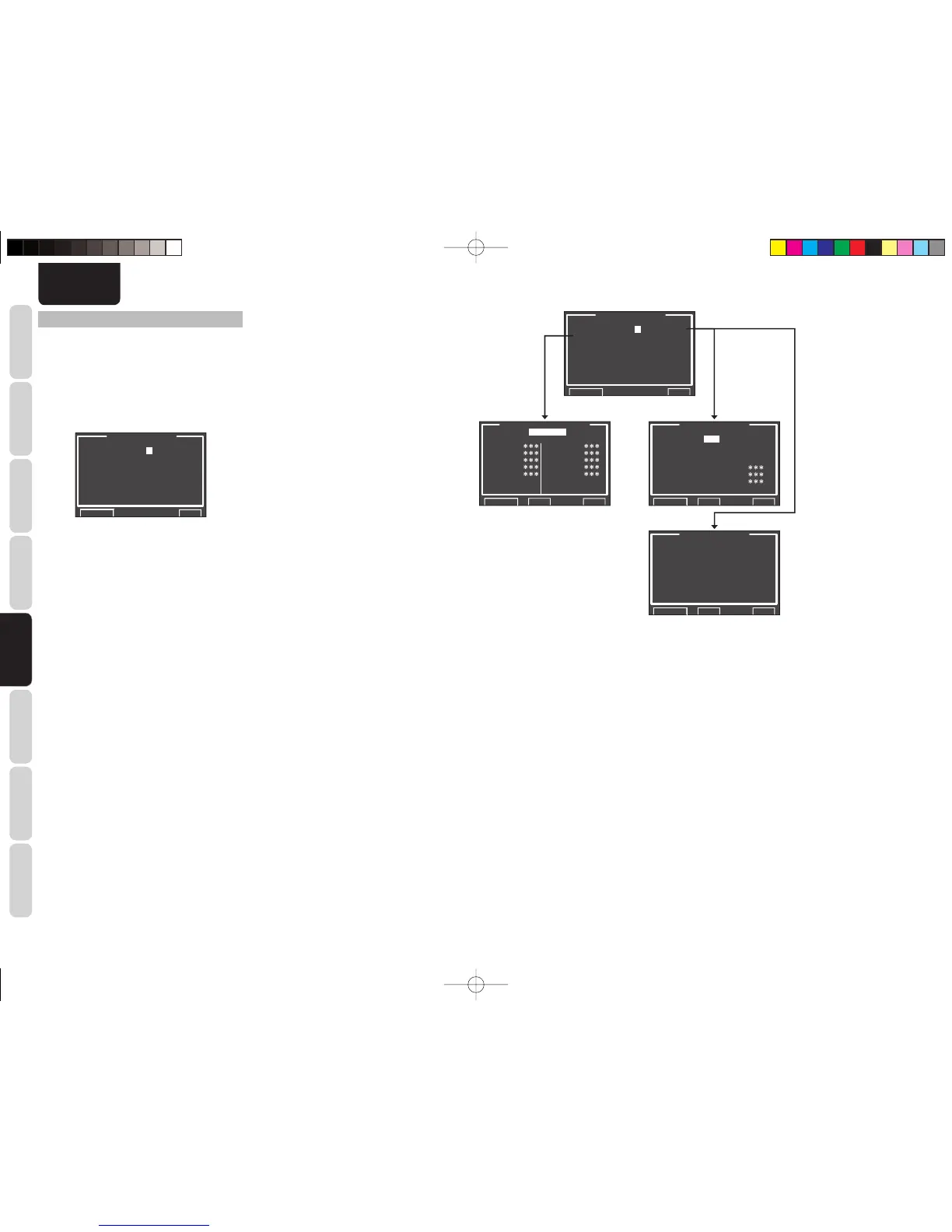
5.PREFERENCE
ZONE SETUP A B
DC TRIGGER SETUP
OPTICAL :REC OUT
STANDBY :NORMAL
AUDIO :MAIN
HDMI AUDIO:ENABLE
HDMI LIP :DISABLE
RETURN NEXT EXIT
2.
Select the desired menu with the 3
or
4 cursor
buttons and press the ENTER button.
OPTICAL:
Select a unit for optical digital output.
REC OUT: Select to record via a CD recorder
or MD deck. (See page 12.)
ZONE B OUT: Select to use ZONE B.
(See pages 21, 39 and 60.)
STANDBY:
When this is set to “ECONOMY”, you can reduce
the power consumption when the unit is in the
Standby mode. When “ECONOMY” is selected,
“TV AUTO” and “RS-232C” are disabled when the
unit is in the Standby mode.
AUDIO:
In the Audio mode, Dolby Digital and DTS output
is set to either “MAIN” or “SUB”. Select “AUDIO”
with the 1 or 2 cursor buttons, then select MAIN
↔ SUB ↔ MAIN+SUB with the 1 or 2 cursor
buttons.
HDMI AUDIO:
This setting determines whether to play back audio
input to the HDMI jacks through the unit or output it
through the unit to a TV or projector.
ENABLE: The audio input to the HDMI jacks
can be played back by this unit.
In such case, audio signals are not
output to the TV or projector.
THROUGH: The audio input to the HDMI jacks is
not output from the speaker terminals
of the unit. Audio data is output
directly to the TV or projector. This
setting is used to listen to audio on a
multi channel TV, etc.
5.PREFERENCE
ZONE SETUP A B
DC TRIGGER SETUP
OPTICAL :REC OUT
STANDBY :NORMAL
AUDIO :MAIN
HDMI AUDIO:ENABLE
HDMI LIP :DISABLE
RETURN NEXT EXIT
DC TRIGGER SETUP
DC TRIG:DISABLE
TV : TAPE :
DVD : CD/R :
VCR1 : AUX :
DSS : TUNER :
NET : 7.1CH :
RETURN BACK EXIT
ZONE B SETUP
AUDIO :DVD(DIG2)
SLEEP :OFF
ZONE:OFF
RETURN BACK EXIT
ZONE A SETUP
AUDIO :DVD
SLEEP :OFF
MONO/ST:STEREO
ZONE:OFF SPKR:
VOL :VARI VOL :
LEV :-90dB LEV :
RETURN BACK EXIT
HDMI LIP (Auto Lipsync Correction):
Video signals may take longer to process than
audio signals depending on the connected video
equipment.
When the unit is connected to TV or Projector
supporting Auto Lipsync Correction in HDMI
1.3a, audio and video can be automatically
synchronized using this function.
Use the 1 or 2 cursor buttons to switch between
ENABLE and DISABLE.
ENABLE: Auto Lipsync Correction is used to
synchronize audio and video.
DIESABLE: Deactivates this function.
Note:
• This function is not available when the unit is
connected to equipment that does not support HDMI
1.3a or Auto Lipsync Correction. For details, check
the user’s manual of the connected equipment.
• If this function is unavailable, you can use the
regular Lipsync function to synchronize audio and
video. (See page 45)
After you complete this portion of the setup, move the
cursor to “RETURN” with the 3, 4 cursor buttons and
press the
ENTER
button.
SR5003U1ENG23.indd38SR5003U1ENG23.indd38 08.7.44:48:40PM08.7.44:48:40PM



 To Next Page