63
ENGLISH
BASIC
CONNECTIONS
BASIC OPERATION
ADVANCED
CONNECTIONS
SETUP
ADVANCED
OPERATION
TROUBLESHOOTING
OTHERS
NAMES AND
FUNCTION
ADVANCED
OPERATION
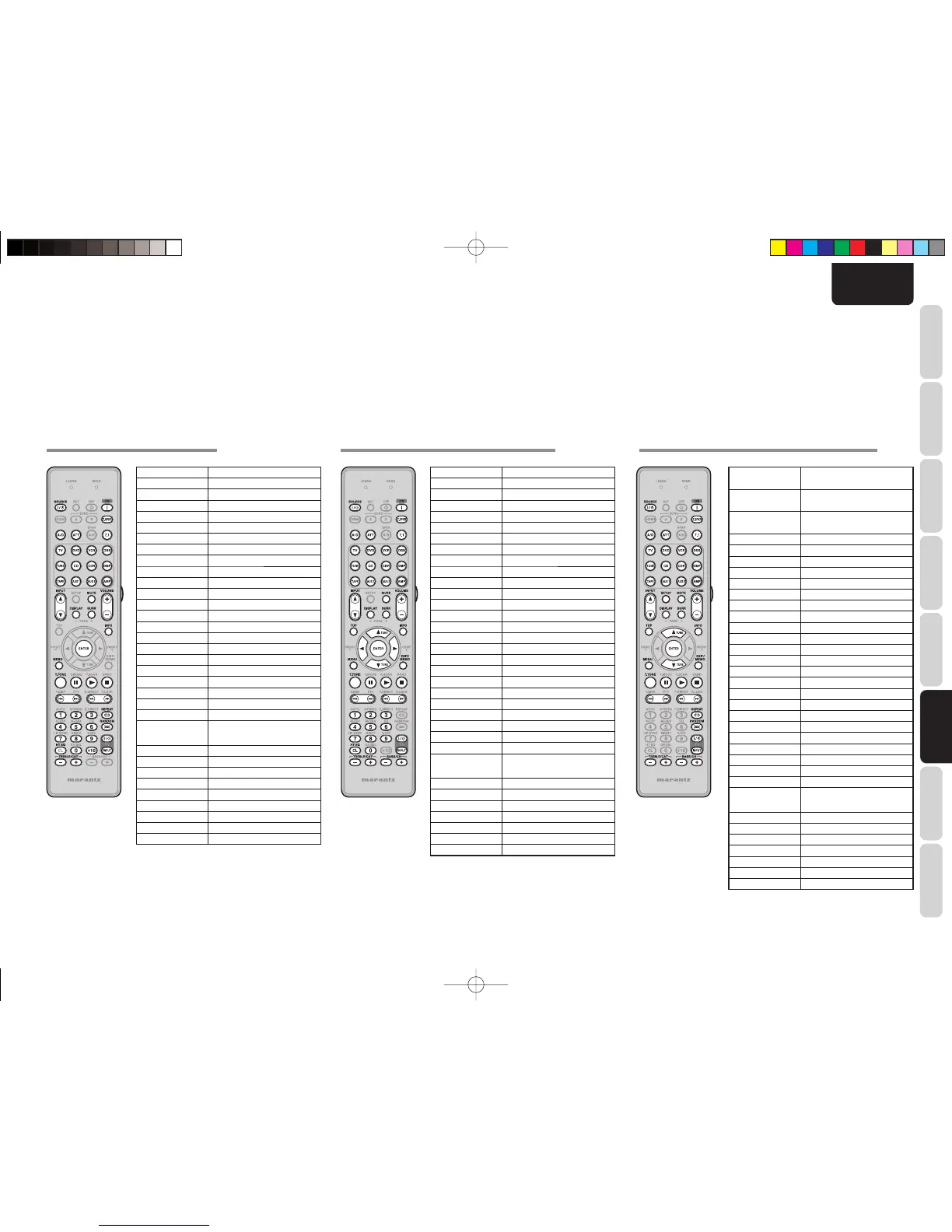
CONTROLLING A MARANTZ CD (CD MODE) CONTROLLING A MARANTZ TAPE DECK (TAPE MODE) CONTROLLING A MARANTZ UNIVERSAL DOCK (AUX MODE)
SOURCE ON/OFF Turns the CD player on and off
STANDBY Turns the CD player off(*)
POWER ON Turns the CD player on(*)
Z.SPKR AMP function enabled
ZONE A/B AMP function enabled
A/D AMP function enabled
ATT AMP function enabled
SPKR A/B AMP function enabled
7.1 IN AMP function enabled
SOURCE AMP function enabled
AMP AMP function enabled
INPUT 3 / 4 AMP function enabled
DISPLAY AMP function enabled
MUTE AMP function enabled
SURR AMP function enabled
VOLUME+/- AMP function enabled
INFO AMP function enabled
ENTER Enters the setting(*)
MENU Calls up the menu(*)
T.TONE AMP function enabled
PAUSE PAUSE
PLAY PLAY
STOP STOP
Previous/Next Sk ips forward or prev ious
chapter/track
Rewind/Forward Searchs forward or backward
0-9,+10 Inputs the numeric(*)
HT EQ(CL) Clears the inputting(*)
REPEAT Select REPEAT PLAY(*)
RANDOM Select RANDOM PLAY(*)
TV POWER Turns the TV on and off
TV INPUT Select the TV video input
TREBLE-/+ AMP function enabled
BASS-/+ AMP function enabled
(*) RC004SR dose not have the PRESET code library
for this key
SOURCE ON/OFF Turns the TAPE deck on and off
STANDBY Turns the TAPE deck off
POWER ON Turns the TAPE deck on
Z.SPKR AMP function enabled
ZONE A/B AMP function enabled
A/D AMP function enabled
ATT AMP function enabled
7.1 IN AMP function enabled
SPKR A/B AMP function enabled
SOURCE AMP function enabled
AMP AMP function enabled
INPUT 3 / 4 AMP function enabled
DISPLAY AMP function enabled
MUTE AMP function enabled
SURR AMP function enabled
VOLUME+/- AMP function enabled
TOP AMP function enabled
INFO AMP function enabled
Cursor AMP function enabled
ENTER AMP function enabled
MENU AMP function enabled
EXIT AMP function enabled
T.TONE AMP function enabled
PAUSE PAUSE
PLAY PLAY
STOP STOP
Previous/Next Skips forward or previous
chapter/track
Rewind/Forward Searchs forward or backward
0-9 Inputs the numeric
HT EQ(CL) Clears the inputting
TV POWER Turns the TV on and off
TV INPUT Select the TV video input
TREBLE-/+ AMP function enabled
BASS-/+ AMP function enabled
(*) RC004SR dose not have the PRESET code library for
this device
SOURCE ON/OFF Turns the UNIVERSAL DOCK
(Dock connector) ON and OFF
STANDBY Turns the UNIVERSAL DOCK
(Dock connector) OFF
POWER ON Turns the UNIVERSAL DOCK
(Dock connector) ON
Z.SPKR AMP function enabled
ZONE A/B AMP function enabled
A/D AMP function enabled
ATT AMP function enabled
7.1 IN AMP function enabled
SPKR A/B AMP function enabled
SOURCE AMP function enabled
AMP AMP function enabled
INPUT 3 / 4 AMP function enabled
SETUP MODE
DISPLAY AMP function enabled
MUTE AMP function enabled
SURR AMP function enabled
VOLUME+/- AMP function enabled
INFO AMP function enabled
Cursor Up Select contents Up
ENTER Enter the setting
Cursor Down Select contents Down
MENU Call up the menu
T.TONE AMP function enabled
PAUSE PAUSE
PLAY PLAY
STOP STOP
Previous/Next Sk ips forward or prev ious
chapter/track
Rewind/Forward Searchs forward or backward
REPEAT Select REPEAT PLAY
RANDOM Select RANDOM PLAY
TV POWER Turns the TV on and off
TV INPUT Select the TV video input
TREBLE-/+ AMP function enabled
BASS-/+ AMP function enabled
(*) RC004SR dose not have the PRESET code library for
this device
SR5003U1ENG33.indd63SR5003U1ENG33.indd63 08.7.44:49:18PM08.7.44:49:18PM



 To Next Page