Front panel Display Rear panel IndexRemote
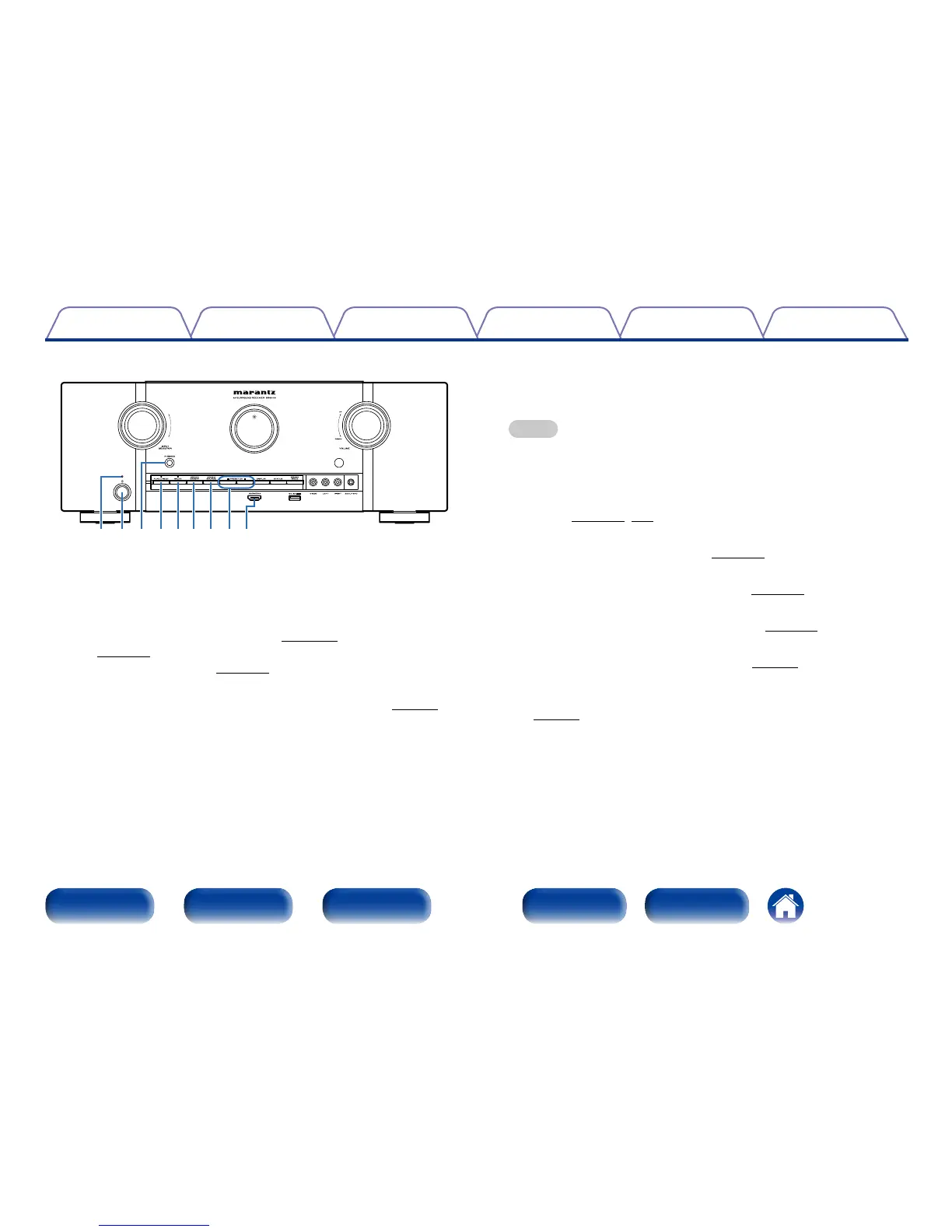
rtyu iowq e
q Power indicator
This is lit as follows according to the power status:
•Power on : O
•Normal standby : Red
•When “HDMI Pass Through” (vpage 155) or “HDMI Control”
(vpage155) is set to “On” : Orange
•When ““IP Control” (vpage179) is set to “Always On” : Orange
w Power operation button (X)
This turns the power of MAIN ZONE on/o (standby) (vpage53).
e Headphones jack (PHONES)
Used to connect headphones.
When the headphones are plugged into this jack, audio will no longer be
output from the connected speakers or from the PRE OUT connectors.
NOTE
•To prevent hearing loss, do not raise the volume level excessively when using
headphones.
r PURE DIRECT button
This switches the sound mode between DIRECT, PURE DIRECT and
AUTO (vpage108, 109).
t M-DAX button
This enables the M-DAX mode (vpage147).
y ZONE2 ON/OFF button
This turns the power of ZONE2 on/o (vpage132).
u ZONE2 SOURCE button
This selects the input source for ZONE2 (vpage132).
i Tuner preset channel buttons (PRESET CH +, –)
These select preset FM radio stations (vpage68).
o AUX-HDMI connector
Used to connect devices such as video camcorders and game consoles
(vpage40).



 To Next Page