Appendix
TipsSettingsConnections
Contents
Front panel Display Rear panel IndexRemote
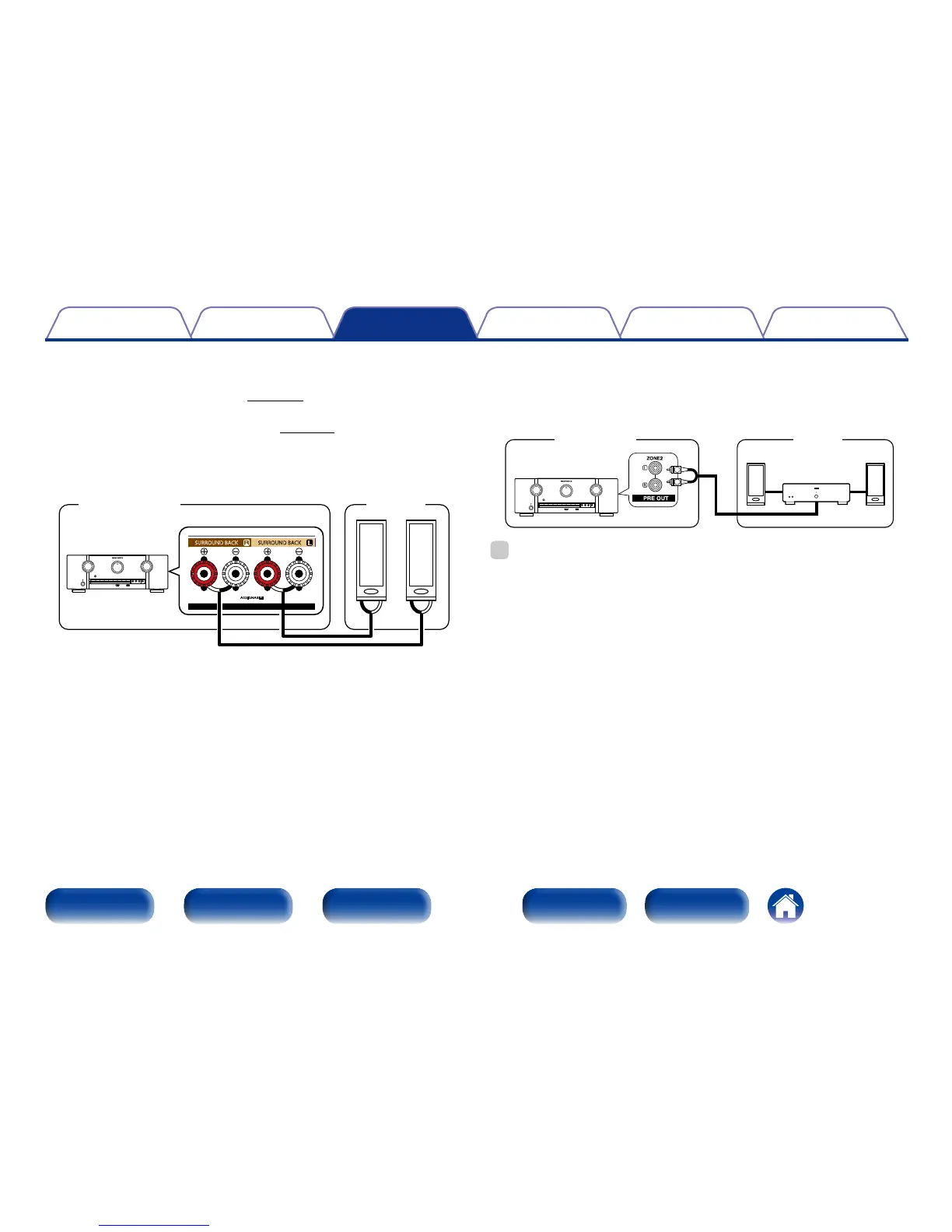
2 Connection 2 : Connection through the speaker
output terminals
•Set the “Assign Mode” (vpage 172) setting to “ZONE2”, and
outputs ZONE2 audio from SURROUND BACK speaker terminals.
•If you set the “Assign Mode” (vpage 172) setting to “ZONE2”,
the main zone home theater system can play back up to 5.1-channels.
Even if you play back audio recorded in 6.1 or 7.1-channels, this unit
automatically downmixes the audio to 5.1-channels.
MAIN ZONE
SURROUND BACK SURROUND BACK
FRONT HEIGHT/WIDE
SPEAKERS
SURROUND BACK SURROUND BACK
ZONE2
w q w q
(L) (R)
This unit
2 Connection 3 : Connection using an external
amplifier
The audio signals of this unit’s ZONE2 audio output connectors are
output to the ZONE2 amplifiers and played on these amplifiers.
ZONE2MAIN ZONE
AUX IN
R
L
This unit
Power
amplifier
%
•We recommend using high quality pin-plug (RCA type) cables for audio connections
in order to prevent noise.
•If you select a same input source for MAIN ZONE and ZONE2, audio playback may
be restricted.



 To Next Page