EasyManua.ls Logo

Marantz SR7000 - System Setup

Marantz SR7000
40 pages
Print Icon
To Next Page IconTo Next Page
To Previous Page IconTo Previous Page
Loading...
UJ5U
MAIiM
WltNU
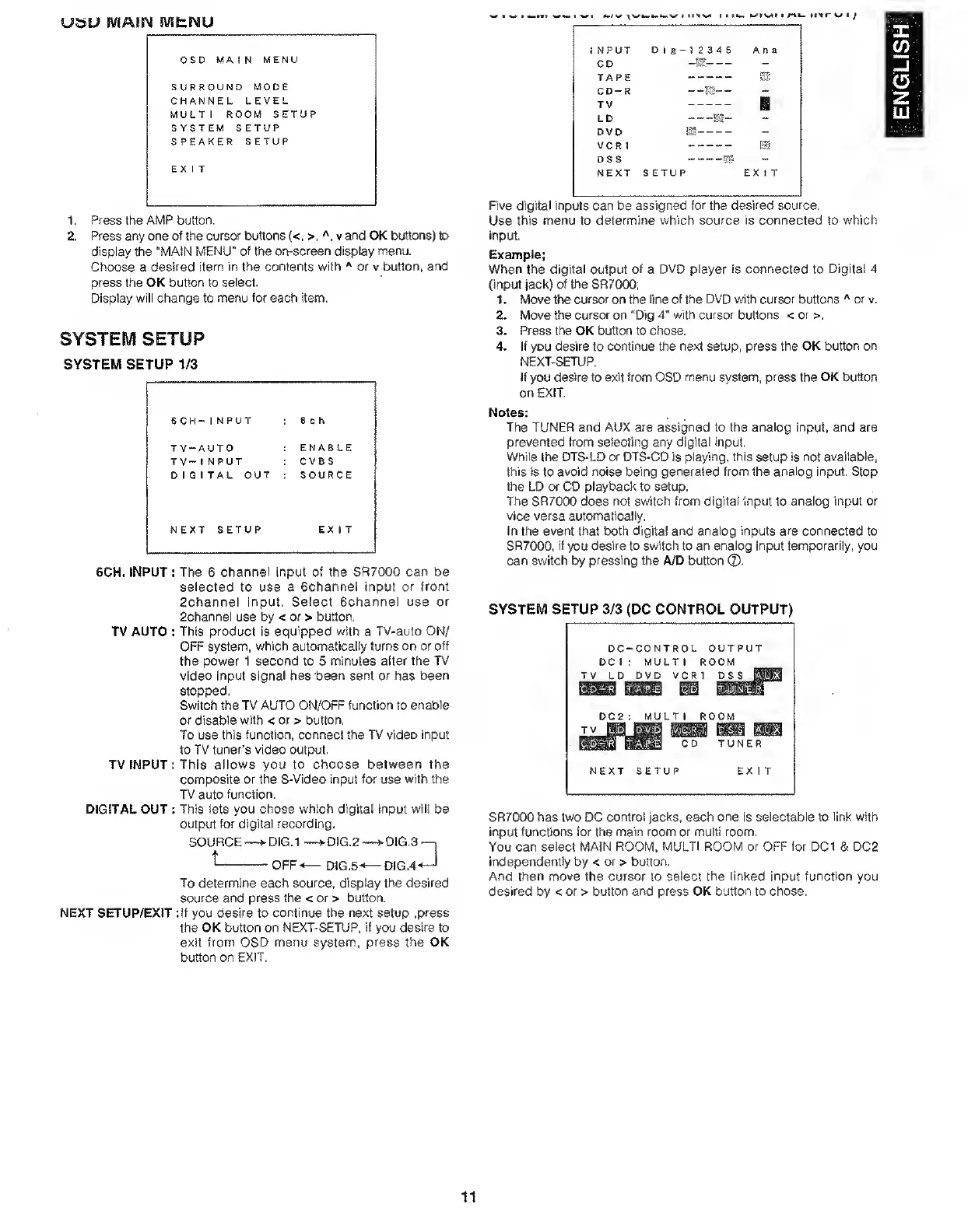
1,
Press
the
AMP
button.
2.
Press
any
one
of
the
cursor
buttons
(<,
>,v
and
OK
bultcxis)
to
display
the
"MAIN
MENU"
of
the
on-screen
display
menu.
Choose
a
desired
item
in
the
contents
with
or
v
button,
and
press
the
OK
button
to
select.
Display
will
change
to
menu
for
each
item.
SYSTEM
SETUP
SYSTEM
SETUP
1/3
6
CH-
1
N
PUT
6
c
h
TV-AUTO
ENABLE
TV-1NPUT
CVBS
DIGITAL
OUT
SOURCE
NEXT
SETUP
EX
1
T
6CH.
INPUT
:
The
6
channel
input
of
the
SR7000
can
be
selected
to
use
a
Bchannel
input
or
front
2channel
input.
Select
6channel
use
or
Schannet
use
by
<
or
>
button.
TV
AUTO
:
This
product
is
equipped
with
a
TV-auto
ON/
OFF
system,
which
automatically
turns
on
or
off
the
power
1
second
to
5
minutes
after
the
TV
video
input
signal
has
been
sent
or
has
been
stopped,
Switch
the
TV
AUTO
ON/OFF
function
to
enable
or
disable
with
<
or
>
button.
To
use
this
function,
connect
the
TV
video
input
to
TV
tuner’s
video
output.
TV
INPUT:
This
allows
you
to
Choose
between
the
composite
or
the
S-Video
input
for
use
with
the
TV
auto
function.
DIGITAL
OUT
:
This
lets
you
chose
which
digital
input
will
be
output
for
digital
recording.
SOURCE
t_
•DiG.1
-
OFF-
-DIG.2
DIG.5-
'DIG.3
DIG.4
To
determine
each
source,
display
the
desired
source
and
press
the
<
or
>
button.
NEXT
SETUP/EXIT
:if
you
desire
to
continue
the
next
setup
.press
the
OK
button
on
NEXT-SETUP,
if
you
desire
to
exit
from
OSD
menu
system,
press
the
OK
button
on
EXIT,
w
I
tiI
11-
rtk.
tt'tr
1/
i
/
1
NPUT
Dig-52345
Ana
CD
-It'-
TAPE
^
—,
—.
CD-R
-
-M-
-
TV
-
g
LD
m-
DVD
gs-
VCR
1
-
ES
DSS
-IjK
NEXT
SETUP
EXIT
Five
digital
inputs
can
be
assigned
for
the
desired
source.
Use
this
menu
to
determine
which
source
is
connected
to
which
input.
Example:
When
the
digital
output
of
a
DVD
player
is
connected
to
Digital
4
(input
jack)
of
the
SR7000;
1.
Move
the
cursor
on
the
line
of
the
DVD
with
cursor
buttons
''
or
v,
2.
Move
the
cursor
on
“Dig
4"
with
cursor
buttons
<or>.
3.
Press
the
OK
button
to
chose.
4.
If
you
desire
to
continue
the
next
setup,
press
the
OK
button
on
NEXT-SETUP,
if
you
desire
to
exit
from
OSD
menu
system,
press
the
OK
button
on
EXIT.
Notes:
The
TUNER
and
AUX
are
assigned
to
the
analog
input,
and
are
prevented
from
selecting
any
digital
input.
While
the
DTS-LD
or
DTS-CD
is
playing,
this
setup
is
not
available,
this
is
to
avoid
noise
being
generated
from
the
analog
input.
Stop
the
LD
or
CD
playback
to
setup.
The
SR7000
does
not
switch
from
digital
input
to
analog
input
or
vice
versa
automatically.
In
the
event
that
both
digital
and
analog
inputs
are
connected
to
SR7000,
if
you
desire
to
switch
to
an
analog
input
temporarily,
you
can
switch
by
pressing
the
A/D
button
®.
SYSTEM
SETUP
3/3
(DC
CONTROL
OUTPUT)
DC
-CONTROL
OUTPUT
DC
i
;
MULTI
ROOM
TV
L
D
DVD
VC
R1
ass
m
DSS
yKi
DC2
MULTI
ROOM
TV
c
d
TUNER
NEXT
SETUP
EXIT
SR7000
has
two
DC
control
jacks,
each
one
is
selectable
to
link
with
input
functions
for
the
main
room
or
multi
room.
You
can
select
MAIN
ROOM.
MULTI
ROOM
or
OFF
for
DC1
&
DC2
independently
by
<
or
>
button.
And
then
move
the
cursor
to
select
the
linked
input
function
you
desired
by
<
or
>
button
and
press
OK
button
to
chose.
11
ENGLISH

Other manuals for Marantz SR7000

Related product manuals