EasyManua.ls Logo

Marantz SR7000 - Surround Modes; AUTO and STEREO Modes; DOLBY and DTS Modes; MOVIE, HALL, MATRIX, 5-STEREO Modes

Marantz SR7000
40 pages
Print Icon
To Next Page IconTo Next Page
To Previous Page IconTo Previous Page
Loading...
ENGLISH
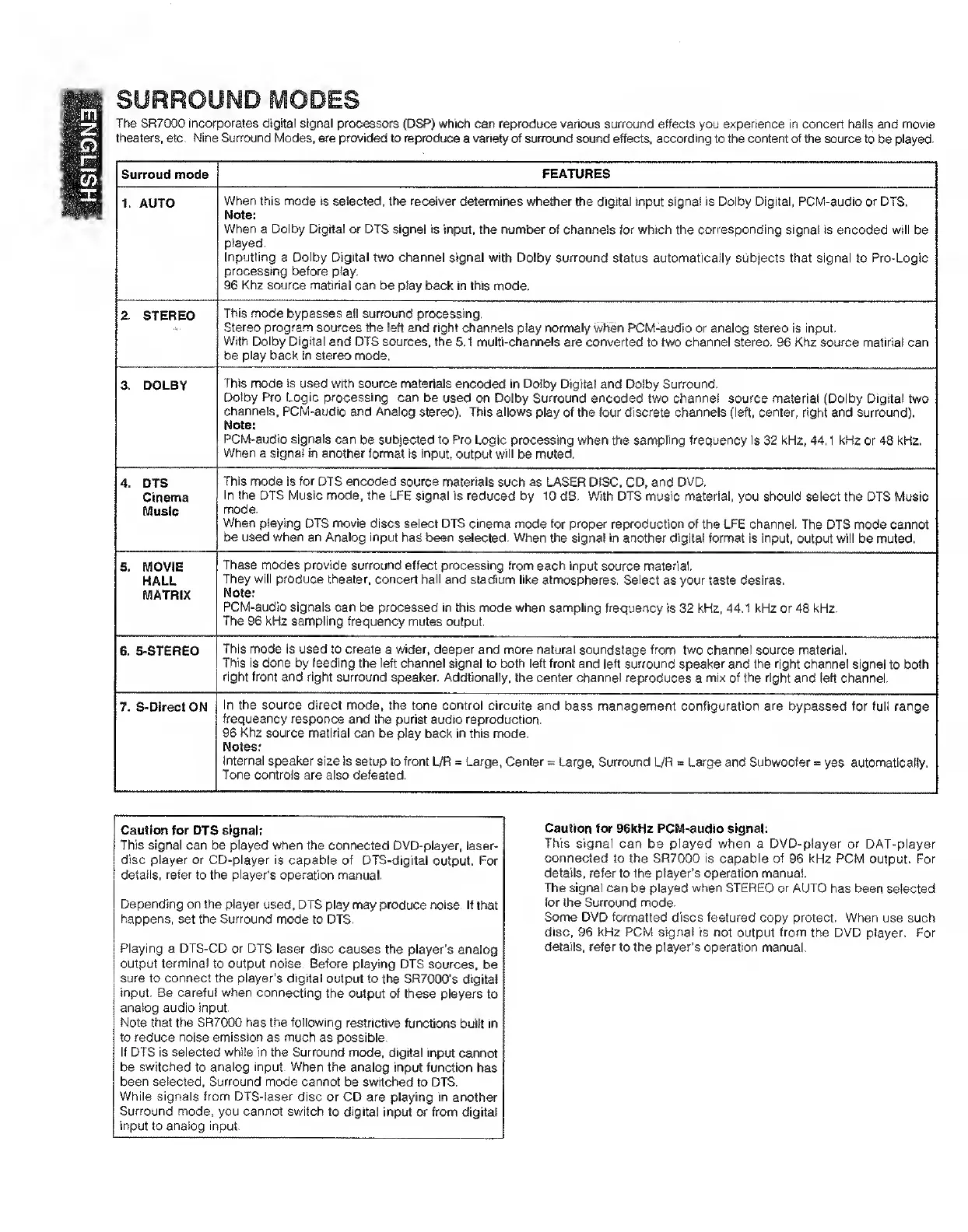
SURROUND
MODES
The
SR7000
incorporates
digital
signal
processors
(DSP)
which
can
reproduce
various
surround
effects
you
experience
in
concert
halls
and
movie
theaters,
etc.
Nine
Surround
Modes,
are
provided
to
reproduce
a
variety
of
surround
sound
effects,
according
to
the
content
of
the
source
to
be
played.
Surroud
mode
FEATURES
1.
AUTO
When
this
mode
is
selected,
the
receiver
determines
whether
the
digital
input
signal
is
Dolby
Digital,
PCM-audio
or
DTS.
Note:
When
a
Dolby
Digital
or
DTS
signal
is
input,
the
number
of
channels
for
which
the
corresponding
signal
is
encoded
will
be
played.
Inputting
a
Dolby
Digital
two
channel
signal
with
Dolby
surround
status
automatically
subjects
that
signal
to
Pro-Logic
processing
before
play.
96
Khz
source
matiriai
can
be
play
back
in
this
mode.
2.
STEREO
This
mode
bypasses
all
surround
processing.
Stereo
program
sources
the
left
and
right
channels
play
normaly
when
PCM-audio
or
analog
stereo
is
input.
With
Dolby
Digital
and
DTS
sources,
the
5.1
multi-channels
are
converted
to
two
channel
stereo,
96
Khz
source
matiriai
can
be
play
back
in
stereo
mode.
3.
DOLBY
This
mode
is
used
with
source
materials
encoded
in
Dolby
Digital
and
Dolby
Surround.
Dolby
Pro
Logic
processing
can
be
used
on
Dolby
Surround
encoded
two
channel
source
material
(Dolby
Digital
two
channels,
PCM-audio
and
Analog
stereo).
"Riis
allows
play
of
the
four
discrete
channels
(left,
center,
right
and
surround).
Note:
PCM-audio
signals
can
be
subjected
to
Pro
Logic
processing
when
the
sampling
frequency
is
32
kHz,
44,1
kHz
or
48
kHz.
When
a
signal
in
another
format
is
input,
output
will
be
muled.
4.
DTS
Cinema
Music
This
mode
is
for
DTS
encoded
source
materials
such
as
LASER
DISC,
CD,
and
DVD.
In
the
DTS
Music
mode,
the
LFE
signal
is
reduced
by
10
dB.
With
DTS
music
material,
you
should
select
the
DTS
Music
mode.
When
playing
DTS
movie
discs
select
DTS
cinema
mode
for
proper
reproduction
of
the
LFE
channel.
The
DTS
mode
cannot
be
used
when
an
Analog
input
has
been
selected.
When
the
signal
in
another
digital
format
is
input,
output
will
be
muted,
5.
MOVIE
HALL
MATRIX
These
modes
provide
surround
effect
processing
from
each
input
source
material.
They
will
produce
theater,
concert
halt
and
stadium
like
atmospheres.
Select
as
your
taste
desires,
Note;
PCM-audio
signals
can
be
processed
in
this
mode
when
sampling
frequency
is
32
kHz,
44,1
kHz
or
48
kHz.
The
96
kHz
sampling
frequency
mules
output.
6.
5-STEREO
This
mode
is
used
to
create
a
wider,
deeper
and
more
natural
soundstage
from
two
channel
source
material,
This
is
done
by
feeding
the
left
channel
signal
to
both
left
front
and
left
surround
speaker
and
the
right
channel
signal
to
both
right
front
and
right
surround
speaker.
Addtionally.
the
center
channel
reproduces
a
mix
of
the
right
and
left
channel.
7.
S-Direct
ON
In
the
source
direct
mode,
the
tone
control
circuite
and
bass
management
configuration
are
bypassed
for
full
range
frequeancy
responce
and
the
purist
audio
reproduction.
96
Khz
source
matiriai
can
be
play
back
in
this
mode.
Notes:
internal
speaker
size
is
setup
to
front
L/R
=
Large.
Center
=
Large,
Surround
L/R
=
Large
and
Subwoofer
=
yes
automatically,
Tone
controls
are
also
defeated.
Caution
for
96kHz
PCM-audio
signal:
This
signal
can
be
played
when
a
DVD-player
or
DAT-player
connected
to
the
SR7000
is
capable
of
96
kHz
PCM
output.
For
details,
refer
to
the
player’s
operation
manual.
The
signal
can
be
played
when
STEREO
or
AUTO
has
been
selected
for
the
Surround
mode.
Some
DVD
formatted
discs
featured
copy
protect.
When
use
such
disc.
96
kHz
PCM
signal
is
not
output
from
the
DVD
player.
For
details,
refer
to
the
player’s
operation
manual.
Caution
for
DTS
signal;
This
signal
can
be
played
when
the
connected
DVD-player,
laser¬
disc
player
or
CD-player
is
capable
of
DTS-digitai
output.
For
details,
refer
to
the
player's
operation
manual.
Depending
on
the
player
used,
DTS
play
may
produce
noise.
If
that
happens,
set
the
Surround
mode
to
DTS.
Playing
a
DTS-CD
or
DTS
laser
disc
causes
the
player’s
analog
output
terminal
to
output
noise.
Before
playing
DTS
sources,
be
sure
to
connect
the
player’s
digital
output
to
the
SR7(X)0’s
digital
input.
Be
careful
when
connecting
the
output
of
these
players
to
analog
audio
input.
Note
that
the
SR7000
has
the
following
restrictive
functions
built
in
to
reduce
noise
emission
as
much
as
possible.
If
DTS
is
selected
while
in
the
Surround
mode,
digital
input
cannot
be
switched
to
analog
input.
When
the
analog
input
function
has
been
selected,
Surround
mode
cannot
be
switched
to
DTS.
While
signals
from
DTS-laser
disc
or
CD
are
playing
in
another
Surround
mode,
you
cannot
switch
to
digital
input
or
from
digital
input
to
analog
input.

Other manuals for Marantz SR7000

Related product manuals